Asking for a project update does not have to sound like a demand. The most effective request names the work, explains why the update is needed, and makes it easy for the other person to reply with a short status, blocker, or expected completion date.
A vague "Any updates?" can feel abrupt, especially when someone is busy. A clear request, on the other hand, gives them enough context to respond quickly and keeps the project moving.
How to request a project status update without sounding demanding
Be specific about the project, acknowledge the recipient's workload, explain why the update matters, and ask for a response that does not require a lengthy report. Professional follow-up is not about adding more "just checking in" language. It is about reducing ambiguity.
For example, this message works in email, chat, or a project-management comment:
Hi [name], when you have a moment, could you share a quick update on [project or deliverable]? We are planning the next steps for [date or dependency], so it would be helpful to know whether we are still on track and if anything is blocking progress. A brief status and expected timing would be great. Thanks.
The four parts of a polite status update request
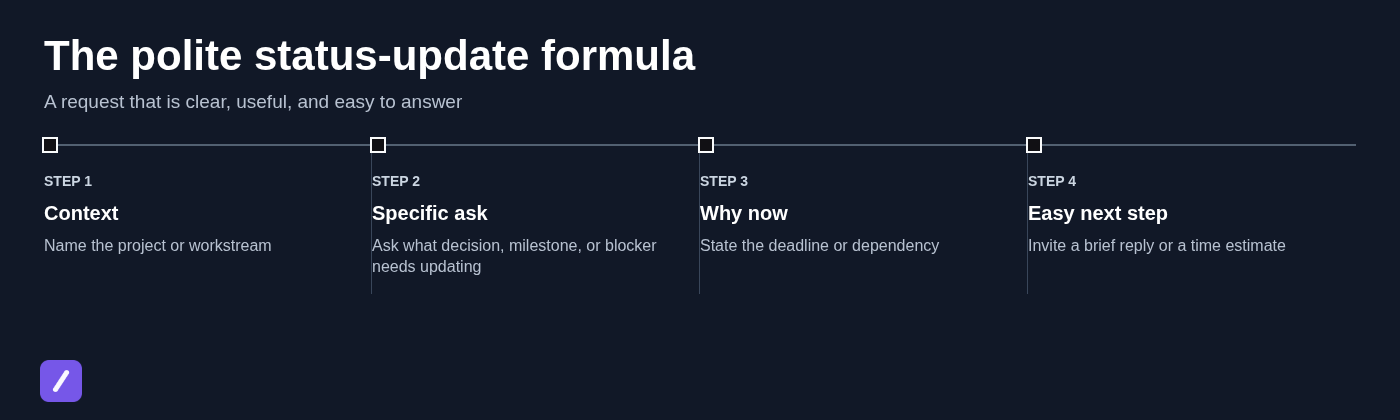
A good request project status update message has four parts: context, a precise question, a reason for asking now, and an easy next step. Use all four when the project has moving pieces or a meaningful deadline. For a simple task, you may only need the project name and a request for timing.
- Friendly context: Identify the project, workstream, or prior conversation. "I wanted to check in on the [project] design review."
- Specific ask: Ask about the milestone, decision, deliverable, or blocker that matters. "Could you confirm whether the revised draft is ready for review?"
- Why now: State the dependency or deadline. "We need to finalize the launch schedule by Thursday."
- Easy next step: Invite a short reply. "A quick status and estimated completion date would help."
Request project status update message templates
Use the templates below as starting points, then replace the bracketed details with the actual project, deliverable, and timing. The best template is not the longest one; it is the one that gives the recipient a clear route to answering.
A general professional email template
This status update request email sample works for a colleague, client, or cross-functional partner when you need a documented response.
Subject: Status update request: [project or deliverable]
Hi [name],
I hope you are doing well. Could you please share a status update on [project/deliverable]? In particular, it would be helpful to know what has been completed, whether there are any blockers, and the expected timing for the next milestone.
We are coordinating [related work, review, launch, or decision] by [date], so this will help us plan accordingly. A brief update is perfectly fine.
Thanks,
[your name]
A short Slack or Teams message template
Chat is best for a quick pulse check, not a request for a formal report. For more guidance on reusable chat wording, see these Slack message templates. Give the person room to respond when they can rather than implying they must stop what they are doing immediately.
Hi [name] - when you have a moment, could you share a quick status on [project/task]? We are planning [next step] for [date]. Mainly looking to confirm whether the timeline is still on track and flag any blockers.
If the task is straightforward, make it even lighter: "Quick check: are we still on track for [deliverable] by [date], or has the timing shifted?"
A template when a deadline or dependency is approaching
When another decision depends on the work, say so plainly. The goal is to surface risk early, not to imply that someone has failed.
Hi [name], could you let me know where things stand with [deliverable]? We are scheduled to [launch/review/hand off/make a decision] on [date], and this item is a dependency. Is the current target date still achievable? If not, please share the revised estimate and anything needed to get it moving.
This wording invites an honest answer. Asking "Will it definitely be done?" often encourages false reassurance when the real answer is uncertain.
A template for a client, vendor, or external partner
External requests need a courteous tone and a clear response window. Avoid treating a partner like an internal teammate, but do not leave the request open-ended.
Hi [name],
I am following up on [project, order, deliverable, or approval]. Could you share the current status and expected completion date by [date or time]? We are coordinating [next step] on our side and want to ensure our timeline remains aligned.
If you need additional information or an input from our team to proceed, please let me know and we will provide it.
Best,
[your name]
A gentle follow-up when no one has replied
If your first message received no response, reference it briefly and repeat the practical need. These principles also apply to a proposal follow-up email template: do not add guilt, artificial urgency, or a string of apologies.
Hi [name], following up on my note from [day/date] about [project]. Could you share a quick status or expected timing when you can? We are planning [dependency] for [date]. If someone else now owns this item, please point me to the right contact.
That final sentence is useful when priorities or ownership have changed. It allows the recipient to redirect the request without turning the exchange into an escalation.
Choose the right level of detail for the channel
Email is usually best when the request needs an auditable record, involves outside partners, or affects a deadline that multiple people need to reference. It also works well when you need more than a one-line answer.
Use Slack or Teams for a fast check-in during an active working conversation. A chat message is appropriate for confirming timing, asking whether a blocker exists, or requesting a brief update before a meeting.
A project-management comment is often the best choice when the answer belongs with the work itself. If the status concerns a ticket, task, approval, or milestone, keeping the request and response there gives the rest of the team the needed context.
Avoid sending the same follow-up in every channel at once. If you need to escalate from chat to email, explain why: for example, "I am documenting this here because the launch decision is due tomorrow." Otherwise, duplicate messages can feel more forceful than intended.
Phrases that make a request sound collaborative
Small wording choices can make a status request feel like coordination rather than surveillance. The key is to use them with a clear request, not instead of one.
- "When you have a moment, could you share a quick update on [project]?"
- "To help us plan [next step], could you confirm the expected timing?"
- "Could you share where things stand with [deliverable] and any current blockers?"
- "Please let me know if the timeline has shifted."
- "A brief estimate is enough if the full details are still being worked through."
- "What would you need from us to keep this moving?"
Polite language should not hide a real deadline. If you need an answer by Wednesday at 3 p.m., say so. "When you have a moment" is appropriate for a routine check-in; it is not appropriate when a decision cannot wait.
What to avoid in a project status follow-up
Most status requests fail because they are vague, loaded, or disproportionate to the information needed. A better message asks for the smallest useful update.
| Avoid | Use instead |
|---|---|
| "Any updates?" | "Could you confirm whether the [deliverable] is still expected by [date]?" |
| "Why is this taking so long?" | "What is the current blocker, and what timing should we plan around?" |
| "I need this ASAP." | "We need to make the [decision] by [date]. Can you send a status by [time]?" |
| "Please send a complete report." | "A quick status, blocker, and estimated completion date will be enough for now." |
| "Following up again..." | "Following up on my message from [date] so we can plan [next step]." |
Passive-aggressive wording rarely gets a better answer. It may produce a defensive reply, but it does not reveal the actual risk, owner, or path forward.
If the project is late, blocked, or unowned
When a project is off track, ask for facts rather than explanations designed to assign blame. You need to know the current state, the blocker, who owns the next action, the revised estimate, and the support required.
Try this:
Hi [name], I understand [project or deliverable] may no longer be on the original timeline. Could you confirm the current status, the primary blocker, the owner of the next step, and the revised estimate? If there is a decision or resource needed from our side, please include that so we can address it promptly.
If the answer affects scope, customer commitments, or a launch date, document the agreed next steps in the project record or a follow-up email. A status request becomes a coordination decision once dates, owners, or deliverables change.
Make recurring status requests faster to send
Recurring check-ins do not need to be rewritten from scratch. Save approved templates for weekly project updates, launch dependencies, client deliverables, missing approvals, and unanswered follow-ups, then adjust the project name, date, and relevant dependency before sending. Teams that maintain several response types can also organize related resources such as a feature request response template alongside their status messages.
SnipFlux can help with this by expanding a shortcut into a consistent, editable status-request template across Chrome, macOS, and Windows. For example, a shortcut such as /projectupdate can insert your standard request, leaving you to personalize the bracketed details rather than reconstruct the message each time.
Keep separate templates for internal chat, formal email, external partners, and deadline-sensitive requests. One universal template tends to be either too formal for chat or too vague for a critical dependency.
Send a clear request, then give a reasonable response window
A professional status request is specific, relevant, and easy to answer. Name the project, ask for the update that matters, explain the deadline or dependency, and invite a short response.
Give the recipient a reasonable window based on the urgency of the work. If a response is needed by a certain time, state that directly; if it is a routine check-in, avoid manufacturing urgency.