A feature request can become a trust-building moment or a quiet source of frustration. The difference is rarely whether the feature ships. It is whether the customer gets a reply that proves someone understood the problem without making a roadmap promise the product team cannot keep.
A good feature request response template gives support teams a reliable starting point. It should not turn agents into copy-and-paste machines; it should make room for the details that matter: the customer's workflow, the current status, and what happens next.
What a helpful feature request response achieves
The immediate support goal is simple: make the customer feel heard while protecting the team from accidental commitments. Saying "Great idea, we'll add it to the roadmap" may sound encouraging, but it creates an expectation that can be hard to unwind later.
A strong reply does four jobs:
- Acknowledge the request: Thank the customer and recognize the specific problem they are trying to solve.
- Clarify the impact: Confirm the job they need done and ask for context that may affect priority.
- Set an accurate expectation: Use language that reflects the real status: logged, evaluating, planned, in development, or unavailable.
- Preserve the conversation: Give the customer a useful next step, a workaround, or a reason to expect an update.
Templates save time only when agents personalize the relevant pieces. A reply that includes the customer's use case is far more useful than a generic "Thanks for your feedback," even if both messages come from the same approved template.

Before and after: from vague acknowledgment to an actionable reply
Consider a representative situation. A customer who prepares weekly performance reports asks for scheduled CSV exports. Today, they log in every Monday, run a report, export it manually, and send it to several stakeholders.
Here is the weak version of a response:
Weak reply:
"Thanks for the suggestion. We've passed this along to the team."
It is not rude, but it leaves the customer with no evidence that the request was understood. It does not reveal whether the team needs more information, whether the idea was recorded, or whether a workaround exists.
Now compare it with a more useful response:
Improved reply:
"Hi [Customer name], thanks for requesting scheduled CSV exports. It sounds like you are manually exporting the same report each week so your stakeholders can review it on a regular schedule. I've logged that use case with our product feedback.
To help us understand the need, could you tell me which report you export, how often you send it, and whether the recipients need a CSV specifically? We are not able to confirm delivery timing at this stage, but those details help us evaluate the request alongside similar workflows."
The improved version earns better product evidence without pretending the feature is coming. It confirms the customer was heard, captures details that may affect priority, and states the status honestly.
The response framework support teams can reuse
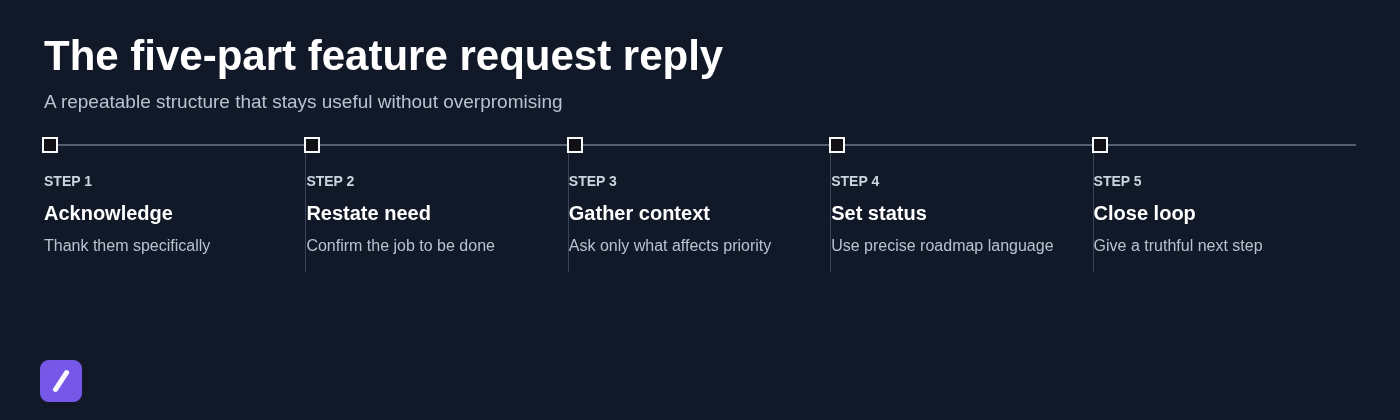
A dependable feature request reply follows a short sequence. Agents do not need a complicated script; they need a structure that prevents vague acknowledgments and premature promises.
- Thank the customer: Be specific about what they raised.
- Restate the need: Confirm the outcome they are trying to achieve, not just the feature label.
- Gather context: Ask only for details that can affect evaluation, such as frequency, user count, workflow, or integration needs.
- Set the status: State whether the request is logged, under consideration, planned, in development, or unavailable.
- Close the loop: Offer the next truthful action, such as recording feedback, sharing a workaround, or updating the customer at an approved milestone.
Status language matters. "Logged" means the feedback has been captured. "Under consideration" means the team is evaluating it. "Planned" means work has been approved, while "in development" means active work is underway. Those phrases are not interchangeable.
Most importantly, do not say a request is "on the roadmap" unless it is formally committed and approved for customer communication. A roadmap is not a polite synonym for "we like the idea."
Feature request response template examples by request status
The best feature request response template depends on what is actually true today. Use the examples below as approved-language starting points, then personalize the bracketed fields before sending.
1. Acknowledge a new request and ask the right follow-up question
When to use it: The request is new and the team needs enough context to understand its importance or scope.
Template:
"Hi [Customer name], thanks for sharing your request for [feature]. I understand you are trying to [use case], and that the current process requires [current workaround or friction].
I've started capturing this feedback for our team. If you have a moment, could you share how often this comes up, who is affected, and what makes it most urgent for your workflow? If there is a particular integration, report, or step where the issue occurs, that detail is helpful too.
We cannot promise a change based on one request, but your context helps us evaluate the problem accurately."
Personalize the first two sentences at minimum. Do not turn the reply into a five-question survey. Ask for the customer goal, the current workaround, affected users, frequency, and urgency only when those answers will genuinely influence the handoff.
At scale, a feature request intake form can collect these fields consistently. Support should still own the immediate acknowledgment, especially when a customer has taken the time to explain a frustrating workflow.
2. Confirm that the request has been logged without promising delivery
When to use it: The team has enough information to record the request, but it is not committed work.
Template:
"Hi [Customer name], thank you for the additional details about [feature] for [use case]. I've logged your feedback with the context that [specific impact or workflow].
Our product team uses requests like this alongside customer impact, product direction, and technical considerations when prioritizing work. I cannot confirm whether or when this will be added, but your request is now part of that evaluation."
Optional sentence:
"If you would like to follow public updates, you can also add your feedback to our feature request page: [feature request page]."
Avoid claiming that a customer has "voted" unless your process actually uses votes in prioritization. Likewise, do not imply that every logged request receives a personal product-team response. Honest language is more durable than enthusiastic language that later proves inaccurate.
3. Explain that the team is evaluating the request
When to use it: The request is actively being considered, but no delivery decision has been made.
Template:
"Hi [Customer name], we are currently evaluating [feature] because it may help with workflows like [use case]. At this point, evaluation means we are reviewing the problem, possible approaches, and the impact on customers; it is not yet a delivery commitment.
The most useful information for this review is [business impact, affected workflow, integration requirement, scale, or constraint]. If you can share that context, we will add it to the request rather than ask you to repeat it later.
We will share another update if the status changes or if we need more information."
This template gives the customer a realistic expectation. It also makes clear what evidence helps the team decide, without suggesting the customer must build a business case to deserve attention.
4. Share that the feature is planned or in development
When to use it: The product team has approved the work, or active development has begun. Use the correct status rather than grouping both together.
Planned template:
"Hi [Customer name], I have an update on your request for [feature]. This work is now planned because it supports [use case or customer need].
We are not sharing a delivery date yet, but we expect to provide the next update at [approved update point]. We will keep the request connected to your original feedback so the team retains the context behind it."
In-development template:
"Hi [Customer name], [feature] is now in active development. The work is intended to help customers [use case].
Our current customer-facing update is [approved timeframe or update point]. As with any development work, details can change before release, so we will confirm availability once it is ready."
If there is a real beta or early-access program, add it plainly: "We are inviting eligible customers to test this feature. If [eligibility requirement] applies to your account, we can share the next steps." Do not offer beta access as a generic reassurance when no program exists.
5. Decline the request while protecting the relationship
When to use it: The team has decided not to pursue the request, or the requested implementation conflicts with product direction, security, or maintainability.
Template:
"Hi [Customer name], thank you for explaining how [feature] would help you [use case]. We have reviewed the request and are not planning to add [requested capability] at this time.
The decision reflects [concise, appropriate reason, such as product direction or a technical constraint]. I know that does not remove the need behind your workflow, so the closest current option is [workaround or adjacent capability], with the limitation that [limitation].
If this creates a high-stakes issue for [accessibility, compliance, contractual obligation, or another specific need], please share that context and we will make sure it is included in any future review."
A useful decline names the customer's goal before it names the decision. For more difficult customer interactions, see these negative feedback response template examples. Avoid defensive explanations of why the product is designed the way it is. The customer needs clarity and a practical path, not an internal debate.
6. Offer a workaround or alternative workflow
When to use it: The requested outcome is possible now through existing settings, an integration, or a different process.
Template:
"Hi [Customer name], you can achieve much of the outcome you described with [existing setting, integration, or workflow]. For [use case], the recommended approach is:
- [Step 1]
- [Step 2]
- [Step 3]
This does not provide [specific requested capability], so it may not be suitable if you need [limitation, such as automation at scale, a compliance control, or a particular file format]. If that limitation affects your accessibility, compliance, or high-volume workflow, let us know and we can review the right next step."
Be exact about the limitation. A workaround that only works for one user, small volumes, or non-regulated data can create a second support problem if it is presented as a full replacement.
7. Close the loop after a request ships or changes status
When to use it: The feature is available, a major status change has occurred, or a previously declined request is being reconsidered.
Release follow-up template:
"Hi [Customer name], I wanted to close the loop on your request for [feature]. It is now available and can help you [original use case].
To get started, [concrete next action, such as navigate to a setting, review a guide, or enable the feature]. Thank you for sharing the workflow that helped us understand the need."
Reconsideration template:
"Hi [Customer name], we previously shared that [feature] was not planned. We are revisiting that area because [approved reason or changed product direction]. This is not a release announcement, but we wanted to acknowledge that your earlier feedback remains relevant to the review."
Reliable follow-through is one of the clearest ways to distinguish a real feedback process from a one-time acknowledgment email. Not every requester will receive personal release outreach, but teams should establish clear rules for when they will reconnect the release to earlier feedback.
How the same request evolves from intake to follow-up
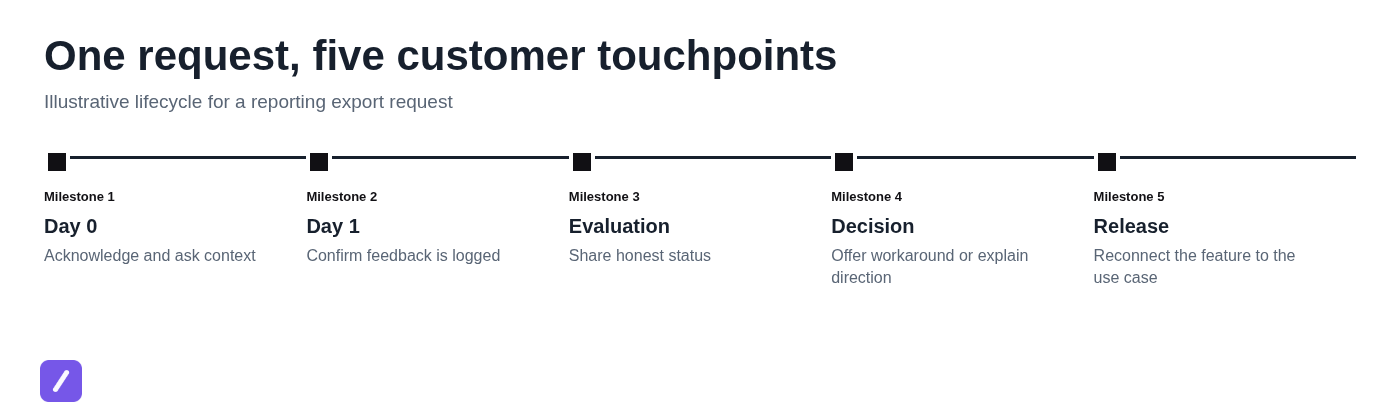
Isolated scripts help, but customers experience feature feedback as a conversation over time. Consider the same representative scheduled-export request.
Day 0: Support acknowledges the request and asks which report is exported, how frequently it is needed, and who receives it. The customer explains that three managers need a CSV every Monday morning.
Day 1: The agent confirms the request is logged, including the weekly reporting deadline and the manual workaround. That handoff is much more useful than a bare request titled "scheduled export."
Evaluation: The team shares that the request is being reviewed alongside reporting automation needs. The agent asks one additional question about whether the customer needs email delivery, a download link, or an integration destination.
Decision: If the request is not planned, the agent provides the closest available workflow and names its limitation. If it is planned, the reply uses approved status language and avoids inventing a date.
Release: When scheduled exports become available, the follow-up links the release back to the Monday reporting workflow and tells the customer where to configure it.
Early context reduces generic replies later. It also gives product teams a stronger record of why a request matters, how often it occurs, and whether several requests represent the same underlying job.
Match the template to the channel and request source
The status language should stay consistent, but the amount of detail should change by channel. An email can carry a complete explanation and a few thoughtful questions. Live chat needs a shorter acknowledgment first, followed by a ticket or email if more detail is required.
Help desk tickets are usually the best place to preserve the full conversation, status, and internal handoff. A public feature request page may invite broader feedback, but public comments should still avoid roadmap promises. In-product feedback often needs the shortest response because the customer may be in the middle of a task.
Internal systems can standardize collection without forcing customer-facing messages to sound bureaucratic. A Jira feature request form can capture impact, affected accounts, linked tickets, and product-owner review. A GitHub feature request template can guide open-source contributors toward reproducible use cases and technical context. Neither should be pasted directly into a customer reply.
Early teams sometimes manage templates in a Word document or an Excel spreadsheet. That is workable at first, but it becomes vulnerable to version drift: one agent uses an old promise, another uses revised wording, and neither knows which version is approved. Help desk macros and shared snippet libraries are usually safer once request volume grows. Teams comparing tools can also review this guide to canned response software.
Build a response system that keeps templates current
A template library needs ownership. Assign someone to maintain the approved language, define each request status, and review templates after roadmap changes, policy changes, or recurring support issues. Keep placeholders obvious so agents know where personalization is expected.
Organize templates by status rather than by vague labels such as "feature request reply." For example, maintain separate entries for new request, logged, evaluating, planned, in development, declined, workaround, and release follow-up. That structure makes it harder for an agent to select language that overstates the request's status.
Reusable snippets are particularly useful when support teams work across multiple tools and operating systems. They keep approved wording accessible while allowing the agent to edit the customer's name, use case, and next step before sending. For a practical organization method, see how to organize copy paste templates into reusable snippets.
SnipFlux
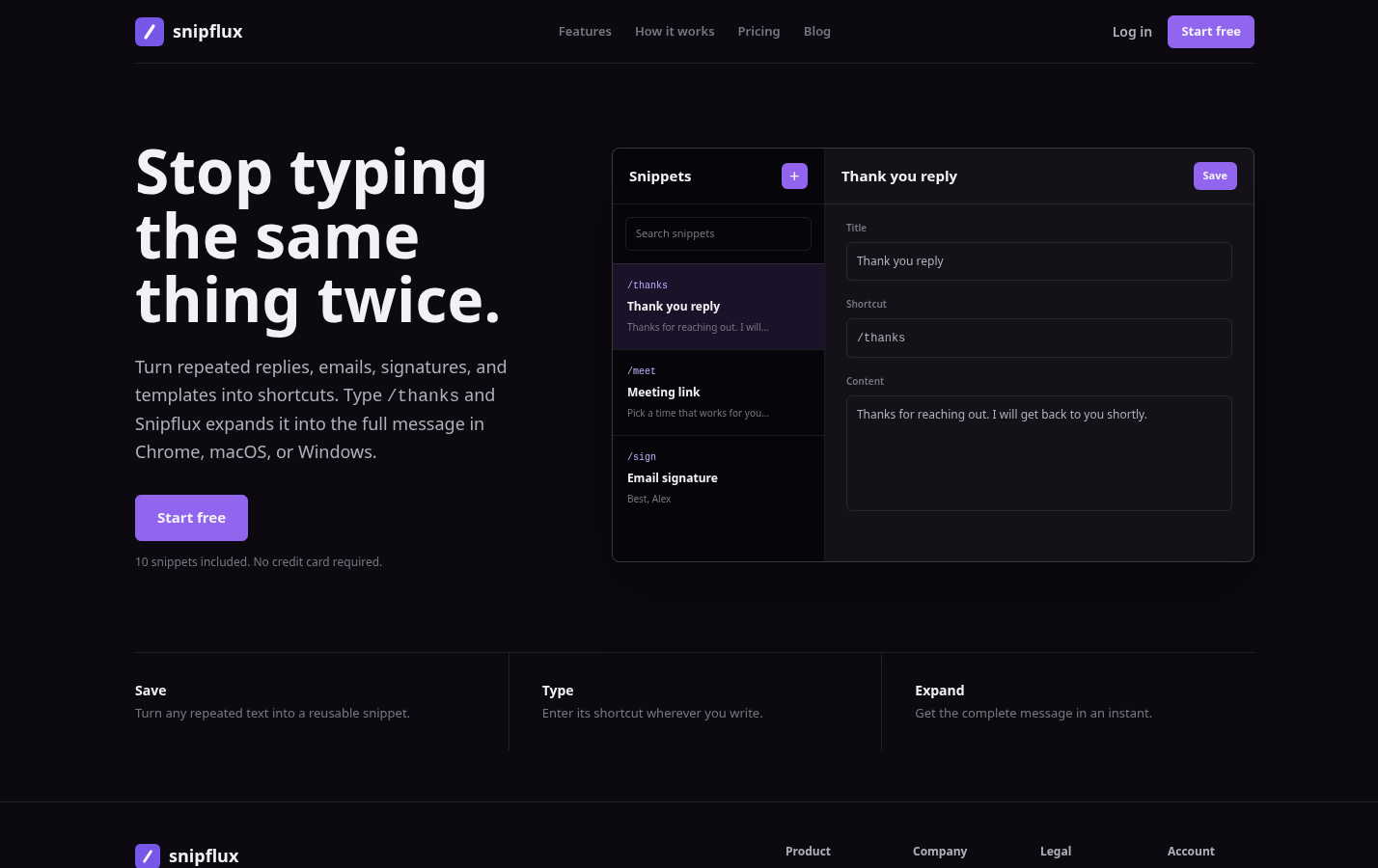
SnipFlux is a cross-platform text expander and reusable snippet manager for teams that repeatedly type approved replies, email language, links, and instructions. A support team can save each feature request response template, assign a shortcut such as /fr-logged or /fr-workaround, and expand it in supported writing fields across Chrome, macOS, and Windows.
Its strongest fit is fast, consistent insertion of reusable text that still needs light personalization. Teams can organize snippets with folders and labels, then use shared workspaces and invitations to maintain a common library. It is not a full help desk, product feedback platform, or roadmap management system, so teams still need a place to track the request itself and its internal decision.
Choose SnipFlux when the bottleneck is repeated typing and inconsistent response language across tools. It is especially practical for support, sales, recruiting, and operations teams that need the same approved text available wherever they write.
Quality checks before sending a feature request reply
Before sending, take a few seconds to verify that the message is helpful and accurate. This check prevents the most expensive mistake in feature request communication: an accidental commitment.
- Does the reply reflect the customer's actual goal, not just the requested feature name?
- Is the stated request status accurate today?
- Have you avoided dates, release windows, or roadmap language that is not approved?
- Have you avoided promising delivery, product-team contact, or individualized follow-up when none is guaranteed?
- Does the customer have a useful next step, workaround, or realistic expectation?
- Has the CRM, help desk record, or feedback system been updated with the useful context?
Escalate rather than use a standard template when the request involves security, accessibility, compliance, contractual obligations, revenue risk, or repeated enterprise demand. Those requests may need more careful investigation and a response aligned with account, legal, security, or product stakeholders.
Finally, do not treat every feature request as a ticket to close. The support interaction may be resolved, but the feedback should remain connected to its underlying customer problem until the team has made and recorded a decision.
Turn response templates into better product feedback
The operating principle is straightforward: acknowledge the problem, collect decision-useful context, be exact about status, and close the loop when possible. Customers can accept a "not now" or even a "no" far more readily than vague language that leaves them guessing.
The practical takeaways are equally clear: separate status templates, personalize the use case, never use roadmap language casually, document the context for product review, and follow up when a meaningful change occurs.
Teams that need faster, more consistent replies can store approved feature request response templates as SnipFlux snippets, then personalize them without rewriting the same message from scratch.