Typing the same reply for the tenth time is not just tedious. It creates inconsistency, slows response times, and makes it far too easy to send an outdated policy, broken link, or slightly different promise to each customer.
Canned response software solves that problem when it is used well. The goal is not to turn people into robots. It is to make approved, repeatable language easy to find, insert, personalize, and maintain wherever work actually happens.
What canned response software is - and what it is not
Canned response software is a tool for storing reusable text and inserting it quickly when needed. A user might type a shortcut such as /refund-policy, search a snippet library by name, choose an item from a menu, or use a keyboard trigger to place a saved response into a writing field.
That saved content can be a two-sentence acknowledgement, a detailed troubleshooting sequence, an email signature, a scheduling message, a policy explanation, a link collection, or a complete reply template. In practical terms, canned response software combines text expansion with a reusable snippet manager.
It is not necessarily the same thing as canned replies built into one help desk. Native help-desk replies work well inside that ticketing system, but may not be available in email, a CRM, social messages, internal chat, documents, or browser-based tools. It is also different from a full customer-service platform, which may handle ticket routing, customer records, reporting, and automations.
Social media management platforms serve another job. Tools such as Buffer and Hootsuite help teams schedule, publish, and manage social activity. Canned response software helps people write repeatable replies across the places they work. The categories can complement each other, but they are not substitutes.
Finally, do not confuse this category with audience response software. Audience response systems are generally used for polls, quizzes, classroom participation, or live-event interaction. They are not built for reusable written customer, sales, or operations responses.
The best option depends on where your team writes. If all work stays in one support desk, that product's built-in replies may be enough. If people move between browser tools, desktop apps, email, CRM records, chat, and support platforms, a cross-platform response library is usually more useful.
The quick answer: who benefits most
Canned response software is especially useful for customer support teams, sales representatives, recruiters, agencies, operations teams, client-service staff, and solo professionals who repeatedly write accurate versions of the same message.
- Support teams can reuse troubleshooting steps, policy explanations, handoff notes, and status updates.
- Sales teams can speed up follow-ups, discovery questions, scheduling messages, and proposal next steps.
- Recruiters can standardize candidate outreach and interview coordination without losing a personal tone.
- Operations staff can reuse instructions, internal requests, process updates, and links.
- Independent professionals can insert signatures, frequently sent emails, onboarding instructions, and client updates.
A simple personal text macro tool is enough when one person needs a small set of private shortcuts. Shared libraries, role controls, owners, and approval processes matter when multiple people rely on common messaging or when mistakes carry financial, legal, or brand consequences.
How canned responses work in a real workflow
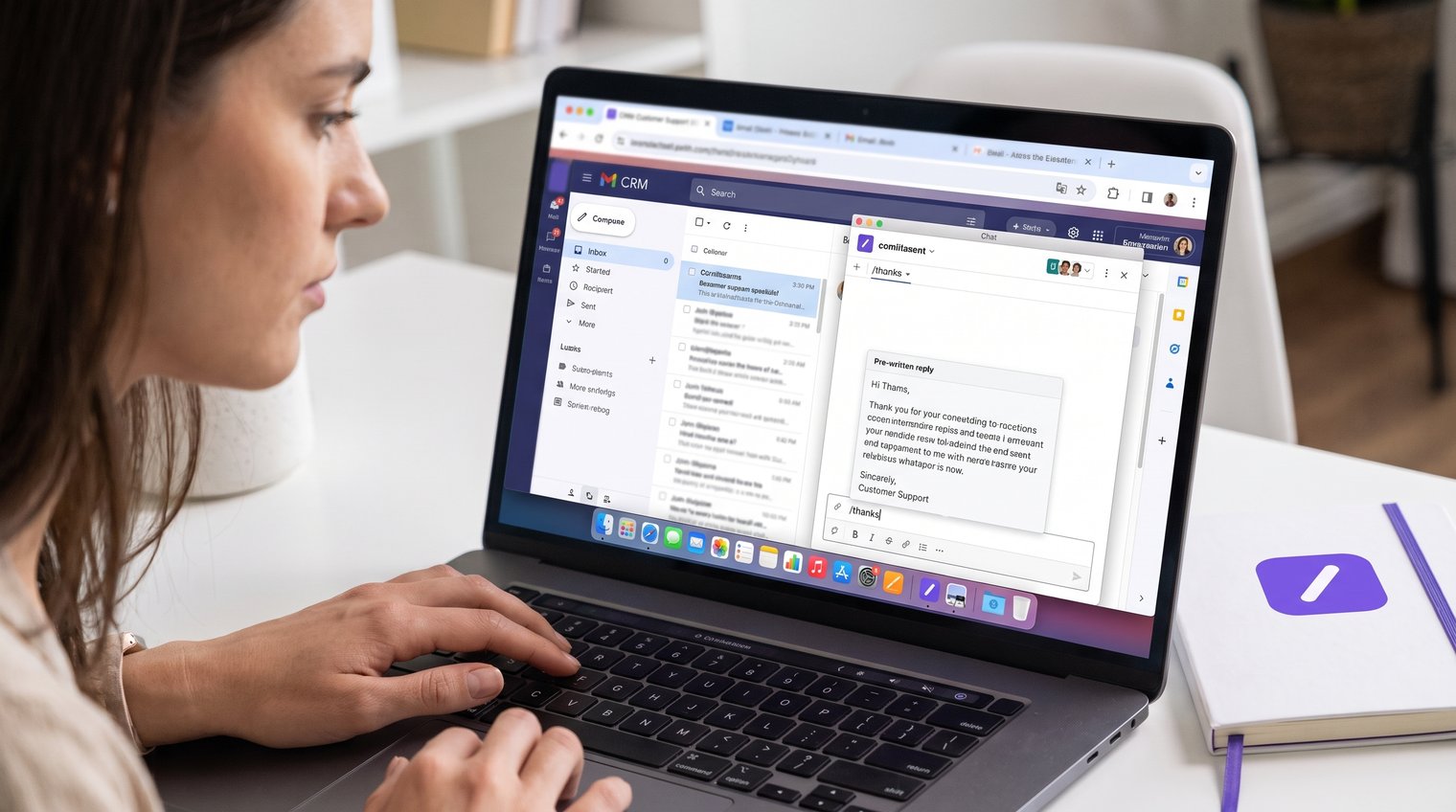
The workflow is straightforward: find language that people repeat, save it as a snippet, assign a memorable trigger, insert it when needed, personalize the details, and update it when the underlying information changes.
For example, a support team may notice that agents explain invoice retrieval dozens of times each week. Instead of drafting the same guidance repeatedly, the team creates an approved template with the correct instructions and link. An agent can then insert it with a shortcut, add the customer's name or invoice details, and send a response that is both fast and accurate.
Common insertion methods include slash commands, abbreviations, search-and-insert interfaces, context menus, keyboard shortcuts, and clipboard-based insertion. Each has a place. Shortcuts are fastest for a response used constantly; search is better for a large library or for a reply an employee uses occasionally.
A huge snippet count is not the mark of good canned response software. Reliable expansion in the fields people use every day is more important. If a shortcut fails in the CRM, breaks formatting in email, or does not work in a browser-based support tool, the library will quickly be ignored.
Shortcuts, text macros, and templates: the practical differences
These terms are often used interchangeably, but separating them makes library design easier. A shortcut is the trigger a person types, such as /invoice. A text macro is the automated expansion that happens after the trigger is recognized. A template is the reusable content itself: the longer message, instruction, or response structure.
One approved template can support multiple shortcuts without creating conflicting copies. A billing template might be found under a search term such as "invoice request," while shortcuts such as /invoice-copy and /billing-invoice direct users to the same current content. That approach reduces copy-and-paste drift.
Variables and personalization without sounding robotic
Variables are placeholders that make reusable text specific to the recipient. Common examples include a first name, company name, ticket number, meeting link, date, order reference, or agent signature.
A useful response might begin, "Hi {{first_name}}," then include approved troubleshooting guidance and end with a next step relevant to the case. The fixed language preserves accuracy, while the variables make the message appropriate to the person receiving it.
Not every detail should be inserted automatically. Account numbers, refund eligibility, delivery estimates, legal wording, and facts about a customer's specific situation should be reviewed before sending. Good canned responses make the safe parts fast; they do not remove the need for judgment.
Where canned response software creates the most value
The value is easiest to see in real workflows, not broad promises about "productivity." Canned responses reduce typing, but their larger benefit is making high-frequency communication more consistent, easier to update, and less dependent on each person's memory.
Customer support and live chat
Support teams use reusable responses for triage acknowledgements, password reset instructions, troubleshooting steps, refund-policy explanations, service status updates, escalation handoffs, and follow-up requests for missing information.
Consider an agent who receives a vague message: "I was charged twice." A snippet can provide the approved first response: acknowledge the issue, ask for the relevant transaction details, explain what will happen next, and set a reasonable expectation. The agent still needs to inspect the account and decide whether a refund, escalation, or different explanation is appropriate.
That distinction matters. Complaints, account-specific failures, distressed customers, and unclear requests should not receive an unedited generic reply. The snippet should shorten the path to a helpful response, not substitute for customer care.
Sales, recruiting, and client services
Sales teams often repeat the same high-quality language in prospect follow-ups, qualification questions, scheduling reminders, post-demo notes, proposal next steps, and objection-handling replies. A shared library lets the team preserve its voice without forcing every representative to memorize every approved phrase.
Recruiters can create reliable templates for sourcing outreach, interview invitations, rescheduling messages, candidate updates, and requests for availability. Client-service teams can reuse project-status updates, approval reminders, intake instructions, and handoff emails.
The strongest templates leave room for a real observation. A follow-up that refers to a prospect's stated goal or a candidate's relevant experience will outperform one that simply inserts a generic paragraph and presses send.
Marketing, community, and social replies
Marketing and community teams can use snippets for comment responses, creator outreach, partnership inquiries, review requests, campaign FAQs, and messages directing people to the right resource.
This is where category confusion is common. A social scheduling platform manages publishing calendars, approvals, reporting, and social inbox workflows. Canned response software accelerates the writing itself, including replies written outside a social platform. A community manager may use both: one to coordinate content and one to insert consistent answers quickly.
Essential features to look for in canned response software
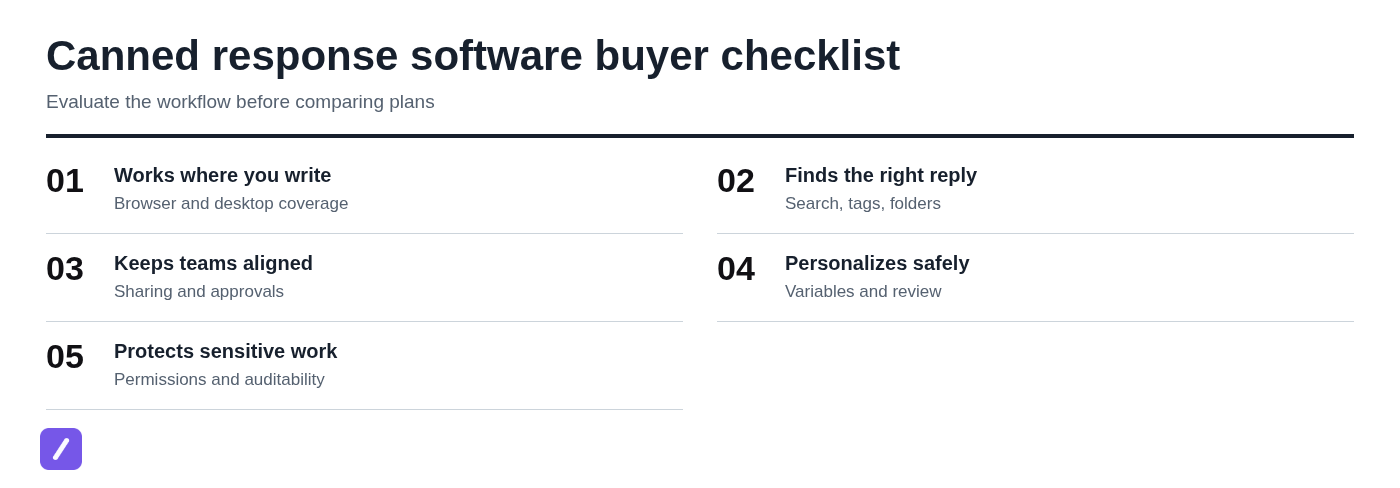
Feature lists can be misleading. The right buyer's checklist starts with reliability in your actual workflow, then adds organization and controls as the library becomes shared and business-critical.
Fast insertion across the places you work
Check where the tool can run and where it can insert text. Review browser extension coverage, macOS and Windows support, compatibility with common writing fields, behavior in desktop apps, offline access where relevant, and conflicts with existing keyboard shortcuts.
Searches for a canned-response software download or a Chrome extension for canned responses usually reflect a practical question: will this work in the apps I already use? Confirm installation requirements and test the exact browser, email client, CRM, chat tool, and support platform your team uses before committing.
Also test failure behavior. If a trigger is unavailable in a specific app, can the employee search and insert a response instead? A fallback matters in mixed environments.
Organization, search, and a usable canned response manager
A library only helps if people can find the right content in seconds. Look for folders, labels or tags, favorites, clear naming, full-text search, and a way to archive outdated snippets without losing useful history.
As a library grows, naming becomes operational infrastructure. "Refund" is not a sufficient title when there are separate responses for eligibility, processing times, denied requests, duplicate charges, and subscription cancellations. Specific names reduce mistakes and make onboarding easier.
Duplicate detection is helpful, but the larger issue is ownership. If five people independently create their own version of the same answer, search results become a liability rather than an advantage.
Shared libraries, roles, and approval controls
Teams should be able to distinguish personal snippets from shared, approved content. Look for team workspaces, invitations, permission levels, ownership, editing controls, and version history or equivalent change visibility where the workflow requires it.
Controlled messaging matters in regulated, legal, financial, and healthcare-adjacent work. That does not mean every organization needs specialized regulatory response software. It means the team should know who can change customer-facing wording, who approves it, and how an outdated version is removed.
Dynamic fields, forms, and rich content
Useful dynamic features include variables, fill-in fields, date tokens, links, and formatting. Some tools may also support richer content depending on the destination application.
Use dynamic fields when they prevent a predictable error. A meeting confirmation that requires a date, time, meeting link, and contact name benefits from structured prompts. Do not add a form to a simple acknowledgement just because the option exists. Extra friction makes people bypass the library.
Security, privacy, and auditability
Do not assume a snippet tool is suitable for sensitive information simply because it is used at work. Ask vendors and internal stakeholders about access controls, encryption claims, data location, SSO requirements, audit trails, account provisioning, and offboarding.
As a policy, avoid storing passwords, payment-card data, private authentication codes, or sensitive personal information in reusable snippets. A saved template should guide the communication, not become an uncontrolled repository for confidential data.
Useful procurement questions include:
- Who can view, edit, export, or delete shared content?
- Can administrators remove access promptly when someone leaves?
- How are changes to critical shared snippets reviewed?
- What data is stored, and where is it stored?
- Which security and identity controls are required for our team?
How to choose the right type of canned response tool
Choose the category before comparing brands, features, or pricing. A native help-desk reply system and a standalone text expander can work together, but they solve different parts of the workflow.
Choose a cross-platform text expander when writing happens everywhere
A cross-platform text expander is the right fit when people write in many web apps, email clients, CRM systems, chat tools, documents, and internal systems. It centralizes the source library so approved wording does not fragment into personal notes, browser bookmarks, and copied documents.
This is particularly valuable for teams whose customer conversations begin in one channel and continue somewhere else. A support agent may use the same policy explanation in a ticket, a CRM note, and an email. A salesperson may use a qualification template in a LinkedIn message, an email, and a proposal follow-up.
Choose native help-desk canned replies when the work stays in tickets
Native canned replies are often best when agents work almost entirely inside one ticketing system. They can take advantage of ticket fields, customer context, routing, reporting, and other support-specific functions.
The limitation is portability. A response stored in the help desk may not be available in the CRM, social inbox, email client, or internal chat. If employees regularly write beyond tickets, native replies alone may leave gaps.
Choose automation or an AI assistant when the response needs data or judgment
Reusable text is not workflow automation. Automation can retrieve account data, update records, route a case, trigger a sequence, or take action based on conditions. Use it when the job requires system-level steps, not just repeatable language.
AI assistants can help draft, summarize, classify, or suggest a response when a message is varied and context-heavy. Approved snippets are still better when wording must be controlled, repeatable, and quickly verifiable. The practical approach is often a combination: automation for actions, AI for variable drafting, and snippets for dependable language.
A step-by-step buying process for teams
A free plan or quick download can be useful for testing, but it is not proof that a tool fits a team. Run an evaluation around the work itself.
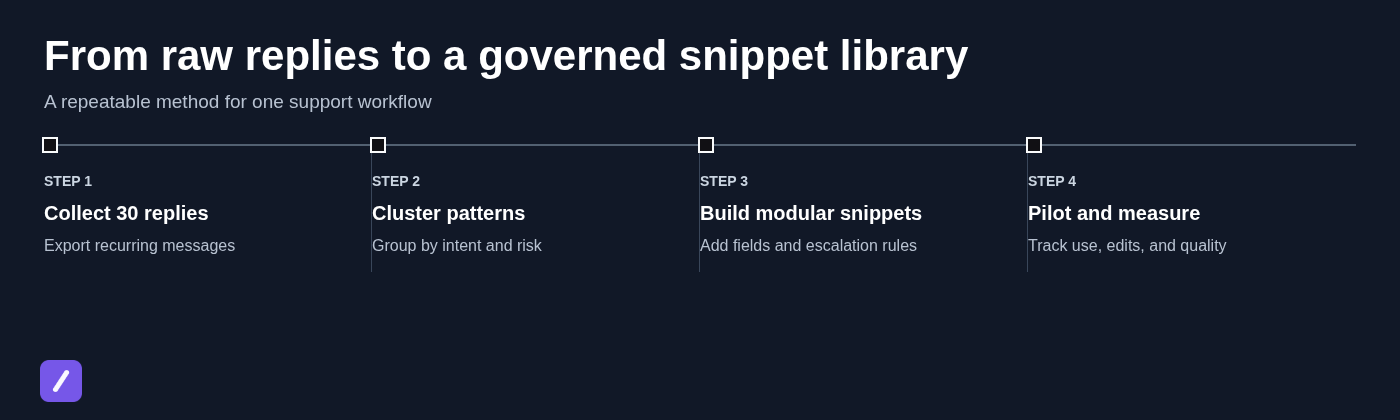
Step 1: audit repeated responses before choosing software
Collect roughly two weeks of recurring messages from the channels where work occurs. Include support tickets, emails, chat messages, CRM notes, social replies, and internal operational requests where appropriate.
Group the messages by volume, risk, and personalization needs. Start with high-frequency, low-risk content: scheduling confirmations, standard instructions, basic acknowledgements, and commonly requested links. This first set provides a cleaner test than trying to build a 500-item library on day one.
Step 2: test the workflow, not just the editor
During a trial, test insertion in the browser, email, CRM, chat, and support tools used daily. Create a small shared library and ask a new teammate to find and use a response without coaching.
Evaluate expansion speed, formatting retention, shortcut collisions, search quality, library navigation, and the effort required to edit or retire an outdated response. A polished editor is irrelevant if the tool cannot insert reliably where the team writes.
Step 3: compare pricing against operational requirements
Compare free, individual, and team options based on user limits, shared libraries, administrative controls, supported platforms, and security requirements, not only the monthly price.
A free canned-response tool may be ideal for an individual testing a personal library. It may be unsuitable for a team that needs shared ownership, controlled edits, and broad application support. Validate the actual limits before treating free as a long-term collaboration plan.
Build a response library people can trust
Buying software is the easy part. A useful response library is a living knowledge asset with structure, owners, review dates, and clear rules for what belongs in it.
Use a naming and folder system that mirrors real work
Organize content by the way employees think about their tasks. A practical pattern is team > workflow > situation > action.
- Support > Billing > Refund eligibility
- Support > Account access > Password reset
- Sales > Discovery > Scheduling follow-up
- Recruiting > Interviews > Reschedule request
- Client Services > Onboarding > Asset reminder
Use titles that describe the moment in which someone should use the response. Shortcuts can follow a similar pattern, such as /sup-refund-eligible or /sales-discovery-followup, provided they remain easy to remember.
Write snippets in modular blocks
Long templates become brittle when every variation is stored as a separate item. Instead, create modular blocks for greetings, core explanations, next steps, policy language, links, and signatures.
For a cancellation request, the agent may combine a greeting, an account-verification block, a cancellation-policy block, and a next-step block. This makes responses easier to tailor while keeping critical wording consistent. It also reduces maintenance: change one policy block rather than hunting through 12 near-identical templates.
Set owners, review dates, and retirement rules
Every major library area should have an accountable owner. Support leadership may own billing and troubleshooting snippets; sales leadership may own outreach and positioning; operations may own internal process templates.
Set review dates around policy changes, product releases, pricing updates, and brand shifts. Archive obsolete snippets rather than deleting them outright when historical reference or auditability matters. Archived content should no longer appear in everyday search results, but it should remain available to authorized owners when needed.

Worked example: turn 30 support replies into a scalable snippet system
Imagine a fictional SaaS support team that receives 30 repeated replies across a two-week period. Agents are helpful, but they each phrase answers differently, and a policy update has not reached everyone.
Start with the raw replies and identify response patterns
The team gathers examples involving password resets, invoice requests, cancellation requests, outage acknowledgements, and feature-availability questions. They classify each group by frequency, urgency, policy sensitivity, and customer-specific information required.
| Response pattern | Frequency | Risk | Personalization needed |
|---|---|---|---|
| Password reset | High | Low | Name and reset link |
| Invoice request | High | Medium | Account or invoice details |
| Cancellation request | Medium | High | Plan status and eligibility |
| Outage acknowledgement | Low to variable | High | Current status and next update |
| Feature availability | Medium | Medium | Product context and roadmap guidance |
The team starts with password resets and invoice requests because they are frequent and structured. Cancellation and outage responses get templates too, but with clear escalation guidance because the consequences of an unreviewed response are higher.
Convert one generic reply into a safe reusable template
A raw invoice response might look like this:
"Hi, you can find your invoice in settings. Let us know if you need help."
That is fast to write, but it leaves out useful detail and may send customers to the wrong place. The team turns it into a reusable template:
Hi {{first_name}},
You can download the invoice for {{account_or_invoice}} from the Billing section of your account. If you cannot access it, reply with the billing email address and the invoice date or amount, and we will help locate it.
Next step: {{next_step_link}}
{{agent_signature}}
The account-specific fields must be checked. The core instructions stay fixed. If the customer disputes a charge, requests a tax document, or cannot be verified, the agent uses an escalation path instead of inserting this template unchanged.
Measure whether the library is improving the workflow
After a pilot, measure median first-response time, average handling time, snippet adoption, edits after insertion, repeat contacts, and findings from quality reviews.
High editing rates are not automatically bad. They may reveal that a response needs better variables, that there are two common situations hidden inside one template, or that the library's language no longer reflects how customers ask the question. As covered in the section on modular snippets, splitting one overly broad response into smaller blocks can often solve the issue.
Avoid the mistakes that make canned replies feel canned
Canned replies feel impersonal when teams mistake reusable language for a replacement for attention. The software should make routine communication easier, not flatten every interaction into the same script.
Do not automate judgment, empathy, or exceptions
Use a custom response, or at minimum a heavily tailored starting point, for serious complaints, account-specific failures, sensitive personal circumstances, legal threats, ambiguous requests, and emotionally charged conversations.
A good rule is simple: automate the repeatable facts and process steps, not the human decision. An apology for a major service failure should acknowledge what happened to that customer, not merely insert a generic sentence about inconvenience.
Prevent outdated, contradictory, and duplicate messaging
Outdated policies, competing response versions, and unowned snippets undermine trust quickly. A customer should not receive one cancellation policy from support and a different version from a sales representative.
Prevent that with the governance practices discussed earlier: clear ownership, review dates, search-friendly naming, approved shared content, and archive rules. The goal is not to create bureaucracy. It is to ensure that the easiest response to use is also the correct one.
Keep shortcuts memorable without causing accidental expansions
Global text macro software can create problems when triggers are common words or when a shortcut fires in the wrong application. Use distinctive trigger conventions, delimiters, and prefixes. For example, /sup-reset is less likely to expand accidentally than reset.
Test shortcuts in the applications where people work. Avoid triggers that conflict with native commands, common abbreviations, or words employees regularly type in normal sentences. When in doubt, make search-and-insert available for lower-frequency content.
Canned response software compared with related tools
Several adjacent categories overlap with canned responses, but choosing the wrong one can lead to a frustrating rollout.
Canned response software vs text expansion software
The categories overlap substantially. Most standalone canned response managers are text expanders with stronger capabilities for organizing reusable content, sharing it with a team, and governing approved messaging.
Basic text macro software may focus on personal typing speed: expanding abbreviations into addresses, signatures, or short phrases. That is useful, but a team handling customer communication usually needs more than individual shortcuts. It needs a shared library that people can search, trust, and keep current.
Canned response software vs AutoHotkey
AutoHotkey is a Windows automation and scripting approach. It can be extremely flexible for technically confident users who want to create custom keyboard shortcuts, workflows, and desktop automation.
Its flexibility is not the same as a team-ready canned response system. A shared response workflow usually needs cross-platform access, simple editing, searchable libraries, onboarding, and administration without requiring every employee to write or maintain scripts. AutoHotkey can be excellent for custom individual automation; it is rarely the easiest foundation for governed team messaging.
Canned response software vs audience response software
Audience response software, sometimes called an audience response system, generally supports live polling, quizzes, classroom clickers, surveys, or event participation. It is designed to collect responses from an audience, not to help a professional insert recurring written replies.
Similarly named direct response products may relate to advertising, marketing campaigns, or unrelated workflows. Focus on the job to be done: if the need is to reuse accurate text while writing across applications, look for a text expander and snippet manager.
How SnipFlux fits a cross-platform canned response workflow
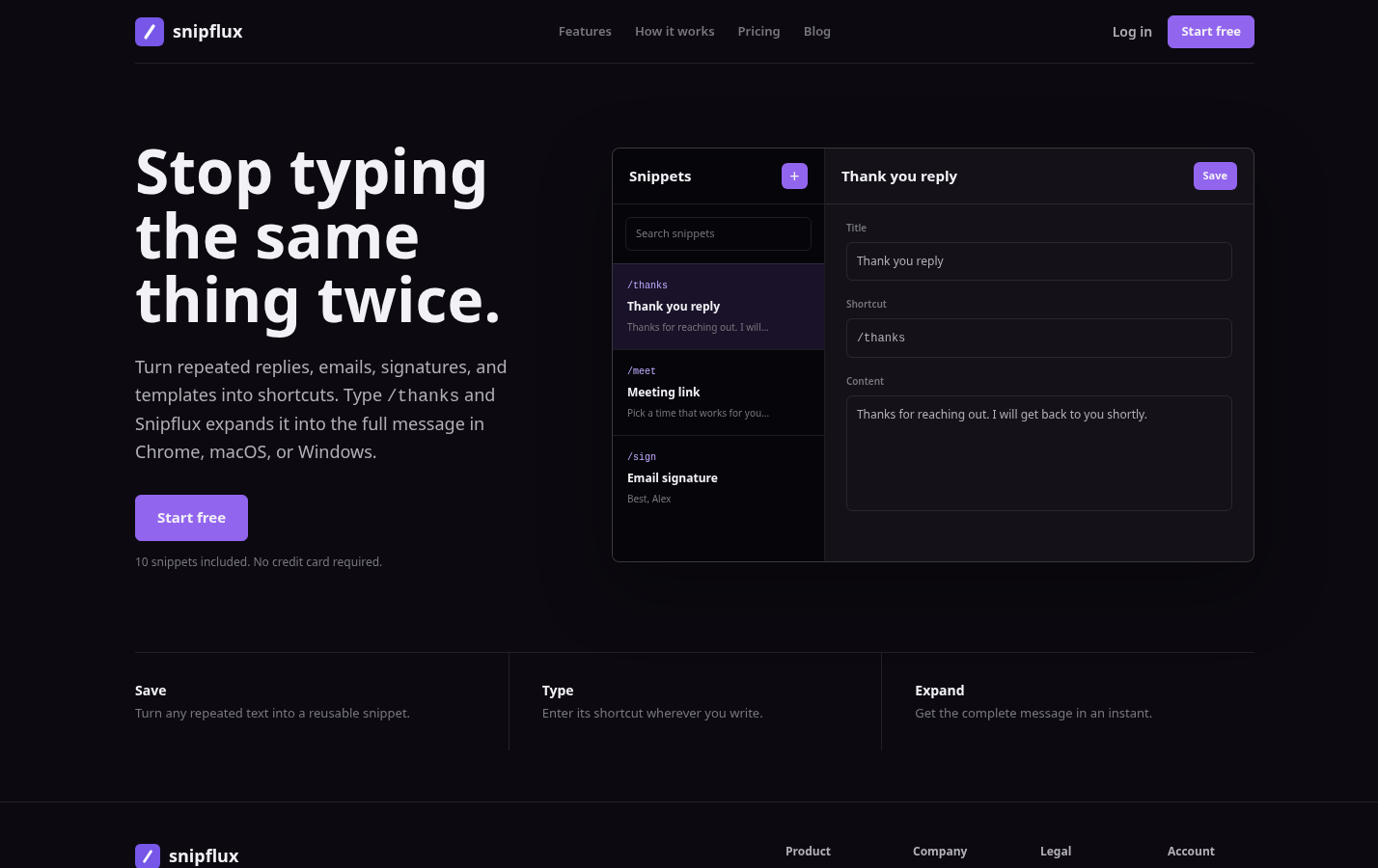
SnipFlux is a cross-platform text expander and reusable snippet manager for people who repeatedly write the same useful content across Chrome, macOS, and Windows. Users can save replies, emails, signatures, templates, instructions, and links, then expand them from memorable shortcuts in supported writing fields.
Its practical value is not limited to customer support. A sales representative can keep follow-up language and scheduling templates available while working in browser tools and email. An operations team can maintain common instructions and internal updates. A support team can organize approved replies into shared workspaces rather than leaving each agent with an isolated set of copied notes.
SnipFlux supports organization through folders and labels, helping users find snippets by name or shortcut. Workspaces and invitations provide a way for teams to maintain shared libraries while still allowing individuals to keep personal material separate.
A sensible first test is small: add five high-frequency, low-risk snippets, use them in the applications your team relies on, and note where people still copy and paste. That will reveal whether shortcut expansion and library organization fit the actual workflow before you attempt a larger migration.
Make every repeated response faster, safer, and easier to maintain
The best canned response software is the one that works where people write, gives them the right response quickly, and provides enough shared control to keep important language accurate.
Start with a small library of high-volume replies. Build clear naming, assign owners, add only the variables that reduce real errors, and require human review when the situation calls for judgment. Faster typing is useful. Maintained, trustworthy communication is the outcome worth optimizing for.