A polite reminder email should be brief, specific, and easy to act on. State what you are following up about, name the action you need, and give a reasonable deadline or next step.
The biggest mistake is trying so hard not to sound pushy that the request disappears. A good reminder is not an apology for having a need; it is a clear, respectful nudge that helps work move forward.
How to write a polite reminder email
Start by naming the original request, then make one clear ask. If timing matters, say so plainly and explain the practical reason without adding pressure or drama.
For example, instead of writing, "Just checking in to see if you might possibly have had a chance to look at this," write: "I'm following up on the draft contract sent Monday. Could you please share your feedback by Thursday so we can keep the project on schedule?"
A useful reminder usually does four things: provides context, identifies the needed action, gives the recipient a way to respond, and keeps the tone calm. You do not need several paragraphs of filler or repeated phrases such as "just checking in." Directness is often more considerate because it saves the other person time.
The four parts of an effective reminder email
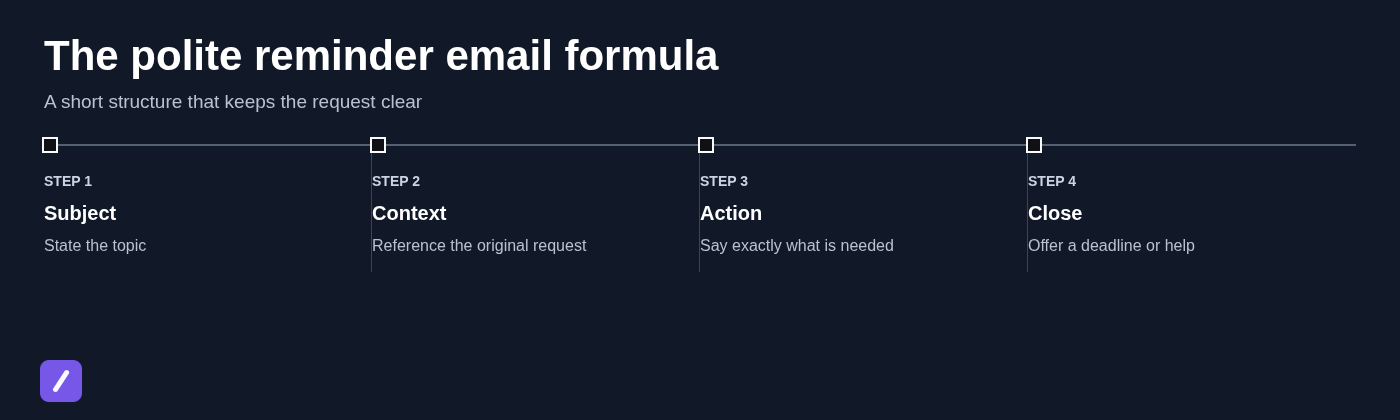
Most strong reminder emails follow the same simple structure. Use it as a baseline, then adjust the wording for the relationship and urgency.
- Clear subject line: State the topic and, when useful, the deadline.
- Brief context: Refer to the earlier request, meeting, invoice, or application.
- Specific action: Say exactly what the recipient needs to send, approve, complete, or decide.
- Helpful close: Include a deadline, offer help, or ask them to share an updated timeline.
For a first follow-up, assume the person is busy and keep the language light. If an item is overdue or blocking other work, be more explicit about timing and consequences. The goal is not to become harsher; it is to remove ambiguity.
Phrases to use instead of "just a gentle reminder"
"Just a gentle reminder" is not wrong, but it is so common that it can sound automatic. A more specific opening gives the recipient useful context immediately.
For a first follow-up, try:
- "I'm following up on [topic]."
- "Could you please share an update on [request]?"
- "When you have a moment, could you [action]?"
- "I wanted to check whether you had any questions about [item]."
- "Following up on the [document/request] sent on [date]."
When the request is time-sensitive or overdue, be clearer:
- "To keep [project] on schedule, we need [action] by [date]."
- "The deadline for [item] is [date]. Please complete [action] before then."
- "Could you confirm whether you can provide [item] by [date]?"
- "If you need more time, please let me know by [date] so we can adjust the plan."
These alternatives work because they focus on the work, not on whether the recipient has failed to respond. That distinction matters, especially with customers, colleagues, and prospects.
Polite reminder email templates for common work situations
Use the templates below as starting points, not scripts you must copy word for word. Replace bracketed details, keep the requested action concrete, and match the deadline to the situation. For a customer-support-specific version, see this support ticket closure email template.
Meeting follow-up email with action items
When to send: Shortly after a meeting, especially when work has owners and due dates.
Subject: Action items from [meeting name] - due [date]
Hi [Name],
Thanks for your time in today's [meeting name]. I'm following up on the action items assigned to you:
- [Deliverable or action item] - due [date]
- [Deliverable or action item] - due [date]
Please let me know if any deadlines need to be adjusted or if you need input from me to complete these items.
Best,
[Your name]
Invoice payment reminder email
When to send: For a first courteous reminder after an invoice due date has passed.
Subject: Payment reminder: Invoice [invoice number] due [date]
Hi [Name],
I'm following up on invoice [invoice number] for [amount], which was due on [date]. If payment has already been submitted, please disregard this message.
If not, you can complete payment here: [payment link]. Please let us know if you need a copy of the invoice or have any questions.
Thank you,
[Your name]
Customer onboarding reminder email
When to send: When a customer has not completed a milestone needed to get value from the product or service.
Subject: Next step for your [Company] setup
Hi [Name],
To keep your onboarding moving, the next step is to complete [specific milestone, such as invite your team or connect your account].
You can do that here: [link]. If you ran into a blocker or would like help with the setup, reply to this email and we will help you get unstuck. For a fuller sequence of setup messages, use this customer onboarding checklist email template.
Best,
[Your name]
Customer renewal reminder email
When to send: Before a subscription, service agreement, or contract renewal date.
Subject: Your [product/service] renewal on [date]
Hi [Name],
Your [product/service] renewal is scheduled for [renewal date]. Please let us know whether you would like to renew, make changes to your plan, or discuss your options before that date.
If you have questions, reply here or choose a time to talk: [link].
Regards,
[Your name]
Mandatory training reminder email
When to send: When required training has not been completed before the deadline.
Subject: Action required: Complete [training name] by [date]
Hi [Name],
This is a reminder that [training name] must be completed by [date]. Please complete the course here: [training link].
The training takes approximately [time], and completion is required for [reason, if appropriate]. If you cannot access the course or need support, contact [support contact] before the deadline.
Thank you,
[Your name]
Access request approval email
When to send: When approval is needed before someone can access a system, folder, account, or project resource.
Subject: Approval needed: [access type] for [person/project]
Hi [Name],
I'm following up on the request for [specific access] for [person or team]. Your approval is needed before we can proceed.
Could you please approve or decline the request by [date]? This access is needed for [project or task], which is scheduled to begin on [date].
Thanks,
[Your name]
Request for missing application documents
When to send: When an applicant, vendor, customer, or internal requester has not submitted required materials.
Subject: Documents needed to complete your [application/request]
Hi [Name],
We are reviewing your [application/request] and still need the following items:
- [Document 1]
- [Document 2]
- [Document 3]
Please submit them through [submission method or link] by [date]. If you have already sent any of these documents, please reply with the details so we can confirm receipt.
Best,
[Your name]
Proposal or product demo follow-up email
When to send: After a proposal or demo when a prospect has not replied.
Subject: Next steps for [company/project]
Hi [Name],
I'm following up on the [proposal/demo] we discussed on [date]. Does [solution or proposal] still align with your priorities for [time period]?
If it would be helpful, I can answer questions, revise the proposal, or schedule a brief follow-up. If the timing is no longer right, a quick update would also be appreciated. For more variations, see these proposal follow-up email template examples.
Best,
[Your name]
Examples by timing: first follow-up, second reminder, and final notice
The wording should become more explicit as time passes. A first follow-up is usually a simple request for an update. A second reminder should restate the deadline and make the required action unmistakable. A final notice should explain what happens if the item remains incomplete, without sounding emotional or accusatory.
First follow-up: "I'm following up on the budget approval sent last week. Could you please let me know whether you have any questions?"
Second reminder: "We need the budget approval by Wednesday to finalize the Q3 plan. Please approve the request or let me know what changes are needed."
Final notice: "The approval deadline is Wednesday at 3 p.m. If we do not receive a response by then, we will move the Q3 launch date to the next planning cycle. Please reply if you need additional information before making a decision."
Do not turn a final reminder into a reprimand. Avoid phrases such as "as I have repeatedly said" or "you have failed to respond." State the facts, the deadline, and the next consequence or decision.
Subject lines that get reminder emails noticed
A subject line should tell the recipient what the email concerns before they open it. Vague lines such as "Reminder" or "Following up" force people to search their inbox for context.
- Meetings: Action items from [meeting name] - due [date]
- Payments: Payment reminder: Invoice [number] due [date]
- Approvals: Approval needed: [request] by [date]
- Documents: Documents needed for your [application/request]
- Training: Action required: Complete [training name] by [date]
- Renewals: Your [service] renewal on [date]
Include a date only when it helps the recipient prioritize the message. For low-stakes follow-ups, a straightforward subject such as "Question about [project]" may be enough.
How to make a reminder sound helpful, not pushy
Assume good intent. Most delayed responses are caused by workload, unclear ownership, missing information, or a task that genuinely slipped someone's mind. Your email should make it easy for the recipient to take the next step.
That means keeping the request narrow, including the relevant link or document, and offering a path for blockers. "Please approve the request by Friday, or let me know if you need changes" is more useful than "Please respond as soon as possible."
Use a deadline when there is a real scheduling, compliance, financial, or customer impact. If no firm date exists, ask for an update instead: "Could you let me know your expected timeline?" Inventing urgency to force a response usually damages trust.
Common polite reminder email mistakes to avoid
Over-apologizing weakens an otherwise reasonable request. You do not need to write "Sorry to bother you" when you are following up on a legitimate deadline, payment, or deliverable.
Also avoid vague language. "Any updates?" may work in a close internal relationship, but it often creates extra back-and-forth. Name the item, the decision or action needed, and the date where relevant.
- Do not bury the ask: Put the requested action near the beginning.
- Do not use passive-aggressive wording: Skip comments about unanswered emails or assumptions about why someone has not replied.
- Do not set unclear deadlines: Replace "soon" with a date and time when timing matters.
- Do not send too many follow-ups: Space reminders according to the urgency and relationship.
- Do not start a new thread without a reason: Keep the original thread when its history helps. Start a new one only when the topic has materially changed or the existing chain is difficult to follow.
Save your best reminder templates for faster follow-ups
The most effective polite reminder email has clear context, one concrete action, and respectful timing. Once you have templates that work for invoices, approvals, onboarding, and meeting actions, there is no reason to rewrite them from scratch every time.
For teams and professionals who send similar follow-ups regularly, SnipFlux can keep approved reminder templates in a reusable snippet library. Assign a shortcut to a template, insert it where you write, and personalize the bracketed details before sending.