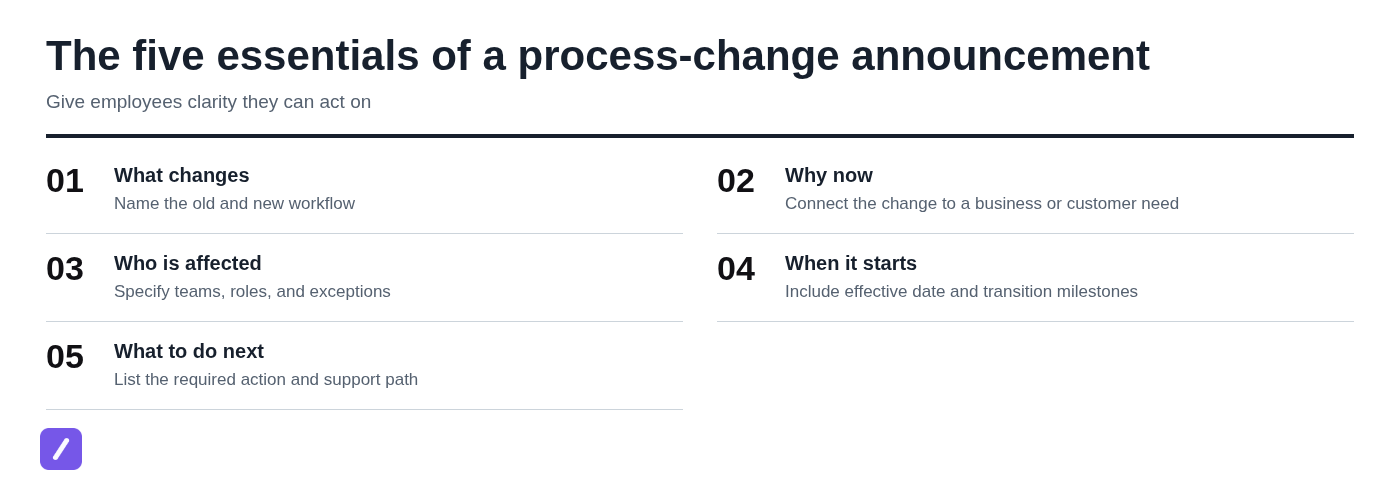
An internal process change announcement should tell employees what is changing, why it matters, who it affects, when it takes effect, and exactly what they need to do next. If any of those answers are missing, the message is not yet ready to send.
Too many announcements read like organizational news: informative, but not actionable. A good process-change message is an operational instruction. Its job is to help someone complete their work correctly on the first day of the new workflow.
What an internal process change announcement should include
Every announcement needs five essentials: the old and new process, the reason for the change, the affected people, the effective date, and the required action. Put those details near the top rather than burying them beneath background context.
Start by naming the process in plain language. "We are updating how equipment requests are submitted" is clearer than "We are introducing an operational efficiency improvement." Then explain what changes in practical terms: which form, system, approval step, deadline, or handoff will be different.
Reason matters, but it should not overpower instruction. Employees generally need enough context to understand the decision, such as reducing duplicate work, improving customer response times, meeting a compliance requirement, or creating a clearer audit trail. They also need to know whether the change applies to everyone or only specific roles, locations, teams, or request types.
Finally, give a concrete next step. Tell people whether they need to attend training, read an updated procedure, change a system setting, stop using an old inbox, or route in-progress work in a new way.
Internal process change announcement email template
Use this internal process change announcement template for email, Outlook, Slack, Teams, or another company communication channel. Customize the bracketed fields before sending, and remove any sections that do not apply.
Subject: Process update: [Process name] changes on [Effective date]
Hello [team or audience],
Starting [effective date], we are changing how [brief description of process]. Instead of [old workflow], [affected group] will [new workflow].
We are making this change because [business, customer, operational, or compliance reason]. The goal is to [specific outcome, such as reduce delays, improve accuracy, or make ownership clearer].
Who is affected: [Teams, roles, locations, or request types affected.]
What you need to do:
- Beginning [date], [required action].
- Use [new form, system, checklist, or channel] for [task].
- Complete [training, acknowledgement, setup, or review] by [deadline], if applicable.
- For work already in progress, [transition instruction].
The updated [SOP, checklist, policy, or guide] is available at [link or location].
[Process owner name or team] is accountable for this process. For questions, exceptions, or access issues, contact [support contact] at [contact method].
Thank you,
[Name and role]
The useful part of this format is not its wording; it is its structure. Avoid empty phrases such as "please be aware" or "we appreciate your flexibility" unless they are followed by a clear action, deadline, or support path.
How to announce a change in process without creating confusion
The clearest sequence is simple: state the decision, explain the day-to-day impact, give instructions, and show employees where to get help. That order respects the reader's most immediate question: "What do I need to do differently?"
Format depends on the risk and complexity of the change. Email is usually necessary because it creates a searchable record. But email alone is not enough for a workflow that changes approvals, customer commitments, system permissions, or several teams' responsibilities. In those cases, pair the written notice with a manager briefing, short meeting, recorded walkthrough, or training session. For a team-channel version, see these Slack message templates.
Detailed instructions should live in one maintained location. The announcement can summarize the change and point employees to that source of truth rather than becoming a long, outdated mini-manual.
Lead with the change and effective date
Employees should be able to identify the new process and its start date from the subject line and first two sentences. A vague subject line such as "Important operational update" encourages people to postpone reading or misunderstand its relevance.
Use a direct pattern instead:
- Process update: Equipment requests move to the service portal on May 6
- Action required: New purchase approval workflow starts July 1
- Customer escalation process changes for Support and Success on Monday
If there is a transition period, say so explicitly. "Effective July 1" means something different from "Training begins July 1, and the new process is required July 15." Do not make recipients infer which date matters.
Translate the change into role-specific actions
Not every recipient needs the same level of detail. Explain what everyone needs to know, then identify the actions required from particular teams. Sales may need to submit a request; Finance may need to approve it; Operations may need to fulfill it.
A short before-and-after comparison is especially useful when the change could be mistaken for a minor system update:
| Before | After |
|---|---|
| Send equipment requests to the Operations inbox. | Submit requests through the equipment form in the service portal. |
| Managers approve requests in email. | Managers approve requests in the portal within two business days. |
This approach removes ambiguity without forcing every employee to read every procedural detail.
Make the source of truth easy to find
Link to the updated SOP, checklist, policy, training recording, or knowledge-base page. Use a descriptive label, not "click here," so people know what they will find and can locate it later through search.
Also name the person or team responsible for questions and exceptions. "Contact Operations" is better than no direction, but "Contact Priya Shah in Operations for form access and urgent exceptions" is more useful. Accountability prevents process questions from bouncing between managers and inboxes.
What to include when the process change affects multiple teams
Cross-functional changes need more than a general announcement. They need clear handoffs, dependencies, ownership, and rules for work that is already underway. Clear ownership and reusable communication also support a quick turnaround across support, sales, and remote teams.
For example, a revised purchase process may affect employees who submit requests, managers who approve them, Finance staff who validate budgets, and Procurement staff who place orders. If the announcement only says "purchase approvals are changing," each group may assume someone else owns the next step.
Address the operational details that generic templates often miss:
- Ownership handoffs: Who owns the request at each stage?
- Dependencies: Does one team need information, approval, or system access from another before work can proceed?
- Approval changes: Have approval thresholds, approvers, or service-level expectations changed?
- System access: Who needs a new permission, form, queue, or notification setting?
- Transition responsibilities: Who resolves requests submitted under the old process?
For complex changes, keep the email concise and use the linked documentation for a compact role-based impact table. That lets each audience find its responsibilities without turning the announcement into a wall of text.
Process change announcement examples
The amount of communication should match the disruption caused by the change. A low-risk workflow update may need one short email and a documented procedure. A new approval path should usually have a longer lead time, manager reinforcement, training, and a defined escalation route.
Example: Updating a routine request process
Subject: Process update: Equipment requests move to the service portal on May 6
Hello team,
Starting May 6, please submit all equipment requests through the service portal rather than emailing the Operations inbox. This change gives requesters a clear status view and helps Operations route requests faster.
Use the equipment request form at [link]. Requests already submitted by email before May 6 will be handled as usual. Questions about the form or portal access should go to Operations at [contact].
Thank you,
[Name]
This is a low-disruption change, so a short email is appropriate. The channel can be email plus a brief team-channel reminder on the start date. A link to the form and a clear contact are enough if no new approval rules or training requirements are involved.
Example: Changing an approval workflow
Subject: Action required: Revised purchase approval workflow begins July 1
Hello managers, budget owners, and requesters,
Beginning July 1, purchase requests over [threshold] will require approval from both the department budget owner and Finance before Procurement can place an order. Requests at or below [threshold] will continue through the standard manager approval path.
This update creates a consistent review process for higher-value purchases and confirms budget availability before orders are submitted. Training for requesters and approvers will be held on [date], and the updated purchase procedure is available at [link].
For requests already submitted before July 1, use the current approval process unless Procurement contacts you directly. Requests submitted on or after July 1 must use the revised approval path. If a purchase is urgent, contact [escalation owner or team] before submitting the request.
Managers should review the new approval steps with their teams before July 1. Questions about thresholds, pending requests, or Finance review should be sent to [contact].
Thank you,
[Name]
This change is more disruptive because it introduces new approvers and may delay spending if people follow the old route. Send the email well before launch, brief managers separately, provide training, and repeat the key deadline in the relevant work channels.

Choose the right channel and timing for a process-change announcement
Email is sufficient when the process change is simple, low-risk, and easy to understand from written instructions. Pair email with a live meeting, manager briefing, team-channel post, or training session when the change affects multiple teams, changes decision rights, requires practice, or could interrupt customer-facing work.
Announce early enough for people to prepare, but not so early that the process is still unsettled. Before sending, the new workflow, accountable owner, documentation, access requirements, and support route should all be ready. Announcing a change before employees can act on it creates unnecessary follow-up and damages confidence.
A Word or PDF version may be useful as a downloadable record, particularly for formal policy updates. Still, the maintained online process document should remain authoritative. Static files become outdated quickly when steps, systems, or contacts change.
Common mistakes that weaken process change announcements
Most weak announcements fail because they leave employees to fill in the operational gaps themselves. These are the errors worth correcting before a message goes out.
- Announcing before instructions are ready: Do not send the notice until the process guide, forms, permissions, and support route are available.
- Explaining the rationale but not the action: Context is helpful, but employees need numbered steps, deadlines, and a clear starting point.
- Omitting affected groups: Identify which teams, roles, locations, or request types are included and call out exceptions.
- Using an ambiguous date: State the date, time zone if relevant, and whether it is a training date, cutover date, or final transition deadline.
- Ignoring in-flight work: Tell people how to handle open requests, existing approvals, customer commitments, and partially completed tasks.
- Leaving no owner for exceptions: Name a responsible person or team and define how urgent issues should be escalated.
Read the message as a busy recipient would. If someone cannot identify their next action in less than a minute, the announcement needs revision.
A pre-send checklist for process change communications
Before sending an internal process change announcement email, confirm the basics below. This short review catches most avoidable confusion.
- The change is defined in plain language.
- The affected audience is segmented by role, team, location, or use case.
- The effective date and any transition milestones are confirmed.
- The old-versus-new workflow is explained where needed.
- Required actions, deadlines, and training requirements are clear.
- Links to forms, SOPs, checklists, or training materials have been tested.
- An accountable owner and support contact are named.
- Exceptions and in-flight work are covered.
- Managers have been briefed before or at the same time as their teams.
The final test is straightforward: ask, "What do I need to do differently tomorrow?" If the recipient cannot answer that from the announcement and its linked instructions, add the missing direction.
Make the new process easy to follow after the announcement
The announcement starts adoption; it does not complete it. Employees need accessible instructions, consistent manager follow-up, and prompt answers to common questions once the new process is live.
Keep approved announcement follow-ups, FAQ replies, training reminders, and escalation responses easy to reuse. Saving that language as snippets in SnipFlux can help teams send consistent, approved replies; teams comparing that workflow with a text replacer can choose the approach that fits their communication needs.
That consistency matters most in the first few weeks. Clear instructions, a visible owner, and reliable follow-up turn a process announcement from a message people read into a workflow people actually follow.