
A quick turnaround is not the same as firing off a fast reply. Teams often mistake acknowledgment speed for delivery speed, then wonder why customers, prospects, and coworkers still feel ignored. Real turnaround is the time it takes to move a request from "I need help" to a useful, completed outcome.
Support, sales, and remote teams can improve that outcome without asking people to work frantically. The practical work is setting clear expectations, removing avoidable waiting, and making sure every request has an owner.
What quick turnaround means in business and day-to-day work
In business, a quick turnaround means completing a request within a short, agreed timeframe. It covers the full path from intake to a usable result: a customer receives an answer, a prospect receives a quote, or a colleague receives an approved decision.
Turnaround time is the elapsed time work spends moving through a process. A fast turnaround emphasizes that the work was completed faster than expected or faster than the normal standard. The phrase is always relative to the request, its complexity, and the commitment your team made.
For example, a three-day turnaround means the requested work will be delivered within three days. Whether three days is quick depends on the scope. Three days may be fast for a custom proposal requiring legal review, but slow for a simple password reset.
Do not confuse this use of turnaround with a company turnaround. A company turnaround is a broader recovery effort in which a struggling business changes its performance or direction. That effort is usually led by senior leadership, often a CEO, turnaround specialist, or restructuring team. In everyday work, turnaround simply means how long a task takes from request to completion.
Common ways to use "quick turnaround"
You might tell a support agent, "Thank you for the quick turnaround on my refund request." That means the agent completed or returned the requested work promptly. A sales manager might say, "We need a quick turnaround on this quote before the buyer's budget meeting," while a remote teammate might write, "Can you give this draft a quick turnaround by tomorrow afternoon?"
Choose alternatives based on what you actually mean. Fast response is best when someone replied quickly, even if the work is not finished. Prompt completion and rapid delivery emphasize finished work. Short turnaround time is useful in operational reporting. Expedited service suggests a deliberately prioritized request, while timely follow-up fits a scheduled update rather than a final result.
- "Thanks for the prompt response" recognizes a fast reply.
- "We need rapid delivery of the revised contract" focuses on completion.
- "Our expected turnaround time is two business days" sets a measurable expectation.
- "This request qualifies for expedited service" signals a priority path.

Set the turnaround standard before requests arrive
The highest-leverage improvement happens before anyone submits a request. Define what each status means: received, acknowledged, in progress, completed, and reopened. If people use those labels differently, reporting becomes meaningless and customers receive inconsistent updates.
Set separate targets for first response and full resolution. A support team may acknowledge a ticket in 15 minutes but need four hours to investigate and resolve it. Calling that a four-hour response time hides the experience the customer actually had.
Avoid one universal promise for every request. Build expectations around request type, customer tier, urgency, channel, business hours, and the work required. A VIP account with a production outage deserves a different path than a routine internal approval submitted late on Friday.
Use a simple service-level matrix
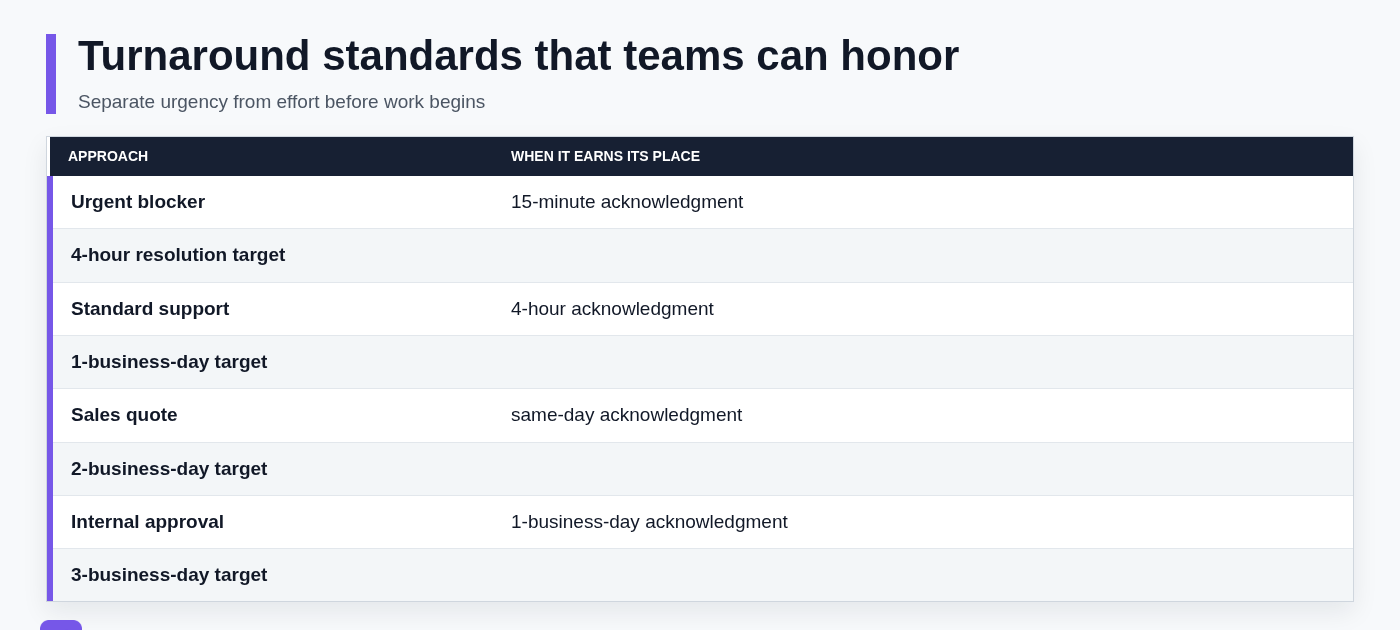
A small matrix gives the team a default decision before the queue gets busy. Include an acknowledgment target, completion target, accountable owner, and escalation rule for each request type.
| Request type | Acknowledgment target | Completion target | Ownership rule |
|---|---|---|---|
| Urgent customer blocker | 15 minutes | 4 hours | Named support owner; escalate to technical lead if blocked |
| Standard support question | 4 hours | 1 business day | Assigned queue owner resolves or routes with notes |
| Sales quote request | Same business day | 2 business days | Account executive owns; pricing approval has a backup approver |
| Internal approval | 1 business day | 3 business days | Requesting team names decision-maker and escalation path |
A deadline without ownership is only a wish. For a sales quote, assign the account executive at intake, route pricing or legal questions to a named approver, and tell the prospect when to expect the next update. Make it clear who acts first, when the work escalates, and who can make a decision when the usual owner is unavailable.
Map the work from request to completion
Most turnaround problems are not caused by slow typing. They come from work sitting between steps: an unclear intake form, a request waiting for assignment, a missing approval, or a teammate who does not know the next action.
Map the actual path for one common request. Start at intake, then trace triage, assignment, information gathering, approvals, delivery, and confirmation. Use real examples from the previous week rather than an idealized workflow.
Look specifically for duplicate questions, manual routing, status-chasing, approval waits, and requests that arrive without enough information to begin. The goal is to optimize the full request-to-resolution path, not merely make the first reply faster.
Measure the right timestamps
Track the received time, first human response, assigned time, first meaningful action, resolved time, and reopened time. These timestamps reveal whether delays happen at intake, during ownership changes, or after a supposedly completed answer.
Use median turnaround time to understand the typical experience, then review percentile performance to find the slow tail. An average can look healthy while a meaningful group of high-impact requests waits far too long.
Triage requests so urgent work moves without disrupting everything else
Triage should be quick, consistent, and based on impact. For every new request, check customer impact, deadline, revenue or retention risk, number of dependencies, likely effort, and whether the requester is blocked from moving forward.
Use a small number of priority levels, such as urgent, standard, and planned. Urgent work should have a specific rule: immediate ownership, a short acknowledgment target, and an escalation path. Standard work stays in the normal queue, while planned work is scheduled rather than repeatedly interrupted.
Common mistake: labeling every request urgent. When every ticket jumps the line, people multitask, important work gets buried, and actual emergencies take longer. Protect urgent status for genuinely time-sensitive or high-impact work.

Reduce repeat work with approved response and document templates
Repeated drafting is one of the easiest sources of avoidable delay. Reusable replies, proposal sections, follow-up emails, troubleshooting steps, and signature blocks let people start from approved language instead of writing the same material from scratch.
Templates need governance to be useful. Assign an owner, add a review date, identify approved claims, use placeholders for information that changes, and state when the template must be customized. A fast but outdated answer can create more work than it saves.
Mobile quick replies are a useful example: short, pre-approved acknowledgments can confirm receipt during live support when a full response will take longer. They do not replace a complete workflow that requires investigation, ownership, and follow-up.
Build templates around the moments that cause delay
Start with high-volume moments that repeatedly slow the queue: acknowledgments, missing-information requests, handoffs, status updates, quote follow-ups, and resolution confirmations. Measure which messages are drafted most often, then standardize those first.
A reliable template pattern is simple: acknowledge the request, state the next action and timing, ask only for essential missing details, and name the owner when appropriate.
For example: "Thanks for reaching out about [issue]. I am reviewing [specific item] now and will update you by [time and date]. To complete this, please send [only required detail]. [Owner name] is handling your request."
SnipFlux
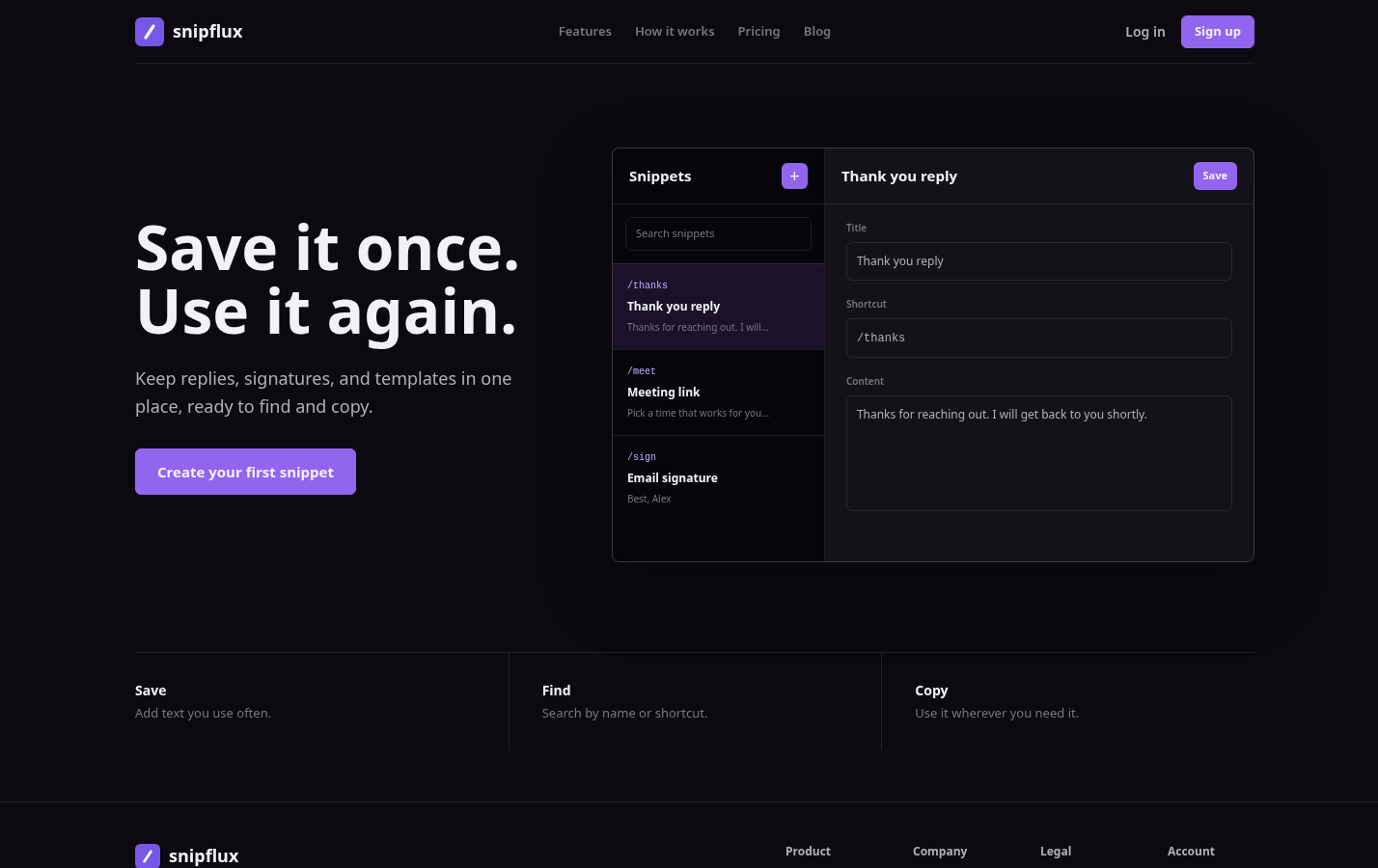
SnipFlux is best for teams and individuals who repeatedly send similar replies, signatures, and message templates and need one central place to find them. Support agents can store approved acknowledgment and status messages, while sales teams can keep follow-up language and meeting-link replies ready to copy when needed.
Its practical value is reducing both drafting time and lookup time. Instead of searching old email threads for a reliable answer, a teammate can retrieve a labeled snippet and tailor the placeholders to the current request.
The limitation is that a template library does not replace ticket routing, approval workflows, or customer context. Choose it when repeat communication is the bottleneck; pair it with clear ownership and queue management for work that requires investigation or collaboration.
Make ownership and handoffs visible in a remote team
Every open request needs one accountable owner, even when several specialists contribute. Shared responsibility often becomes no responsibility, especially across time zones and asynchronous schedules.
Standardize handoff notes so the receiving person can act without reopening the whole conversation. Include the requester or customer context, work already completed, next action, deadline, blockers, and promised update time.
Use shared queues and asynchronous status updates instead of waiting for a meeting or chasing someone through private messages. A visible record lets teammates pick up work responsibly when schedules do not overlap.
Prevent the common handoff failures
Watch for dropped context, unclear decision rights, invisible workloads, and requests passed between teams without telling the requester. These failures make the team appear slow even when individuals are working hard.
Require a handoff confirmation: the new owner acknowledges receipt, records the next action, and confirms the next update time. If resolution will exceed the original target, tell the requester before the target passes and provide the revised estimate.
Automate routing and reminders, but keep judgment where it matters
Automate predictable administrative work: intake acknowledgments, tags, assignment rules, service-level timers, reminders, and escalation alerts. These controls remove waiting and reduce the chance that routine requests disappear in a busy queue.
Keep people responsible for ambiguous requests, exception handling, empathetic customer communication, pricing decisions, and any situation where a rigid rule could damage trust. Automation should advance the work, not generate an instant but empty response.
A good test is straightforward: if the automation cannot tell the requester what will happen next, who owns it, or when they will hear back, it probably has not improved turnaround in a meaningful way.
Communicate a quick response without making promises you cannot keep
A quick response is valuable, but it is not the same as a quick turnaround. Acknowledge promptly, then state a realistic completion estimate and the next update time. This gives the requester certainty without forcing the team into an unrealistic promise.
For a delayed resolution, write: "We have identified the issue and need additional time to verify the fix. I will send an update by 3:00 p.m. tomorrow." For an expedited request: "We can deliver this on an expedited timeline and expect to send the revised quote by the end of the next business day."
"Thank you for the quick turnaround" is appropriate when someone has completed or returned work promptly. If they only responded quickly, "Thanks for the prompt response" is more accurate. For formal communication, "Our expected turnaround time is two business days" is clearer than promising something will be done "as soon as possible."
Review turnaround performance and improve the bottleneck
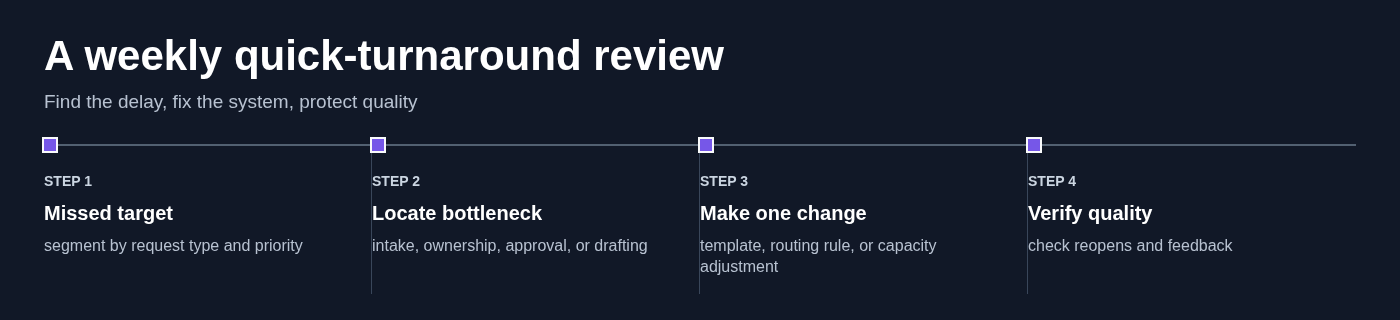
Run a weekly review of actual first-response and completion times against your targets. Segment the results by request type, channel, team, and priority so a single blended number does not hide the source of delays.
When a target is missed, investigate the system before blaming an individual. Common causes include missing intake information, approval latency, unclear ownership, capacity gaps, and weak template coverage. Fix one bottleneck at a time, then see whether the metric changes.
Speed only matters if the outcome is correct. Review customer feedback, reopen rates, repeat contacts, and avoidable escalations alongside turnaround time. A shorter resolution time that creates more follow-up work is not an improvement.
Build a faster, more reliable turnaround habit
Reliable quick turnaround means setting realistic standards, assigning ownership, removing bottlenecks, and protecting quality so people know what will happen next.
Teams that repeatedly draft the same messages can centralize approved replies, signatures, and templates in SnipFlux, making routine communication faster to retrieve, tailor, and send.