A role-based email signature is a professional signature adapted to what the sender actually does: their job title, audience, responsibilities, and the next step a recipient is likely to take. The company identity should stay consistent, but a CEO, support agent, recruiter, and account executive should not all send the exact same block of contact information.
The best signatures are short, easy to scan on a phone, and useful without becoming miniature advertisements. Here is how to build them, with copy-ready examples for common professional roles.
What is a role-based email signature?
A role-based email signature follows company brand standards while emphasizing the information that matters for a specific job function. It gives recipients a clear way to understand who they are speaking with and what to do next.
That does not mean every employee needs a custom-designed signature. In most teams, the core is identical: name, official title, company, direct contact information, and website. The role-based part is a small, intentional adjustment, such as a booking link for sales, a help center for support, or a careers page for recruiting.
Think of it as changing the emphasis, not reinventing the design. A customer support specialist should make help routes easy to find. An executive should communicate credibility without clutter. A recruiter should make it simple for candidates to verify the company and schedule a conversation.
What every professional email signature should include
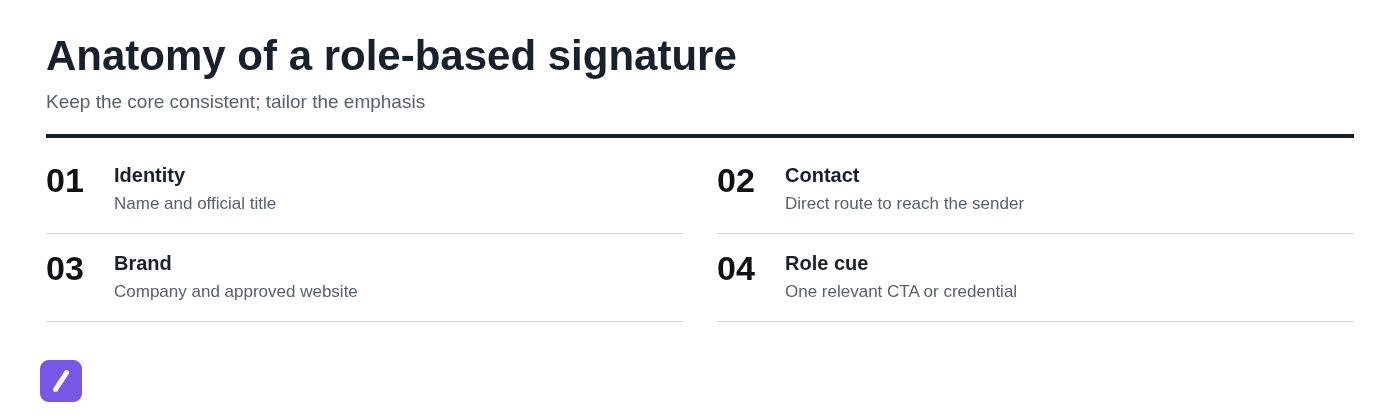
Every professional email signature needs a dependable baseline before role-specific details are added. At a minimum, include the sender's full name, official job title, company name, a direct contact method, and the company website.
- Full name: Use the name the employee uses professionally and consistently.
- Official job title: Put it directly below the name, using a title people outside the company will recognize.
- Company: Include the legal or customer-facing company name according to brand guidelines.
- Direct contact route: Usually an email address, phone number, or both, depending on the role.
- Website: Use the approved company site or a relevant approved page.
- Required legal details: Add regulatory, privacy, regional, or confidentiality language only when your organization requires it.
To put a job title in an email signature, place the official title immediately beneath the sender's name. Avoid inflated labels, internal abbreviations, or vague descriptions such as "Growth Ninja." A recipient should understand the person's authority and function at a glance.
Modern signature best practices are straightforward: make it readable on mobile, use accessible color contrast, keep links restrained, and test how it renders in the email clients your team uses. A signature that looks polished in a desktop composer but turns into a blurry image or six-line wall of text on a phone is not doing its job.
Role-based email signature examples for professional teams
These illustrative examples use fictional names, contact details, company information, links, campaigns, and dates. They use plain text because it is reliable, accessible, and easy to adapt. Keep the company name, typography, logo policy, and any compliance language consistent across roles; change only the details that help the recipient take the right next step.
1. CEO or executive email signature
A CEO email signature should be concise, credible, and selective about contact paths. It does not need promotional banners, a row of social icons, or a long company description.
Example:
Jordan Lee
Chief Executive Officer
Northstar Software
jordan.lee@northstarsoftware.com | +1 212 555 0148
www.northstarsoftware.com | Company news
An executive may include a company news, investor, or newsroom link when it helps the people they regularly email. Otherwise, a clean company website is enough. The signature should support trust, not compete with the message itself.
2. Sales representative or account executive email signature
A sales signature should lower the friction of starting a conversation or booking time. Include a direct phone number and a booking link when meetings are a normal part of the sales process.
Example:
Priya Shah
Account Executive, Mid-Market
Northstar Software
priya.shah@northstarsoftware.com | +1 415 555 0187
www.northstarsoftware.com
Book a 20-minute introduction
A territory, vertical, or account segment is useful only if it helps the recipient understand who owns their account. The meeting link should be subtle and singular. An oversized "Book now" banner, three product links, and five social badges make a sales email feel automated before the prospect has read it. For the message itself, a reusable proposal follow-up email template can help keep recurring outreach consistent.
3. Customer support or customer success email signature
Support and customer success signatures should reflect different kinds of help. Support needs to direct customers toward the fastest resolution path, while customer success often benefits from an account review or planning link.
Customer support example:
Mateo Rivera
Customer Support Specialist
Northstar Software
support@northstarsoftware.com | +1 800 555 0124
Help Center | Submit a support request
Customer success example:
Elena Wong
Customer Success Manager
Northstar Software
elena.wong@northstarsoftware.com | +1 646 555 0192
www.northstarsoftware.com
Schedule an account review
A support agent should not send customers to a scheduling page when the immediate need is troubleshooting. Conversely, a success manager working on onboarding, adoption, or renewal planning can make a meeting route useful. If escalations have a named owner or established path, include it only where that information is appropriate for the recipient.
4. Marketing or communications email signature
A marketing or communications signature can include one approved campaign, event, or resource link when it fits the sender's active conversations. The key word is one.
Example:
Amara Bennett
Director of Communications
Northstar Software
amara.bennett@northstarsoftware.com | +1 312 555 0163
www.northstarsoftware.com
Read the 2026 industry report
Campaign links need an owner and an expiration date. When an event ends or a report is replaced, update the signature promptly. Avoid treating every email as a distribution channel for several campaigns at once; that weakens the message and creates maintenance problems.
5. Recruiter or HR email signature
A candidate-facing signature should be welcoming, easy to verify, and direct about the recruiting process. A careers page and optional scheduling link are usually more useful than promotional content.
Example:
Danielle Brooks
Senior Talent Partner
Northstar Software
danielle.brooks@northstarsoftware.com | +1 206 555 0175
Careers at Northstar Software
Schedule a candidate conversation
Job seekers often want to confirm that a recruiter is legitimate before sharing personal information or attending an interview. A clear company identity and careers-page link help establish that trust. For HR roles that handle confidential employee matters, keep the signature especially simple and avoid public scheduling links unless they are genuinely appropriate.
6. Acting manager or interim leader email signature
An acting manager email signature should state the temporary responsibility plainly. Recipients need clarity about who has ownership, coverage, and approval authority during a transition.
Example:
Omar Hassan
Acting Customer Support Manager
Northstar Software
omar.hassan@northstarsoftware.com | +1 617 555 0119
www.northstarsoftware.com
Acting through June 30, 2026
An end date is useful when the assignment is genuinely temporary and external contacts need to know when coverage may change. If another person handles specific approvals or escalations, a short delegation note can be more helpful than leaving recipients to guess.

How to tailor a signature without breaking brand consistency
The practical approach is to lock the required fields, define approved optional fields by role, and give each role one primary action. That structure gives employees enough flexibility to be useful without inviting one-off edits that make the organization look fragmented.
- Lock the core: Name format, official title, company name, website, visual style, and required legal language.
- Set role options: For example, sales can use a booking link; support can use a help center; recruiting can use a careers link.
- Choose one primary action: Do not ask a recipient to book, download, follow, register, and call all at once.
- Use approved assets: Set rules for logos, banners, fonts, colors, and image dimensions.
- Assign ownership: Someone should own campaign links, title changes, and policy updates.
Document templates by employee group rather than relying on individuals to copy an old signature from a colleague. Test each template on mobile and in the email services your customers commonly use. Also consider accessibility: text should remain readable without images, links should be descriptive, and colors should not be the only way information is conveyed. For Gmail users, these Gmail email signature setup and reuse instructions cover the practical configuration steps.
What should not be done in an email signature
An email signature is not a resume, an ad unit, or a substitute for the email's message. If it is longer than the message above it, it is almost certainly too much.
- Do not use oversized images that load slowly or disappear when image blocking is enabled.
- Do not add long inspirational quotes, personal mottos, or unrelated personal details.
- Do not include a crowded row of social icons just because accounts exist.
- Do not stack multiple competing calls to action.
- Do not shrink required legal text until it is practically unreadable.
- Do not leave outdated titles, expired event links, former phone numbers, or old campaign banners in place.
- Do not use unclear internal job titles that confuse customers, candidates, or partners.
Scanability and trust matter more than decoration. A recipient should be able to identify the sender, company, and appropriate contact route in a few seconds.
How to create and maintain role-based signatures efficiently
The simplest workflow is to map roles to audiences, create approved templates, assign each template a clear shortcut name, and review the library quarterly. Update immediately when someone changes title, a policy changes, or a time-sensitive campaign ends.
For example, a team might maintain separate templates for sales, support, customer success, recruiting, executives, and interim managers. Naming them consistently, such as /sig-sales, /sig-support, and /sig-recruiting, reduces the chance that someone inserts the wrong block into an email.
A text expander and snippet manager helps because the team does not need to rebuild a signature in every message or hunt through old sent mail for the latest version. Approved text can be inserted from shortcuts and maintained in a shared, organized library across supported writing fields.
SnipFlux

SnipFlux is suited to teams that want to save approved signature templates as reusable snippets and expand them with memorable shortcuts. A sales representative, recruiter, or support specialist can use a role-specific shortcut to insert the right signature while writing in supported fields across Chrome, macOS, and Windows.
Its strength is fast, consistent reuse of text that changes occasionally but is typed often. Organizations needing centralized, server-side signature enforcement may need a dedicated signature management system instead.
Choose the role cue that helps the recipient act
A strong corporate email signature keeps identity consistent and changes only the details that make the sender's role clearer or the next step easier. The CEO needs credibility, the account executive needs a simple booking path, the support agent needs an efficient help route, and the recruiter needs a trustworthy candidate experience.
Start with a shared baseline, limit each role to one useful cue, and maintain templates before outdated information spreads through everyday correspondence. Teams that need to reuse and update approved signature templates can organize them as snippets in SnipFlux.