A policy update notification email should tell recipients exactly what changed, who is affected, when the change takes effect, and whether they need to do anything. If those answers are buried in legal language or a generic "we've updated our policies" message, the notice will create confusion rather than provide useful notice.
The email does not need to reproduce an entire policy. Its job is to give people a clear, accurate action guide and direct them to the complete, authoritative policy text.
What a policy update notification email should include
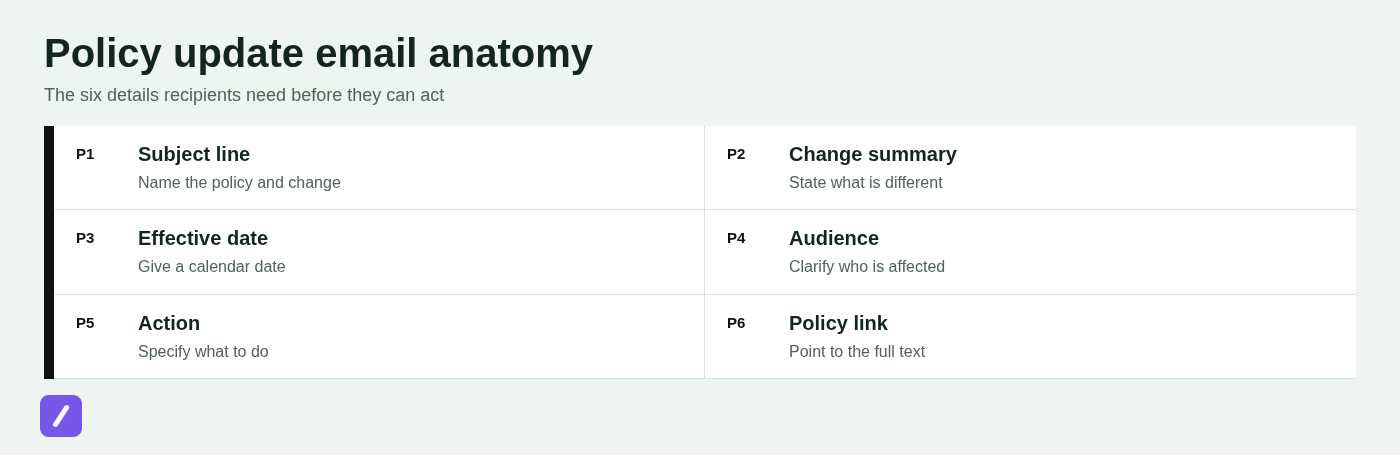
Every policy update notice needs six core details: the policy being changed, a plain-language summary of the change, the affected audience, the effective date, any required action, and a direct link to the updated policy. It should also provide a contact route for questions.
- What changed: Name the policy and summarize the important revision.
- Who is affected: Clarify whether the notice applies to all customers, employees, account holders, vendors, or a narrower group.
- When it takes effect: Use a specific calendar date, not "soon" or "next month."
- What recipients must do: State whether they need to review, accept, acknowledge, submit something, or simply be aware of the change.
- Where to read more: Link directly to the updated policy, relevant sections, or an acknowledgment form.
Think of the message as a notice and navigation tool. The full policy remains the controlling document; the email makes it easier for people to understand what deserves their attention before they open it.
Start with the change and effective date
Lead with the actual change and the date it begins. A vague opening such as "We've updated our policies" forces recipients to hunt for information and can make even a minor change sound suspicious.
Your subject line should identify the policy and communicate the level of urgency without sounding alarming. For example:
- Minor update: "Update to our Acceptable Use Policy, effective June 1"
- Material customer change: "Important update to your account terms, effective July 15"
- Required employee action: "Action required: acknowledge updated Information Security Policy by May 10"
The first sentence should answer the reader's immediate question: what happened? For a small operational revision, try: "We have updated our Expense Reimbursement Policy to clarify receipt requirements for travel expenses submitted on or after August 1, 2026."
For a more material change, be more explicit: "Effective September 30, 2026, we are updating our Terms of Service to revise the payment dispute process and add terms for the new account-sharing feature." If the notice is required by law, contract, or a regulatory framework, say so only when that statement is accurate: "We are updating our Privacy Policy to reflect changes to our data processing practices and applicable privacy requirements."
Explain who is affected and why the policy changed
Recipients should not have to guess whether an update applies to them. Define the audience in the email itself, especially when the organization has multiple customer plans, locations, departments, employment types, or regional requirements.
For example, say "This update applies to customers on Business and Enterprise plans" rather than "This update may affect your account." An internal notice might say, "This policy applies to US-based employees who submit reimbursable business expenses," or "This change applies to all contractors with access to production systems."
A brief explanation of why the policy changed can reduce resistance and support questions. Useful reasons include a new regulatory requirement, a security control improvement, a revised workflow, or the launch of a new service. Keep the explanation factual and concise. For related internal communications, see this internal process change announcement template.
Do not turn the notification into a record of internal debate. Avoid unsupported claims such as "this change gives you better protection" unless you can substantiate that statement. A simple explanation is usually stronger: "We revised this policy to align the approval process with our new travel booking system."

Make required actions and deadlines unmistakable
Not every policy update requires a response. Say so plainly when no action is required, and be equally direct when recipients must review, acknowledge, accept, submit documentation, or change how they complete a task.
For action-required notices, add a short standalone action block. It should contain the deadline, the exact next step, and the consequence of not completing it when that consequence is relevant and appropriate.
For example:
Action required by May 10, 2026: Review the updated Information Security Policy and submit your acknowledgment using the employee portal. Employees who do not complete the acknowledgment by the deadline may have access to certain systems temporarily restricted until the requirement is completed.
Use one primary call to action. If the recipient needs to acknowledge the update, link to the acknowledgment workflow rather than making them search through a policy repository. If the notice is informational, the primary link should lead to the updated policy itself.
Link to the full policy and the exact sections that changed
A generic link to a legal or resources page creates unnecessary friction. Recipients should land on the updated document, not on a page where they must search through dozens of policies to find it.
Link directly to the policy and identify the sections that changed when practical. Include a revision date or version number so people can confirm they are reading the current document. For example: "Read the updated Vendor Security Policy, version 3.2, effective October 1, 2026. Changes are in Sections 4, 6, and 8."
When people may need to compare terms, provide a change summary or retain access to the prior version. This is particularly helpful for contractual terms, privacy notices, employee handbooks, and policies that affect eligibility, payment, access, or obligations.
Do not assume a tracked-changes document is sufficient for every audience. Legal redlines can be useful for sophisticated stakeholders, but most recipients also need a short explanation in ordinary language.
Policy update notification email template
Use this template as a starting point, then adjust the level of detail to the significance of the change and the needs of the audience.
Subject: [Important update to / Update to] [Policy Name], effective [Effective Date]
Hello [Audience or Name],
We are writing to let you know that we have updated our [Policy Name]. The updated policy takes effect on [Effective Date].
What is changing:
[Brief, plain-language summary of the key change or changes. Identify the relevant process, right, responsibility, feature, or requirement.]
Who this affects:
[State the affected customer group, employees, account holders, vendors, region, department, plan, or other audience.]
Why we are making this update:
[Optional concise explanation, such as a regulatory update, security improvement, new process, or product change.]
[Choose one action statement:]
No action is required. Please review the updated policy for your records.
or
Please review the updated policy and [accept / acknowledge / complete the required step] by [Deadline].
You can read the full policy here: [Direct link to updated policy]
[Optional: A summary of the changes or the prior version is available here: Link]
If you have questions, contact [Support Team, HR Contact, Manager, Legal Contact] at [Contact Method].
Thank you,
[Sender Name or Organization]
Example: customer terms or privacy policy update email
External policy notices should be calm, specific, and easy to verify. Customers need enough context to understand the practical impact, but the email should direct them to the full terms or privacy policy for authoritative detail.
Subject: Update to our Privacy Policy, effective November 1, 2026
Hello,
We are updating our Privacy Policy, effective November 1, 2026.
The update explains how we process information associated with our new account analytics feature, clarifies our data retention periods, and updates our contact details for privacy requests. This policy applies to all users of [Company or Service Name].
No action is required. We encourage you to review the updated policy here: [Privacy Policy Link]. A summary of the changes is available at [Change Summary Link].
If you have questions about this update or how we handle personal information, contact us at [Privacy Contact Method].
Thank you,
[Company Name]
For contractual, privacy, regulated, or jurisdiction-specific changes, have legal or compliance reviewers approve both the policy and the notice. A clear email improves communication, but it does not replace the notice language, consent process, or timing requirements that may apply to your organization.
Example: employee policy change email
Internal notices should connect the policy change to the employee's daily work. Employees need to know where the official policy lives, what procedure has changed, and whom to contact if a manager cannot answer a question.
Subject: Action required: updated Remote Work Policy effective June 15
Hello team,
We have updated the Remote Work Policy, effective June 15, 2026. The revised policy applies to all employees approved for regular remote or hybrid work arrangements.
The main changes are: employees must submit remote work schedules through [System Name], managers must approve changes to regular work locations in advance, and the policy now includes updated guidance for working outside your home state or country.
Please review the updated policy in the employee handbook: [Direct Policy Link]. You must acknowledge the policy in [Employee Portal] by June 10, 2026.
Questions about eligibility or scheduling should be directed to your manager. For policy interpretation or acknowledgment help, contact HR at [Contact Method].
Thank you,
[HR or Leadership Team]
Make sure the email matches the official employee handbook or policy repository exactly. If the notice and the handbook conflict, employees will understandably rely on the version that is easiest to find.
Choose the right timing and delivery method
Send policy notices early enough for recipients to understand and respond before the effective date. The right lead time depends on the significance of the change, any contractual or legal notice period, and whether people must complete an action.
Email alone is often sufficient for a minor informational update with no required response. More consequential changes may need an additional channel: an in-product message for active customers, a portal announcement for employees, manager briefings, training, or a formal acknowledgment workflow.
For example, a revised formatting rule in a vendor onboarding guide may only need a targeted email. A security policy that changes employee behavior may require an email, a handbook update, manager talking points, and acknowledgment tracking.
Send a reminder when action is required or when the first notice is likely to be missed. For wording ideas, see these polite reminder email templates. Do not send repetitive reminders for a no-action-required update; that creates inbox fatigue and makes future required notices easier to ignore.
Avoid the mistakes that make policy notices unclear
Most ineffective policy update emails fail because they make the reader work too hard. The following mistakes are common and avoidable:
- Vague subject lines: "Important information" tells recipients nothing. Name the policy and include the effective date or action requirement.
- Hidden effective dates: Do not bury the date in a long paragraph or only inside the linked document.
- Legal text without a summary: Provide a plain-language explanation, even when the policy itself must use formal language.
- Unclear calls to action: Say exactly what recipients need to do, where to do it, and by when.
- Indirect links: Link to the policy, policy section, or acknowledgment form rather than a general homepage or resource center.
- Incorrect audience targeting: A regional or plan-specific change should not be sent as though it applies to everyone.
Do not imply that a recipient has consented simply because you sent an email. Whether consent, acceptance, or acknowledgment is valid depends on the policy, relationship, and applicable requirements. Likewise, an email template is a communication tool, not legal advice.
Before sending, check the policy name, effective date, audience list, links, sender identity, accessibility of linked documents, and required action language. A final review by the policy owner is usually more valuable than another round of stylistic editing.
Send a notice people can understand and act on
A good policy update notification email makes four things immediately clear: what changed, whether it affects the recipient, when it begins, and what to do next. Everything else should support those answers.
Teams that send recurring policy, support, or operational messages can save approved notice language as reusable snippets in SnipFlux, making it easier to reuse consistent wording while updating the details that change for each notice.