
A snippet library can look impressively organized and still fail at the only job that matters: helping people finish repeated work faster and more consistently. Hundreds of saved replies do not prove adoption. They may simply hide duplicates, outdated wording, and shortcuts nobody remembers.
To measure snippet library usage well, look beyond raw expansion counts. The useful question is whether the right people are using accurate templates in the workflows where those templates save time and prevent avoidable rewriting. A text snippet manager can help centralize the shortcuts and reusable text you want to evaluate.
Define what "usage" should tell your team
Start by separating availability from adoption. A template is available when it exists in the library; it is adopted when intended users can find it, remember its shortcut, and actually use it in relevant work.
Your measurement should answer four practical questions:
- Which templates solve meaningful repeat work?
- Which snippets are unused, outdated, duplicated, or hard to find?
- Where can the team reduce rewriting without sacrificing quality?
- Are shared responses helping people communicate consistently?
Measure at both the library level and the team-member level. Library-level reporting reveals which categories and templates are healthy. Team-level reporting can reveal adoption gaps by role or workflow. It should not become a simplistic employee-performance score. A support specialist handling unusual escalations may have fewer expansion opportunities than a colleague answering routine requests.
The goal is to improve the system around the work: templates, shortcuts, training, ownership, and review habits.
Start with a clean inventory of your snippet library
Usage numbers mean little until you know what is actually in the library. Create an inventory of every shared snippet before calculating adoption or time saved. Include personal collections if you want a full picture, but keep them separate from approved team content.
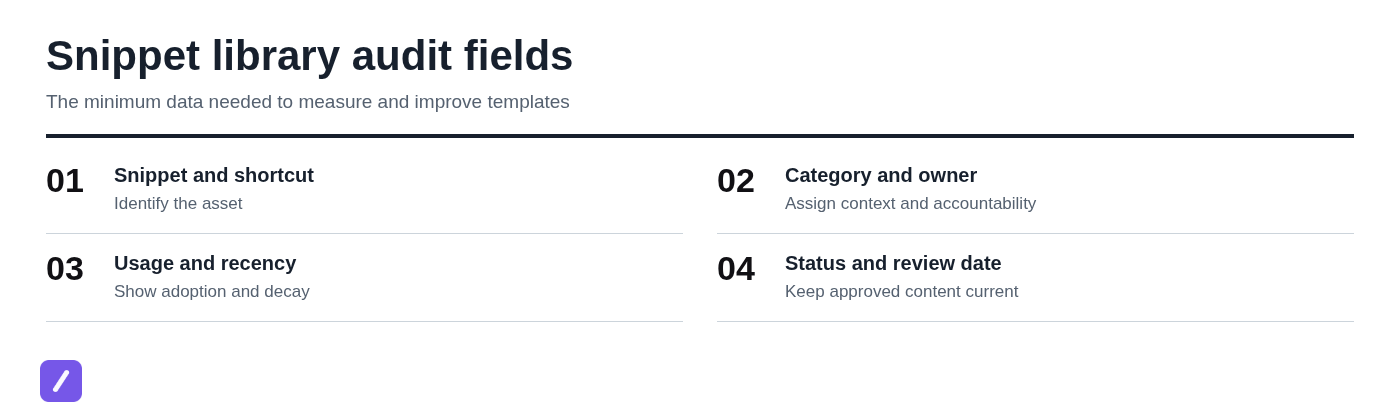
For each snippet, record its name, shortcut, folder or category, owner, intended audience, use case, current status, and last review date. If your text expander provides usage reporting, add available activity data. If it does not, you can still build a reliable baseline with manual records and team input. If your existing material is scattered across copy paste templates, include those sources in the inventory before comparing usage.
This audit is also the fastest way to find common library problems: two nearly identical refund responses, folders abandoned after a team reorganization, shortcuts that give no clue about their purpose, and several conflicting versions of the same policy text.
Do not clean up aggressively on the first pass. Mark questionable items for review rather than deleting them immediately. A low-visibility snippet may support a rare but important workflow.
Use a simple snippet audit sheet
A spreadsheet is enough to begin. Give each snippet one row, then add columns that make ownership, usage, and maintenance visible.
- Snippet name: A plain-language title, such as "Refund approved - standard response."
- Shortcut: The exact command used to expand it.
- Category: Support, sales, recruiting, operations, or another useful grouping.
- Owner: The person responsible for keeping the content accurate.
- Approved status: Draft, approved, needs review, or retired.
- Creation and update dates: Helpful for spotting neglected content.
- Uses: Expansions during the selected measurement period.
- Notes: Known duplicates, required variables, policy dependencies, or feedback.
The source for these fields may be product reporting, existing team records, or a manual sampling process. Text expanders do not all expose the same analytics, so design the sheet around the evidence you can collect consistently rather than assuming every event is available.
Choose metrics that connect usage to useful outcomes
A small, repeatable scorecard is more valuable than an elaborate dashboard nobody reviews. Track metrics that point to a decision, not numbers that merely make the library look active.
- Total expansions: Shows overall use, but not necessarily value. Use it to spot broad trends and heavily repeated tasks.
- Active users: The number of intended users who expanded at least one relevant shared snippet in the period.
- Adoption rate: Shows whether shared templates are reaching the people who should use them.
- Usage per active user: Helps distinguish widespread routine use from activity concentrated in a few people.
- Estimated time saved: Converts repetitive typing avoided into a practical effort estimate.
- Stale-template rate: Shows how much approved content has missed its required review date.
Raw expansion count alone is a weak success measure. A two-word sign-off can be expanded hundreds of times while a detailed escalation reply, used 20 times, may prevent far more rework and risk.
Measure adoption, not just total expansions
Use a defined period and a defined audience:
Adoption rate = active snippet users / intended users x 100
If 18 of 24 support representatives use at least one approved shared support template in 30 days, adoption is 75%. That is more informative than knowing the library had 1,000 total expansions.
Segment this metric by role, team, workflow, or location. A renewal-email template should be assessed against account managers who handle renewals, not every employee in the company. Otherwise, a healthy specialized template can look underused simply because the denominator is wrong.
Estimate time saved with transparent assumptions
Estimate saved time with a documented assumption, not false precision:
Time saved = expansions x estimated seconds avoided per expansion
For example, suppose a support team expands a saved response for a common delivery-delay question 240 times in a month. If writing the response manually takes about 45 seconds longer than using and lightly personalizing the template, the estimate is 10,800 seconds, or 3 hours saved.
Time a representative manual version of the task. Include the typical edits people still need to make after expansion. A 250-word response might take two minutes to draft from scratch, but only 30 seconds may truly be avoided if agents must add account-specific details.
Email signatures can also produce measurable savings, though their individual value is usually lower. A signature used 500 times may save only a few seconds each time. That can still matter, but it should not crowd out higher-impact support, sales, or operational templates.
Track freshness and maintenance risk
A stale snippet is not merely an old snippet. It is content that has not been reviewed within your team-set interval or may no longer reflect pricing, policies, brand language, links, product processes, or compliance requirements.
Set a review cadence by risk. A standard internal meeting link may need a quarterly check. A customer-facing billing or refund reply may need review whenever policy changes, plus a scheduled review every 30 to 90 days.
Separate low usage caused by a rare workflow from low usage caused by obsolete content. A disaster-recovery message should not be deleted because it was not used last month. It should be reviewed for accuracy and clearly labeled for the moment when it is needed.
Set a measurement window and a baseline
Use a 30-day window as the default for frequent workflows such as customer support, outbound sales follow-ups, and internal operations. For lower-volume or seasonal work, review a 60- or 90-day period so one quiet week does not distort the result.
Capture baseline values before you add new templates, rename shortcuts, consolidate folders, or train the team. Record active users, total expansions, top templates, zero-use templates, estimated time saved, and stale items. Without a baseline, you will not know whether a change improved adoption or simply coincided with higher workflow volume.
Compare equivalent periods whenever possible. A customer support team should not compare a normal month with a holiday sales month without accounting for ticket volume. Likewise, compare similar groups: a newly hired cohort may need onboarding support, while experienced staff may already rely on established shortcuts.
Collect usage data from your text expander and workflow signals
Use built-in activity or usage reporting when your text expander provides it. Capture the reporting period, the templates included, the user group, and the definitions used so your monthly figures remain comparable.
If event-level reporting is unavailable, use practical fallback evidence. Map each shortcut to a template, review a small sample of completed work, ask intended users which templates they used that week, or maintain a lightweight manual log for a limited measurement period. You do not need perfect data to identify obvious problems such as a shared library with many approved templates but almost no awareness.
Be transparent about what is being collected and why. Report aggregate adoption and template health where possible. Usage measurement should improve the library, not create unnecessary surveillance around ordinary work.
Separate individual templates from shared templates
Personal snippets and shared templates serve different purposes. An individual's preferred meeting-note block, address, or email sign-off may save time without needing team-wide adoption. It should not be judged by the same criteria as a customer-facing cancellation response.
Report shared-library adoption and template health separately. For approved team content, focus on accuracy, discoverability, consistency, and use among intended users. For personal collections, focus on whether the individual finds the library organized and useful.
Check the context behind surprising numbers
Investigate spikes and drops before reacting. A sharp increase in a policy reply may reflect a real surge in related tickets. A drop may mean workflow volume declined, new staff joined, a shortcut conflicts with normal typing, the template was renamed, or it was moved into a folder people no longer browse.
Low use is a reason to ask questions, not automatic evidence that a snippet should be deleted. Check whether the underlying task still occurs and whether users know the template exists.
Build a monthly snippet usage scorecard
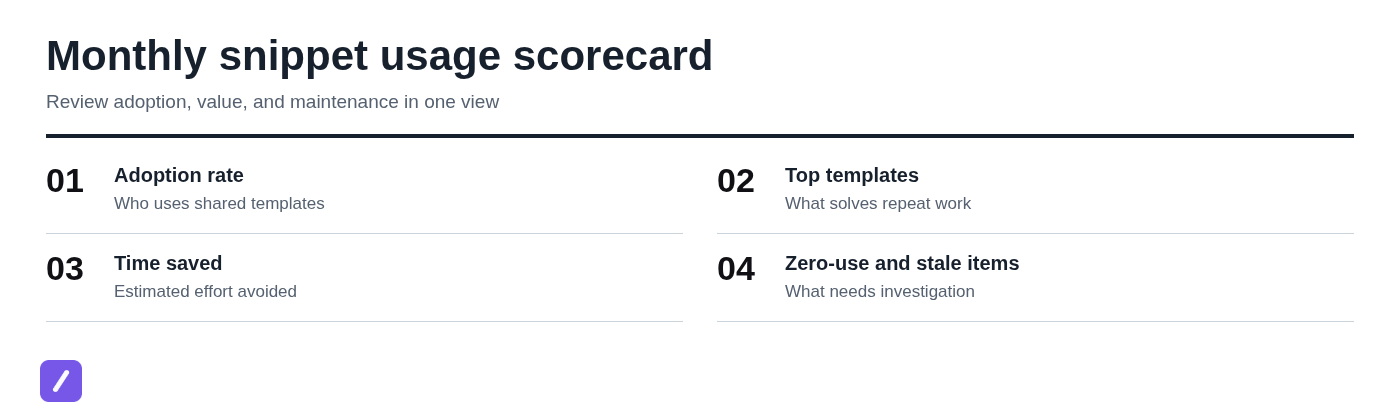
Create a one-page scorecard that a manager and library owner can scan in a few minutes. The report should make it easy to see what is working, what needs investigation, and what changed since the last review.
- Active users and adoption rate: Who is using approved shared templates?
- Total expansions: How much repeated work moved through the library?
- Top templates: Which snippets are repeatedly useful?
- Zero-use templates: Which items need context or discovery checks?
- Estimated time saved: What effort was likely avoided?
- Stale items: Which templates have missed review dates?
- Actions taken: What was revised, consolidated, trained, approved, or retired?
Keep the definitions stable each month. If you redefine an active user or change the list of intended users, note the change so the trend is not misleading.
Interpret the patterns before changing templates
Usage becomes useful when it leads to better decisions. Review template performance through both frequency and quality evidence, including manager review, customer feedback, compliance checks, corrections made after expansion, and recurring edits users make to the text.
- High use, high quality: Keep the template, assign an owner, and consider standardizing it for the wider team.
- High use, low quality: Fix it quickly. A popular template that produces errors, awkward tone, or repetitive edits spreads poor communication faster.
- Low use, high potential: Improve discoverability, naming, shortcut recall, onboarding, or workflow fit.
- Low use, low relevance: Confirm that the workflow has changed, then retire or archive the item.
A template can be popular and still harmful. If agents expand a reply but rewrite half of it, repeatedly correct an old link, or receive customer complaints about its wording, high expansion counts are not a success signal.
When high-use snippets deserve standardization
Promote a proven snippet into an approved shared template when it is accurate, consistently useful, and appropriate for broader reuse. Give it a clear name, a defined owner, and a review date.
Preserve the workflow context. A strong template should tell users when to use it, when not to use it, and what variables they must customize. For example, a refund response may require placeholders for the customer's name, order number, refund amount, and expected processing date.
When low-use snippets need investigation instead of deletion
Low use can have valid explanations: the task is infrequent but important, users cannot find the template, the shortcut is unclear, duplicate options create hesitation, onboarding never covered it, or the workflow changed.
Ask intended users one focused question before retiring the item: "When this situation comes up, what do you use instead?" Their answer often reveals whether the problem is relevance, discoverability, content quality, or an unapproved workaround.
Optimize shortcuts and template content for repeat use
Use your findings to make targeted changes rather than redesigning the entire library at once. Improve shortcuts people cannot recall, remove duplicate choices, group related content, add variables where personalization is required, and revise outdated copy.
For high-impact workflows, change one major variable at a time. If you rewrite the copy, rename the shortcut, move the folder, and retrain the team all in the same week, the next measurement cycle will not tell you what actually improved adoption.
Review template text for accuracy, scannability, tone, current links, and policy language. A reusable reply should save drafting time without reading like a canned block pasted into every conversation. For support and sales teams building reusable answers, paragraph snippets can provide a useful format for longer responses.
Design shortcuts people can recall under pressure
Use a consistent shortcut pattern by function. A support team might use /sup-refund, /sup-delay, and /sup-track; sales might use /sales-followup and /sales-demo. The exact prefix matters less than consistency.
Keep commands short but distinct. Avoid shortcuts that resemble common words, ordinary punctuation, or application keyboard commands. Also avoid a collection of cryptic codes that require people to consult a reference sheet during a live customer interaction.
A common mistake is giving two near-identical templates nearly identical shortcuts, such as /refund and /refund2. Use names that explain the decision: /sup-refund-approved and /sup-refund-review. A good template that cannot be recalled will appear underused.
Use variables without making templates fragile
Placeholders make templates faster without making them impersonal. Use them for details that should never be guessed, such as customer names, order numbers, dates, tracking links, meeting times, or the next action.
Keep the surrounding wording complete and safe. For example, a support reply can include a clear explanation and leave only [Customer name], [Order number], and [Expected date] to customize.
Test important templates in their real destination before wide rollout. Check formatting in the support platform, CRM, email client, browser form, or internal tool where the text will be expanded. A template that looks correct in a snippet editor may break line spacing or links after insertion.
Assign owners and review dates to shared templates
Shared libraries need lightweight ownership, especially for customer-facing, policy-sensitive, or high-volume content. Assign one responsible person to each high-impact category rather than asking everyone to maintain everything.
Use clear statuses: draft for content still being tested, approved for current team-ready templates, needs review for content affected by a change or missed review date, and retired for templates no longer appropriate.
Ownership is not bureaucracy for its own sake. It gives your freshness metric meaning. If a billing policy changes, the owner knows which templates need updating; if a high-use response draws complaints, someone is accountable for revising and approving the fix.
Run a focused improvement cycle with your team
Turn the monthly scorecard into a short improvement loop. Review the data, choose one adoption issue and one content-quality issue, make the smallest useful changes, communicate them, and measure again in the next window.
A practical cycle looks like this:
- Review the latest scorecard with the library owner and relevant team lead.
- Choose one issue preventing use, such as unclear shortcuts or duplicate folders.
- Choose one quality issue, such as a frequently edited customer reply.
- Revise, consolidate, or retire the affected templates.
- Share a brief changelog with the team, including new shortcuts and replaced templates.
- Remeasure after the next 30-day period.
For example, a support team may find two competing refund replies used inconsistently. One is expanded often but contains outdated timing language; the other is accurate but difficult to find. The team consolidates them into one approved reply, assigns a memorable shortcut, trains agents on the new version, and compares adoption, follow-up edits, and review feedback after 30 days.
This approach keeps the work manageable. You do not need to perfect every snippet in a single audit to create measurable improvement.
Make snippet usage measurement a habit, not a cleanup project
A useful snippet library reflects real work, not just good intentions. Measure adoption, estimated time saved, content quality, and freshness together so you can see whether templates are being used in ways that actually help the team.
Use a monthly scorecard for routine decisions and a deeper quarterly audit for shared libraries. Over time, the result should be fewer duplicate choices, more reliable shortcuts, current approved content, and less time spent rewriting the same messages.
Teams using SnipFlux can organize reusable shortcuts and templates across Chrome, macOS, and Windows while building this review process into their regular workflow.