Repeated typing looks harmless until it becomes the background noise of your workday. A support reply takes two minutes instead of 20 seconds. A sales follow-up gets rewritten from scratch. Someone hunts through old documents for the current policy link and sends the wrong one anyway.
A good text snippet manager turns useful, repeated text into a searchable working library. The goal is not to make every message robotic. It is to stop recreating the reliable parts of your work so you can spend attention on the parts that need judgment.
What a text snippet manager is - and what it is not
A text snippet is a reusable block of text: a customer reply, email signature, meeting follow-up, instruction, link, template, command, or short piece of code. A text snippet manager is the place where you save those blocks, organize them, find them later, and reuse them quickly.
For many people, the essential workflow is simple: save a snippet with a clear title, search for it when needed, copy it, personalize it, and send or paste it into the right application. That alone removes a surprising amount of repetitive work.
Several nearby tool categories are easy to confuse:
- Snippet manager: Stores reusable text for searching, copying, sharing, or sometimes expanding.
- Text expander: Replaces a typed abbreviation with saved text. Typing a trigger such as ;refund might insert a full refund-policy response.
- Clipboard manager: Keeps a history of recently copied items. It is useful for temporary reuse, but it is not a curated library of approved content.
- Note app: Stores broader notes and documents. It can hold templates, but finding a precise response in a large notes system is often slower than using a dedicated snippet library.
- Code snippet manager: Organizes reusable code, often with syntax highlighting, language support, version control, repository connections, and developer workflows.
The right category depends on what you repeat and how you need to reuse it. A support team with approved responses usually needs fast search, shared organization, and reliable copying. A programmer maintaining production code may need a code-focused system with Git-based versioning instead.
Quick start: the simplest useful setup
Do not begin by trying to capture every sentence you have ever written. Start with 10 high-frequency responses or blocks of text that you use at least once a week.
- Create three to five broad folders, such as Support, Sales, Operations, Writing, and Personal.
- Name each snippet for the situation in which you will search for it, not for how elegant the wording sounds.
- Save the complete approved text, including the current link or instruction it depends on.
- Add placeholders where personalization is required, such as [Customer name], [Order number], or [Date].
- Review the library once a week at first, removing duplicates and improving snippets that needed heavy editing.
Manual copy-and-paste retrieval is enough for many users. Automatic expansion is optional, not a requirement. If searching, copying, and pasting is faster and safer in your daily tools, use that workflow rather than adding complexity for its own sake.
What is a textexpander?
A textexpander, in the general sense, is software that replaces a short typed abbreviation with a longer saved piece of text. For example, an abbreviation such as ;introcall could insert a complete introduction for a meeting follow-up.
TextExpander is also the name of a specific product. The lowercase phrase text expander, however, describes the broader feature category. Not every text snippet manager includes expansion, and not every expansion tool provides the organization, sharing, and review controls a team needs.
Why text snippets save time, improve quality, and reduce repetitive work
The obvious benefit is less typing. The more important benefit is that a well-maintained snippet library protects work that has already been thought through: the accurate explanation, the approved language, the tested troubleshooting sequence, and the correct link.
That value compounds. Saving 90 seconds on one reply is modest. Saving it across dozens of similar conversations each week, while also reducing omissions and inconsistent phrasing, changes how much work a person or team can handle.
Snippets also reduce cognitive load. Instead of remembering exact wording, searching old email threads, or deciding how to phrase the same answer for the hundredth time, you retrieve a dependable starting point and focus on the customer's actual context.
The hidden costs of unmanaged reusable text
Most teams already use snippets; they just use them badly. They live in private draft emails, old chat threads, desktop documents, browser bookmarks, and copied replies that no one owns.
That fragmented approach creates predictable problems: duplicate templates, stale policy language, inconsistent tone, broken links, and accidental use of an outdated process. It also makes onboarding harder because new teammates must discover tribal knowledge one conversation at a time.
For shared content, assign an owner and a review date to anything high impact. A returns-policy reply, compliance statement, pricing explanation, or account-security instruction should not sit unchanged for years merely because it still appears in search results.
Common uses for text snippets across work and personal workflows
The best candidates are not necessarily the longest messages. They are the pieces of text that recur, require accuracy, and interrupt your concentration when you have to rebuild them.
Text snippets can serve individual professionals, small teams, and larger operations. What changes is the level of governance: one person may only need search and sensible names, while a team may need shared libraries, controlled editing, and scheduled reviews.
Customer service and community replies
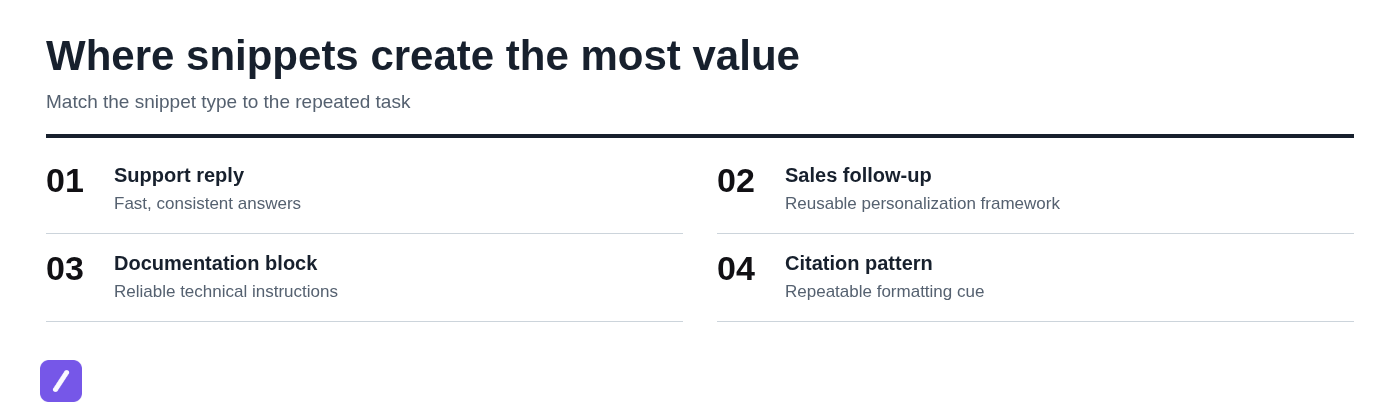
Customer service is one of the clearest uses for text snippets because the same questions appear in different forms. Delivery updates, account-access steps, refund-policy explanations, troubleshooting instructions, escalation handoffs, and polite boundary-setting can all begin from a tested response.
A useful delivery-delay snippet might include a greeting, a concise explanation, a current tracking link placeholder, an expected next step, and an escalation condition. For example: Hello [Name], your order [Order number] is currently showing a delivery delay. You can check the latest status here: [Tracking link]. If it has not updated by [Date], reply to this message and we will investigate further.
Placeholders matter. Names, order numbers, dates, account details, and region-specific links should never be hard-coded into a general template. The snippet supplies the dependable structure; the agent supplies the customer-specific facts and judgment.
Sales, recruiting, and follow-up
Sales teams can reuse outreach structures, qualification questions, post-demo follow-ups, meeting recaps, objection-handling language, and proposal boilerplate. Recruiters can use snippets for candidate acknowledgments, scheduling messages, interview preparation, and status updates.
But a snippet should be a starting point, not an excuse for bulk messaging. The first sentence, the reason for contacting the person, and any claim about their business or experience should be genuinely personalized. If the message would make no sense after removing the recipient's name, it needs more than a placeholder.
A practical follow-up snippet can preserve the useful framework: a short reminder of the conversation, one specific next step, and a simple call to action. It should leave room for the sender to add the detail that proves they listened.
Writing, research, and formatting
Writers and researchers often repeat structures rather than entire paragraphs. Reusable outlines, editorial briefs, disclosure text, interview-request templates, revision checklists, and citation reminders can save time without flattening the writing itself.
For academic work, a snippet can remind you of an MLA in-text citation pattern or preserve a preferred source-note format. It cannot determine whether a source is credible, whether a citation is complete, or whether a style rule applies in a specific case. Use snippets to reduce routine formatting friction, then verify the actual source and required style guide.
Developer and technical documentation workflows
Technical teams often reuse shell commands, configuration blocks, API-request examples, bug-report templates, incident updates, and documentation fragments. A general text snippet manager can be perfectly adequate for short commands, standard troubleshooting instructions, and repeatable documentation language.
Once snippets become language-specific code assets that require syntax highlighting, testing, dependencies, version history, and repository coordination, a dedicated code snippet manager or source repository is usually the better choice. As covered in the next section, code reuse has different maintenance requirements from support or sales copy.
Text snippets vs. code snippets: choose the right kind of library
A plain-text library and a code library can overlap, but they solve different problems. A text library emphasizes quick retrieval, easy copying, templates, shared wording, and everyday workflow speed. A code library must often preserve language formatting, support syntax awareness, document dependencies, and track changes safely.
| Requirement | General text snippet library | Dedicated code snippet library |
|---|---|---|
| Replies, templates, links, instructions | Strong fit | Usually unnecessary |
| Syntax highlighting and language organization | Limited or unnecessary | Important |
| Git sync and version history | Optional | Often essential |
| Variables and fill-in prompts | Helpful for messages | Helpful for configuration and examples |
| Team review and permissions | Useful for approved content | Useful for shared production-adjacent code |
| Security controls | Needed for sensitive business content | Critical when code touches systems or credentials |
The best code snippet manager is therefore not one universal product. It is the one that works with your editor, language, repository workflow, and collaboration requirements. Avoid forcing code into a lightweight text library if losing formatting or version history would create risk.
What is a code snippet example?
A code snippet is a small, reusable piece of source code that performs a focused task. It might be an API request, a logging function, a database connection pattern, or a configuration template.
For example, a reusable API-request snippet could include the request structure, a placeholder for the endpoint, a placeholder for an access token, and a usage note explaining the expected response. A good code snippet is either runnable as written or clearly labeled with its prerequisites, dependencies, inputs, outputs, and intended context.
Never leave someone guessing whether a code block is production-ready, illustrative only, or missing required setup. That distinction is part of the snippet.
Where to put code snippets
Put code snippets where they can be maintained correctly. An integrated development environment, or IDE, is a good home for editor-specific boilerplate. A Git repository is better when a team needs review, version history, and coordinated updates. Team documentation works for explanatory examples, while a dedicated code snippet manager can help organize reusable pieces across projects.
A general snippet app is suitable for lightweight commands, standard bug-report blocks, and short technical instructions. Choose based on reuse frequency, whether others need it, and whether version control matters. If a change could affect a deployed system, treat it like code, not like casual copied text.
The features that matter in a text snippet manager
Feature lists can be misleading because the best text snippet manager is the one you can retrieve from quickly, in the places you already work. Start with workflow fit, then evaluate the details that keep the library useful as it grows.
Fast capture, search, and organization
Fast capture is important because useful text disappears when saving it feels like administrative work. Look for a frictionless way to create a snippet, give it a descriptive name, and place it in a sensible category.
As the library grows, search matters more than a complicated folder tree. Full-text search, shortcut search, tags, favorites, pinned snippets, and reliable filtering all reduce retrieval time. A library that is beautifully organized but impossible to search is still slow.
Copying, shortcuts, and text expansion
There are several valid reuse methods: manual copying, keyboard shortcuts, browser extensions, launcher-based retrieval, and automatic typed-trigger expansion. The right option depends on where the text is used and how much control you need before pasting.
Expansion is fast, but it introduces risk. A short trigger may expand in the wrong field, application, or conversation. Use collision-resistant abbreviations, such as a punctuation prefix plus a descriptive term, and test triggers in your normal workflow before relying on them.
Templates, placeholders, and dynamic fields
Templates become safer when they clearly separate fixed approved language from details that must change. Common fields include name, company, date, reference number, product, region, and link.
Some tools support dynamic fields or fill-in prompts. These can reduce errors when a response always needs specific values. For simpler work, plain text with visible placeholders may be more reliable because it makes the required edits impossible to miss.
Sync, sharing, permissions, and privacy
Individual users may prioritize cross-device access and exports. Teams should also examine shared libraries, invitations, edit permissions, ownership, auditability, and what happens when someone leaves the organization.
Do not treat an ordinary snippet tool as a vault. Passwords, credentials, API keys, authentication tokens, payment information, and private customer data belong in approved password-management or secret-management systems, not a reusable text library.
How to make a snippet people will actually reuse
A snippet is only valuable if people can trust it and find it. The creation process should be lightweight enough for everyday work, but disciplined enough to prevent a library full of mysterious, outdated blocks of text.
A reusable snippet formula
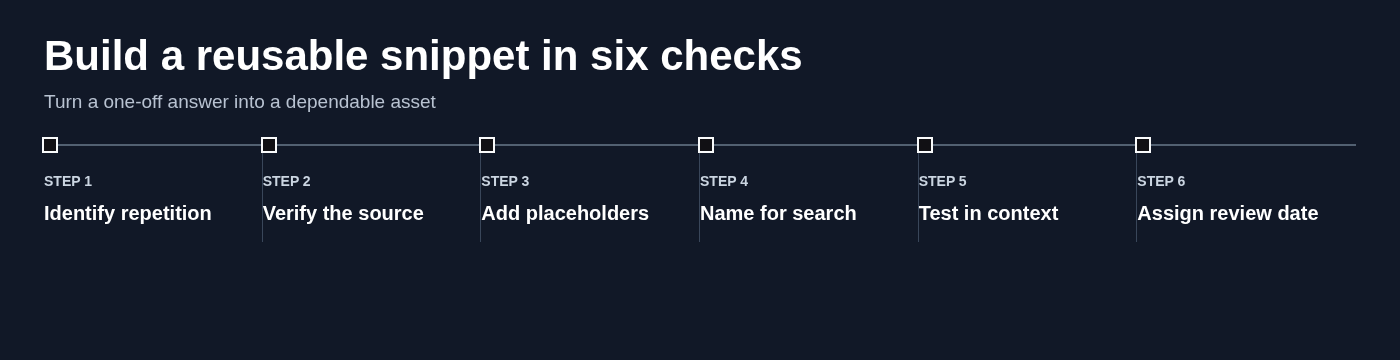
Use a consistent structure for important snippets:
- Purpose label: State the situation it solves.
- Approved core text: Keep the reliable wording concise and current.
- Placeholders: Mark every detail that requires personalization.
- Optional variants: Include only meaningful alternatives, such as domestic versus international delivery.
- Usage note: Explain when to use it and when not to use it.
- Owner and review date: Make maintenance someone's job.
For example, a snippet called Support - delivery delay - domestic is far more useful than one called Shipping update. The first tells users what it is before they open it, and it is easier to retrieve when search terms are imperfect.
How to create a code snippet
To create a code snippet, isolate one small task first. Remove secrets and environment-specific values, state the prerequisites, use the correct language formatting, test the snippet, and document its inputs and outputs.
For anything shared or close to production, use version control and code review. A snippet copied from a one-off debugging session may be useful, but it should not become team guidance until someone verifies that it is safe, current, and understandable outside the original context.
A worked example: build a customer-support snippet system from scratch
Imagine an online retailer handling 400 support conversations a week. The team repeatedly answers questions about shipping delays, returns, account access, damaged orders, and escalation requests. Their existing "snippet system" is a collection of old email drafts and copied chat messages.
The answer is not to write 400 templates. It is to identify the repeatable core of the highest-value conversations and build a library that supports judgment rather than replacing it.
Step 1: turn a support inbox into a snippet backlog
Review two to four weeks of recent conversations. Group messages by issue, then rank candidates using three questions: How often does this occur? How long does the response take to write? What is the risk if the response is inaccurate?
In this example, the team might begin with 12 snippets: delivery delay, tracking request, return eligibility, return label, damaged-item request, account reset, address change, cancellation request, refund timing, escalation handoff, duplicate charge, and a polite response for unsupported requests.
Start with the top 10 to 15. Edge cases are important, but attempting to document every exception before publishing the basics causes delay and creates an unwieldy library.
Step 2: write variants with safe personalization
Take the delivery-delay response. Its fixed portion may explain the current process and set expectations. Its variable portion should include the customer's name, order number, tracking URL, and the date when the team will take the next action.
A safe template could read: Hi [Customer name], thanks for checking in about order [Order number]. The latest tracking update is available here: [Tracking link]. Your shipment is currently delayed, and we expect another update by [Date]. If there is no movement by then, reply here and we will review the order with the carrier.
Add an optional paragraph only when it is genuinely needed, such as a region-specific delivery explanation. Add a clear escalation note: do not use this response if the package is marked delivered but the customer has not received it, if the delivery date is already beyond the stated threshold, or if the customer reports a time-sensitive need. Those situations require an agent to investigate rather than send a canned answer.
Step 3: measure whether the library is working
Do not measure success only by how many snippets exist. Track whether agents can find a response quickly, whether they make fewer corrections before sending, whether replies are more consistent, and whether repeat contacts caused by unclear instructions decline.
Also track maintenance signals: which snippets are rarely used, which ones require frequent rewriting, and how often someone discovers a broken link or outdated policy statement. A lightweight monthly review can archive duplicates, refresh high-use templates, and assign updates after policy changes.

How to organize text snippets so search stays fast
Organization should make retrieval easier, not turn a small library into a filing project. Use a few stable categories, consistent names, and a limited tag system rather than deep folders that require users to remember exactly where something lives.
Use categories for context and tags for attributes
Categories identify the broad work context: Support, Sales, Operations, Writing, and Personal are usually enough to begin. Tags describe attributes that can cross categories, such as email, chat, approved, internal, customer-facing, urgent, UK, or enterprise.
Do not create folders within folders within folders. Likewise, avoid uncontrolled tag sprawl where one person uses refund, another uses refunds, and a third uses returns-money. Define a small shared vocabulary and review it as the library develops.
Name snippets for retrieval, not literary polish
Names should match the words people will type while under pressure. A practical pattern is Category - situation - qualifier.
- Support - delivery delay - domestic
- Support - account access - reset link
- Sales - post-demo - no response
- Operations - vendor request - invoice details
- Writing - disclosure - affiliate link
Consistent names improve search, onboarding, and cleanup. They also reveal duplicates quickly: if five entries begin with Support - refund, it is easier to decide whether they are useful variants or redundant copies.
How to evaluate a text snippet manager before you commit
A text snippet manager app, browser-based tool, Mac utility, or text snippet online service should be evaluated against your actual workflow. Feature count is a poor proxy for usefulness if the tool makes retrieval slower or does not work where you write.
Questions for individual users
Ask whether you can save text quickly, search it reliably, and reuse it in the applications you use most. Check keyboard behavior, device support, offline access if relevant, export options, and whether you truly need automatic expansion.
If you are looking for a free text snippet manager download, the basic standard should be modest but real: you should be able to create a usable library, find entries quickly, and retain control over your content. Before installing a local or free tool, check platform compatibility, privacy practices, maintenance status, and whether you can export your snippets later.
Questions for teams
Teams need to ask different questions. Can people share a library without losing accountability? Who can create, edit, approve, archive, or replace customer-facing templates? How are links maintained? What data may be stored? Is there a workable process for onboarding and offboarding?
Run a pilot with a small group using a real workflow before migrating a large archive. A two-week test with support or sales staff will reveal more about search speed, editing friction, and adoption than a polished feature comparison.
A weighted scorecard for comparing options
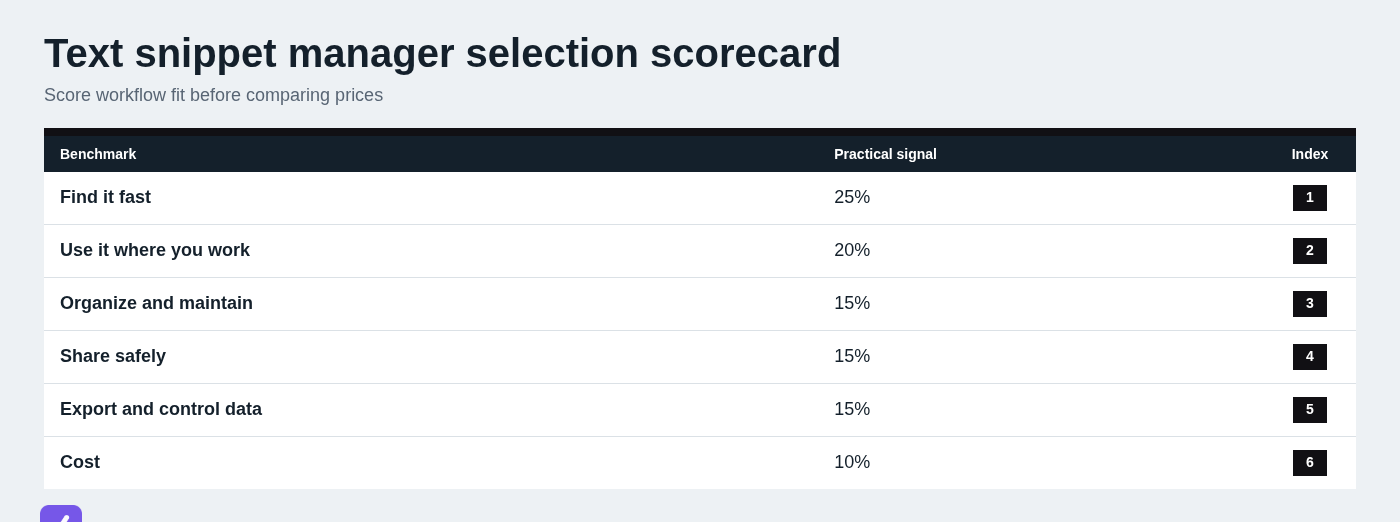
Use a weighted scorecard to compare tools on the criteria that actually affect your work. Score each category from 1 to 5, multiply by the weight, then compare totals. The scores are not absolute truth; they force a useful conversation about trade-offs.
| Criterion | Suggested weight | What to assess |
|---|---|---|
| Retrieval speed | 25% | How quickly can users find the right snippet? |
| Workflow compatibility | 20% | Does it work where and how people write? |
| Organization and maintenance | 15% | Search, folders, labels, naming, and review support |
| Safe sharing | 15% | Shared libraries, editing controls, and ownership |
| Portability and data control | 15% | Exports, access control, and content ownership |
| Cost | 10% | Total value for the workflow, not price alone |
Free text expanders and snippet managers: what to expect
Yes, there are free text expanders and free snippet-management options. They can be excellent for an individual library, but free tools do not all provide the same platform support, sync, sharing, privacy controls, or maintenance guarantees.
When free is enough
Free is often enough when you have a personal library, a limited number of snippets, basic manual copying, local storage, or straightforward text expansion. It can also be a sensible way to learn which snippets you actually use before paying for broader capabilities.
Check whether the tool is actively maintained, supports your operating system and target applications, lets you export your content, and handles privacy appropriately. A free option that traps your library or stops working after an update is not free in the practical sense.
When paid features are justified
Paid features are justified when they remove real coordination or reliability problems: cross-device sync, shared libraries, permissions, dynamic fields, support, integrations, approval processes, or stronger governance. The decision is about workflow cost, not status.
If a team saves a few minutes per person each day and avoids sending outdated customer-facing language, reliable shared tooling can be worth more than its subscription cost. If you only reuse an email signature and three links, it probably is not.
Text snippet manager options for different workflows
Start with the workflow: manual retrieval or expansion, individual use or shared content, general text or code, and the devices where work happens. Then compare options by the same practical criteria: speed of retrieval, organization, collaboration, portability, and fit with your normal tools.
SnipFlux: lightweight reusable text retrieval
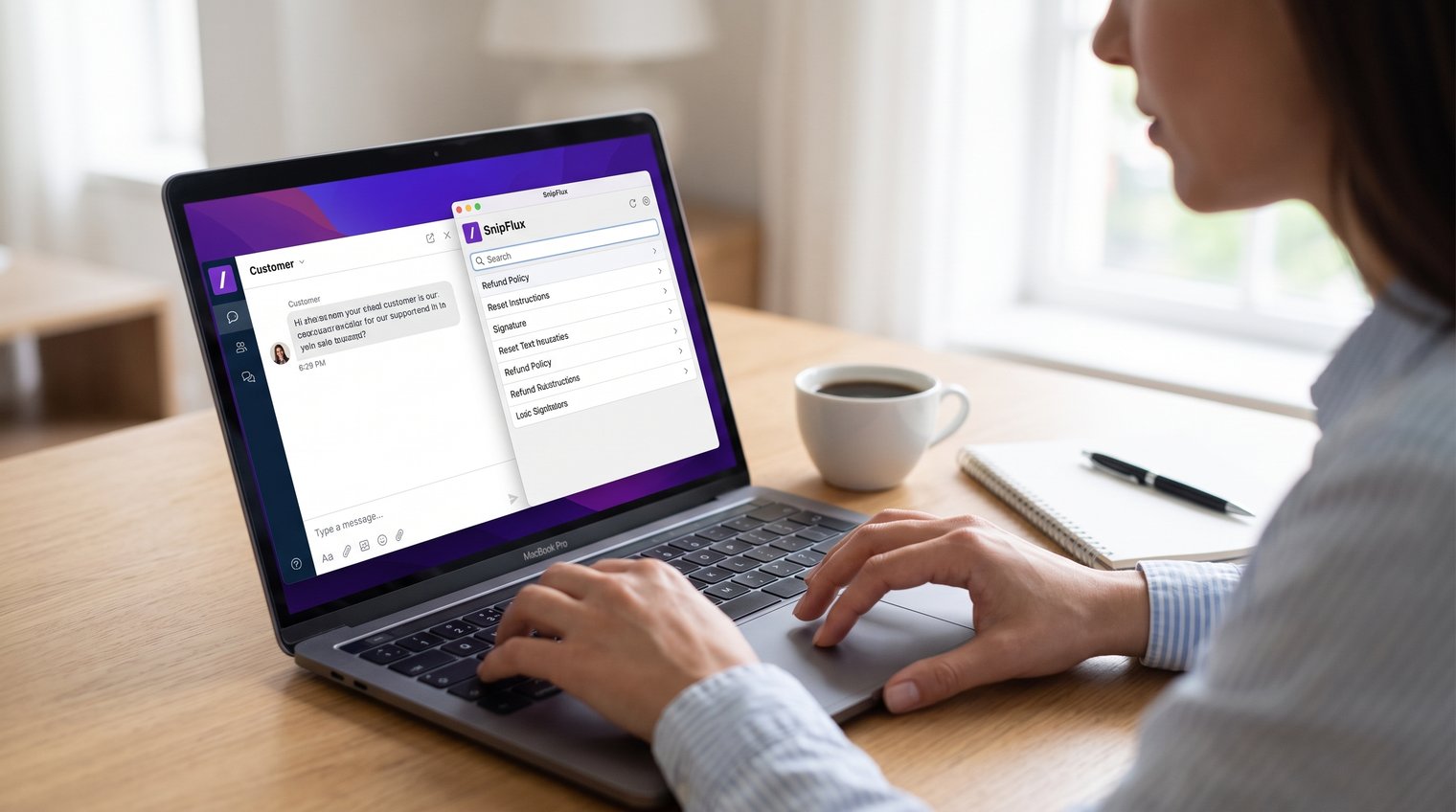
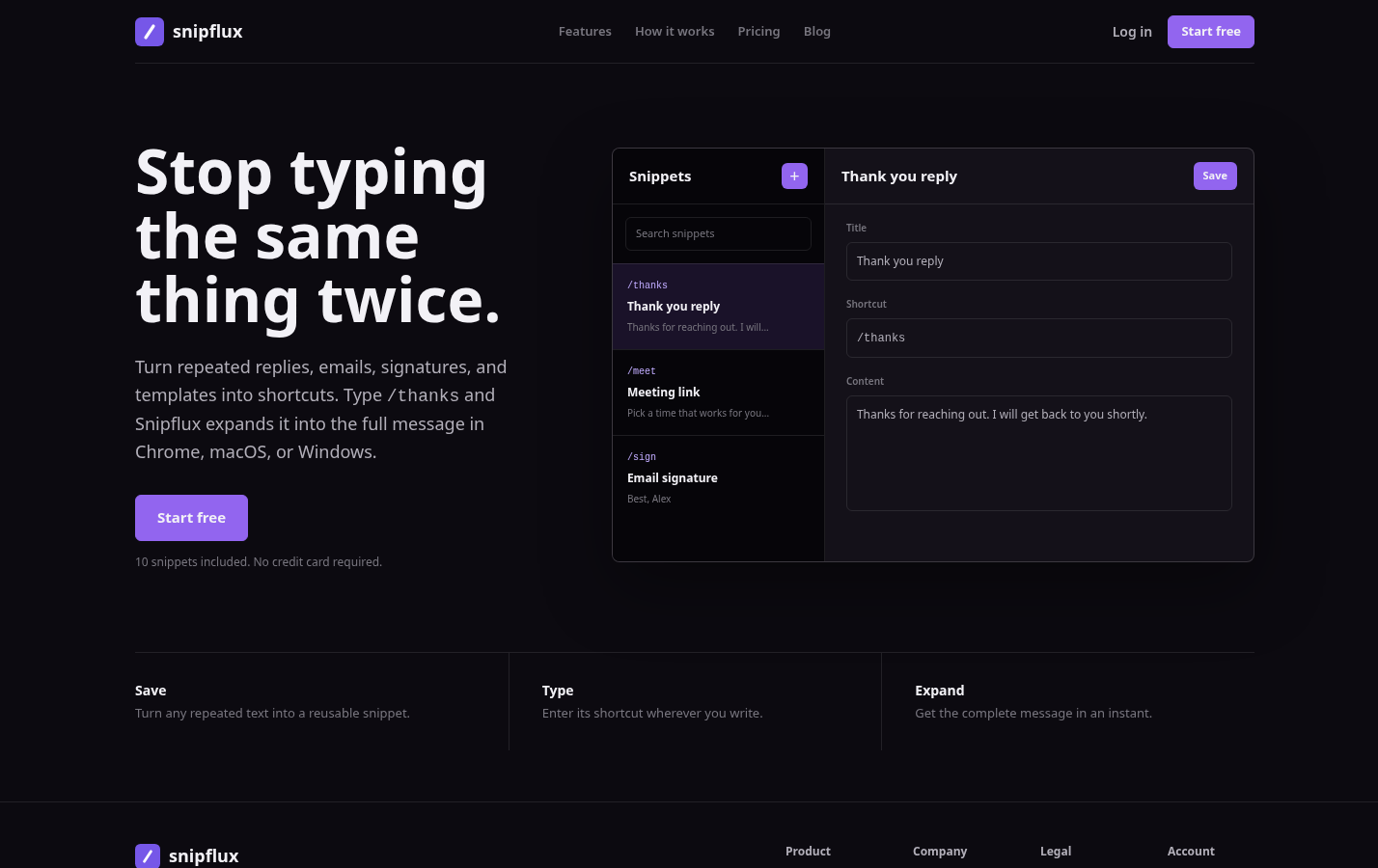
SnipFlux is built for saving, finding, and expanding frequently used replies, signatures, templates, instructions, links, and other reusable text. It is a focused fit for support staff, sales professionals, and teams that need dependable content retrieval without turning a snippet library into a larger social, CRM, or documentation suite.
Its core approach is useful when the main need is save-find-copy reuse: give a snippet a memorable title or shortcut, organize it with folders and labels, search when needed, and copy it into the destination application. For shared workflows, workspaces and invitations can help teams maintain common response templates.
As with any tool, verify current plans, platform availability, and collaboration capabilities against your own requirements before committing.
Raycast Snippets: Mac-based shortcut expansion
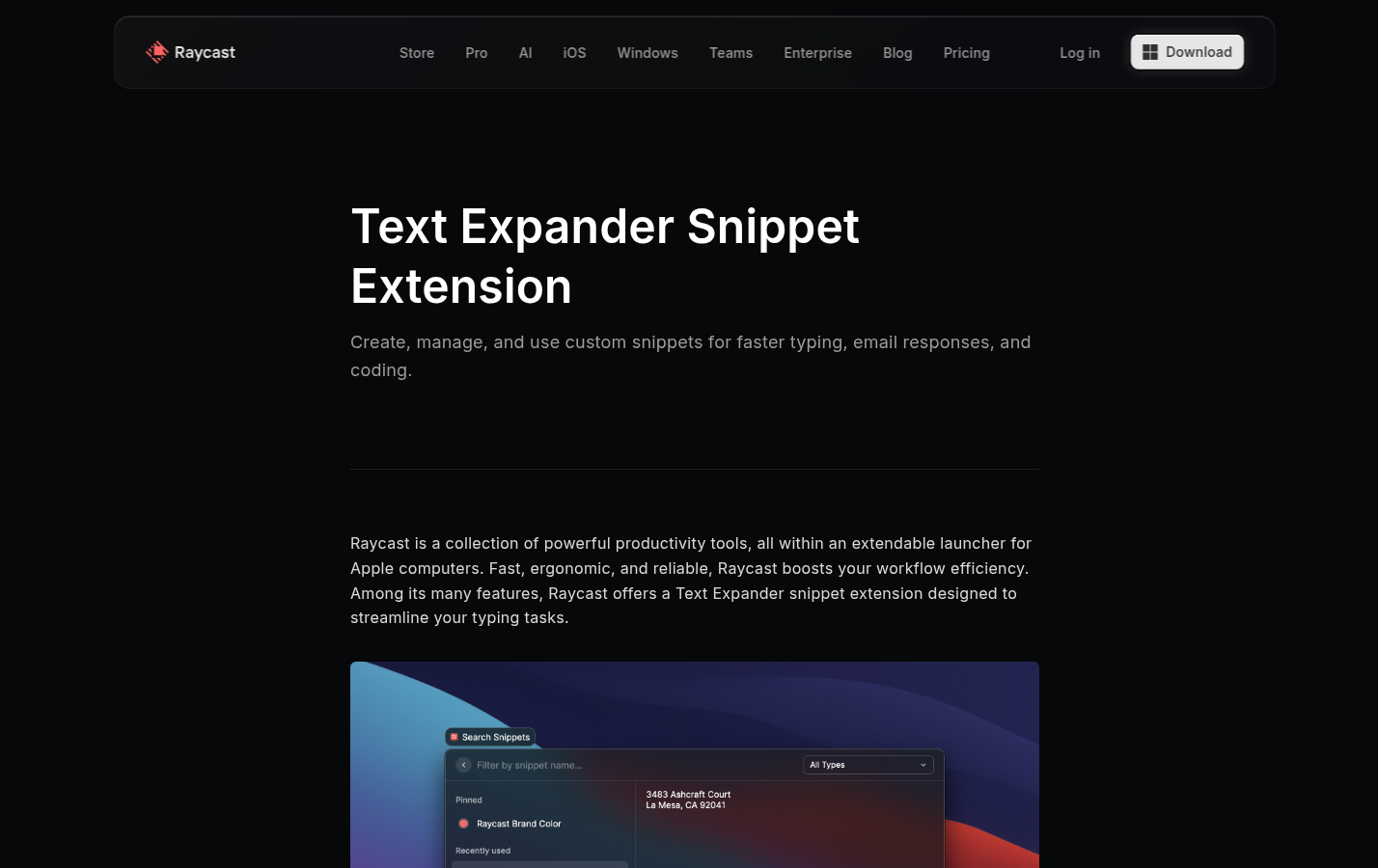
Raycast Snippets is a fit for Mac users who already use Raycast and want snippets accessible through a launcher and text-expansion workflow. Its appeal is speed for people who prefer keyboard-driven actions and shortcut-triggered insertion.
The platform consideration matters: validate how expansion behaves in the specific applications where you work, especially if your workflow crosses browsers, messaging tools, desktop apps, or different devices. Expansion-first tools are excellent when triggers are dependable; retrieval-first tools can be better when you want to review and personalize text before using it.
Dedicated code snippet managers: structured code reuse
Developers who need syntax highlighting, repository connections, language-specific organization, version control, and code review should evaluate dedicated code-focused tools. The best choice depends on compatibility with the editor and repository workflow, not on a generic "best code snippet manager" label.
A general text library still has a role for developer-facing communication: incident-response language, support instructions, common commands, and documentation templates. Keep actual maintained code where developers can test, review, and version it properly.
Code snippets in editors and word processors: useful, but different
People often search for snippets while trying to solve a different problem: where to write code, how to reuse editor boilerplate, or whether a word processor can serve as a coding environment. These are related questions, but they need clear boundaries.
How to write code snippets in Word
Microsoft Word can store code-like text and reusable blocks, but it is not an ideal place to write, test, or maintain executable code. If you must include code in Word, use a monospaced font, preserve indentation carefully, and watch for smart quotes or automatic formatting changes that can break syntax.
Word is useful for a report, training guide, or document that contains a code example. It is not a substitute for a code editor. You can do basic code drafting in Word, but you cannot realistically use it as the environment for running, debugging, organizing, and maintaining code.
How to create a snippet in Sublime Text 3
For a Sublime Text create snippet workflow, create a .sublime-snippet file, define the snippet content and a tab trigger, save it in the User package, then test it in the appropriate syntax scope. The trigger is the short text you type; the scope controls where the snippet should be available.
Exact file paths and syntax can vary by installation and version, so consult current Sublime Text documentation when setting it up. The key idea is that editor snippets are designed to insert code structures while you are actively coding, unlike a general text library intended for broader reusable content.
Where beginners can write code for free
Beginners can write code for free in a code editor or a browser-based coding environment suited to the language they are learning. Microsoft Word is not the right starting point. Choose an environment that lets you save files, run code, read errors, and practice small projects.
Yes, you can teach yourself to write code. Start with one language and one concrete goal, use official documentation alongside structured lessons, build small projects, ask for feedback, and practice consistently. Writing code is learned by writing, running, breaking, and revising code - not by collecting snippets alone.
Security, accuracy, and maintenance rules for snippet libraries
A dependable snippet library is an operational asset. An unmanaged one is a distribution channel for outdated instructions, weak security practices, and inconsistent communication.
Never store secrets as ordinary snippets
Do not store passwords, API keys, authentication tokens, payment data, private customer information, or other secrets in an ordinary snippet library. Even if a tool is convenient, convenience is not a security policy.
Use an approved password manager or secret-management system for credentials. For technical examples, replace sensitive values with obvious placeholders such as YOUR_API_TOKEN and document where authorized users should obtain the real value.
Prevent outdated or misleading snippets
Give high-impact snippets an owner, review date, source link, and clear status. Labels such as Approved, Needs review, Deprecated, and Internal only help prevent accidental misuse.
When auditability matters, do not silently overwrite an important template without a record. Retire the old version, point users to its replacement, and communicate changes to the people who depend on it. This is especially important for customer policies, legal language, compliance messaging, and technical instructions.
Start with a small snippet library, then improve it from real use
The most useful text snippet manager is not the one with the largest possible library. It is the one that helps you capture repeated text, find it in seconds, personalize it responsibly, and keep it accurate over time.
Begin with the responses and instructions that repeatedly interrupt your day. Name them for search, add visible placeholders, review them after real use, and assign ownership to anything shared or high risk. If you need a focused save-find-expand workflow for reusable text, you can explore SnipFlux.