
A shared customer support response library can make a team faster, more accurate, and more consistent. It can also create a wall of stale, robotic copy that agents stop trusting. The difference is not the number of templates you create. It is whether the library is built around real customer conversations, clear ownership, and practical use during live support work.
Use this guide to create a library your team can find quickly, personalize confidently, and maintain without turning every small update into a mess.
Start with the support conversations worth standardizing
Do not begin by trying to document every question a customer might ask. That approach produces a huge collection of vaguely named responses that no one can navigate. Start with conversations that are high-volume, high-risk, or reliably repeatable.
Review the last 30 to 90 days of tickets, chat transcripts, quality assurance findings, escalation notes, and customer feedback. Look for patterns: customers asking how to reset access, recurring billing questions, a product feature that is routinely misunderstood, or a troubleshooting step agents explain several times each day.
Also pay attention to messages that create avoidable risk. A refund response may not be frequent, but inaccurate wording can create a policy problem. An account-security message may need an approved process even if it appears only occasionally.
Prioritize by volume, risk, and effort
Give each potential template a simple score before writing it. Ask three questions:
- Volume: How often does this situation occur?
- Risk: Does the response require precise policy, security, billing, legal, or technical language?
- Effort: Does an agent spend substantial time composing or checking the answer?
Start with responses that score highly in at least one area and reasonably in another. For example, password reset instructions may be high-volume and low-risk, while a service outage update may be lower-volume but high-risk. Both deserve approved language.
Flag policy, security, billing, refunds, and incident communications for extra review from the appropriate subject-matter expert. A fast template is only useful if it is correct.

Define the library's scope, owners, and approval rules
Set the operating model before agents begin adding content. Otherwise, a useful shared library quickly fills with duplicate replies, outdated policy language, and personal preferences presented as official guidance.
Decide who can draft a response, who approves it, who publishes it to the shared collection, who can edit it, and who archives it. Keep this lightweight, but make it explicit. A support lead might own routine service templates, while billing owns payment language, product specialists verify technical instructions, and legal or compliance reviews sensitive policy statements.
Approval should match risk. A simple "we received your request" acknowledgment may need only a support lead's review. A refund exception, account-verification instruction, or statement about contractual terms should not go live without the right reviewer.
Separate approved responses from drafts and personal shortcuts
Agents should never have to guess whether a snippet is safe to send to a customer. Separate approved, customer-facing responses from works in progress using clear folders, labels, or status names.
A practical setup might include:
- Approved - Customer Facing: Reviewed templates agents can use now.
- Drafts - Review Needed: Proposed wording that is not ready for customer use.
- Internal Notes: Escalation instructions, investigation checklists, and team-only guidance.
- Personal Snippets: An agent's own productivity text, such as a personal meeting note or frequently used internal phrase.
Personal shortcuts are fine when they do not represent official customer guidance. The mistake is letting personal versions become unofficial policy simply because they are convenient.
Assign a content owner and review cadence
Every category needs one accountable owner, even when several people contribute. The owner does not need to write every response. Their job is to make sure content remains accurate, named consistently, and reviewed when something changes.
Set triggered reviews for product releases, policy revisions, price changes, workflow changes, known incidents, and help-center updates. Then schedule a broader audit, such as quarterly for active support content and more often for fast-changing areas.
Subject-matter experts should validate accuracy, but ownership should stay visible. "Everyone owns it" usually means no one notices a broken refund link until a customer does.
Design categories agents can scan in seconds
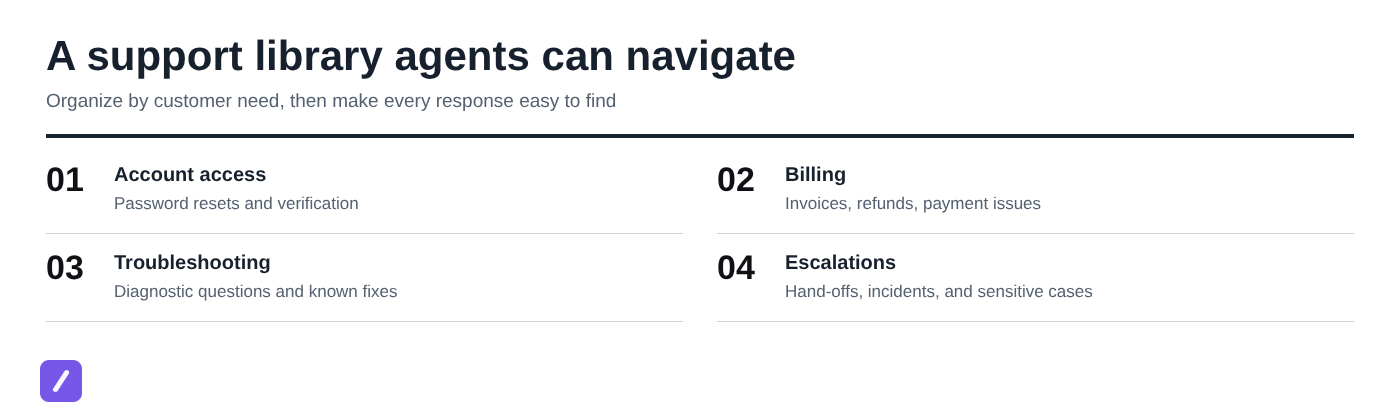
Organize the library around what the customer needs, not around your internal org chart. An agent handling a password-reset ticket thinks "account access," not "identity operations." Clear customer-intent categories reduce search time and make training easier.
Keep the top level short. If your folder tree requires agents to open four layers before finding a common response, it is too complicated. Use subcategories only when ticket volume makes them worthwhile.
Use a practical category structure
For many support teams, this structure is a strong starting point:
- Account access: Password resets, login issues, verification, account recovery.
- Onboarding: Setup instructions, first-use guidance, training resources.
- Billing and refunds: Invoices, payment failures, renewal questions, refunds.
- Product questions: Feature explanations, availability, plan differences.
- Troubleshooting: Diagnostic questions, standard checks, known fixes.
- Bugs and incidents: Bug acknowledgment, outage updates, status communications.
- Shipping or orders: Order status, delivery issues, returns, if relevant.
- Escalations: Handoffs, sensitive cases, next-step updates.
Within Billing and refunds, for example, you might add Invoices, Payment failures, Refund status, and Subscription changes. Do not create a subcategory just because it sounds tidy. Create one when agents need it to find content faster.
Use consistent names, tags, and shortcut conventions
Use titles that describe the customer situation, not the internal team that wrote the response. "Refund - status update" is clearer than "Finance template 4." A good title lets an agent understand the purpose before opening the snippet.
Tags can add useful filtering without bloating the folder structure. Consider tags for channel, product area, customer type, policy sensitivity, or language. For example, a refund-status reply might use tags such as email, billing, policy-reviewed, and existing customer.
Create shortcut rules that are memorable and unlikely to collide. A slash prefix is a simple default: /billing-refund-status, /access-reset, or /bug-update. Avoid cryptic shortcuts such as /brs2; they save a few keystrokes but make adoption harder.
Build each response as a reusable, human starting point
Templates should reduce repetitive writing, not eliminate judgment. The best customer service responses give agents an accurate starting point, then make it easy to adapt the message to the customer's facts and tone.
A reliable response structure usually includes an acknowledgment, the answer or next step, any details the customer needs, a realistic expectation, a relevant link, and a sign-off or personalization cue. Not every reply needs every element, but this pattern prevents common omissions.
For example, a refund-status response could acknowledge the request, explain where the refund is in the process, state what the customer should expect next, and link to the relevant policy or payment guidance. It should not promise an exact bank processing time unless your team can genuinely support that promise.
Write for variables instead of copy-paste perfection
Use clearly marked placeholders for details that vary. Common examples include {{first_name}}, {{order_number}}, {{plan_name}}, {{date}}, and {{next_step}}.
A simple template might read:
Hi {{first_name}},
Thanks for reaching out about order {{order_number}}. I can confirm that {{status_or_next_step}}. You can expect {{expected_timing}}, and we will contact you if anything changes.
Best,
{{agent_name}}
Mark anything an agent must verify before sending. For example, write {{confirm eligibility before sending}} rather than burying an assumption in the copy. This is especially important for refund eligibility, account access, account ownership, and technical troubleshooting.
Common mistake: treating placeholders as optional decoration. If a response contains an unresolved field, the agent should complete or remove it before sending. Customers should never receive "{{first_name}}" or an inaccurate prefilled promise.
Keep reusable links contextual and maintained
Link customers to the exact resource they need: the relevant help article, secure account action, policy page, status page, or setup instructions. Sending every customer to a generic help center shifts the work back onto them.
Name links descriptively in the template so an agent knows what they are sharing. "Reset your password" is better than "Click here." If a response needs a different link by plan, region, or product version, make that decision visible in the snippet rather than hoping the agent remembers it.
Assign an owner to check destination URLs during approval and scheduled reviews. Broken links, redirects to unrelated pages, and outdated policy pages quietly undermine even well-written replies. Teams that maintain many reusable support URLs may also benefit from this guide on how to organize reusable links for customer support.
Create templates for the conversations that need judgment
Most teams remember standard answers for routine questions. The more valuable templates often support situations where agents need to gather facts, set expectations, or hand off an issue without making promises they cannot keep.
Build templates for troubleshooting discovery, escalations, incident updates, and policy-bound requests. These should guide an agent's next action, not force every customer into the same scripted exchange.
Customer support troubleshooting questions template
A good troubleshooting template should save time while avoiding redundant questions. Start by acknowledging the problem, then ask only for information that is missing from the customer's message. For more examples, see this customer support troubleshooting questions template guide.
Use a structure like this:
Hi {{first_name}},
I'm sorry you're running into {{issue_summary}}. To narrow this down, please share {{missing_detail_1}} and {{missing_detail_2}}. If possible, let us know what happens after you {{action}} and whether you see an error message or code.
In the meantime, please try {{safe_first_check}}. If you have already tried that, you do not need to repeat it - just send the result and we will take the next step.
Once we have those details, we will {{follow_up_action}}.
Useful diagnostic fields can include device type, browser or app version, approximate time of the issue, error text, screenshots when appropriate, account or order reference, and steps already tried. Do not ask for everything by default. If the customer already provided their browser version and screenshot, acknowledge that and move to the missing detail.
Customer support escalation response template
An escalation response needs to reassure the customer without suggesting a guaranteed result. State what you are escalating, what the next review step is, and when the customer should expect an update. This customer support escalation response template guide can provide additional examples.
For example:
Hi {{first_name}},
Thank you for the details. I have escalated {{issue_summary}} to our {{team_or_specialist}} team for review. I included {{key_context}} so they have the information needed to investigate.
We will provide an update by {{update_timeframe}}. If we need anything else from you before then, we will let you know.
Best,
{{agent_name}}
Use an internal escalation note when the next message is for a teammate rather than the customer. Internal notes can include technical hypotheses, account history, logs, urgency rationale, and internal routing details. Customer-facing messages should stay clear, factual, and appropriately scoped.
Store and deliver approved responses in a shared snippet tool
A response library is only useful if agents can reach it in the moment they need it. Your delivery tool should support shared access, appropriate permissions, folders or tags, search, variables, cross-channel availability, and a way to manage content changes.
A text expander is especially useful as the delivery layer because agents can type a consistent shortcut directly where they work. That does not replace library governance. It makes approved language easier to use once the team has done the work of writing, reviewing, and organizing it.
Use SnipFlux for cross-platform shared snippets
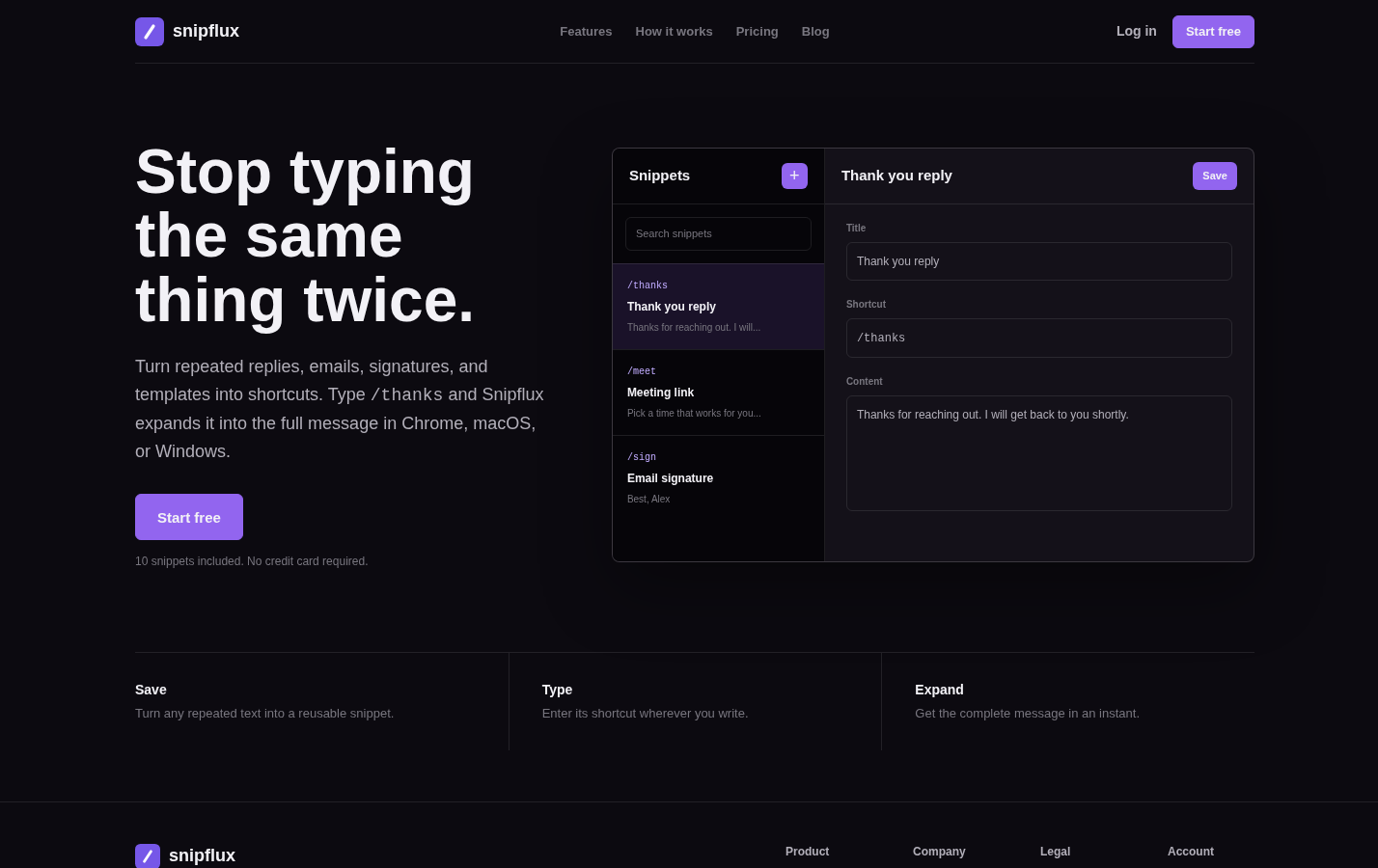
SnipFlux lets teams store reusable snippets and expand shortcuts into complete replies, links, signatures, instructions, and templates across Chrome, macOS, and Windows. That is useful for support teams that work across help desks, email, CRM tools, internal systems, and browser-based workflows.
Start by creating shared category-based collections that match your library structure, such as Account access, Billing, Troubleshooting, and Escalations. Reserve your agreed shortcut format for approved responses, then let agents search by name or shortcut when they cannot remember the exact trigger.
Keep drafts and personal snippets separate from shared approved content. The goal is simple: when an agent uses an approved shortcut, they should know they are starting with current, team-reviewed language.
Pilot the library with a small support group
Do not roll out hundreds of templates to the entire team on day one. Start with a representative group of agents and a limited set of high-volume response types. This makes feedback manageable and exposes problems before they become team-wide habits.
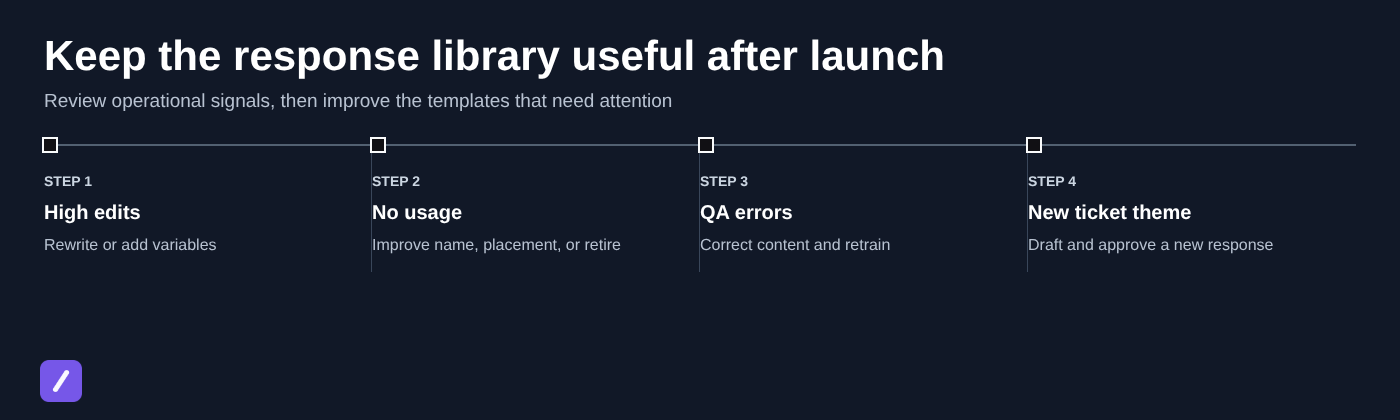
Ask pilot participants about findability, shortcut recall, accuracy, tone, and the situations where they still rewrite most of the response. If agents consistently edit a template in the same way, the template is probably incomplete, too broad, or using the wrong assumptions.
Test templates against realistic ticket scenarios
Use anonymized recent conversations to test each response before publishing it. Run through straightforward cases, incomplete requests, frustrated customers, unusual account states, and channel constraints such as a short live-chat message versus a detailed email.
Before a template goes live, verify the following:
- All links lead to the correct destination.
- Placeholders are obvious and necessary.
- Policy language matches current guidance.
- Technical steps are accurate and safe.
- Escalation instructions identify the right next action.
- The message can be personalized without being rewritten from scratch.
A template that works only for the ideal ticket is not ready. The point is to help agents handle the common reality of partial information and customer context.
Onboard the team to a shared snippet library
Training should cover more than where the folder lives. Show agents how categories work, how to search by title, how to use shortcuts, when personalization is required, where escalation boundaries are, and how to report missing or confusing content.
Make the central expectation explicit: templates support judgment; they do not replace reading the customer's message. An agent who inserts a perfect refund response into an account-security conversation has used the library incorrectly, even if the wording itself is approved.
Teach when to personalize, edit, or not use a template
Give agents concrete examples. Personalize the opening and relevant details when the customer has provided context. Edit a template when the next step or timing differs. Do not use a standard response when the customer is highly distressed, the facts are ambiguous, the request involves account security, or the issue falls outside established policy.
Encourage agents to flag missing templates rather than creating near-duplicate shared responses on their own. A simple feedback route, such as a designated internal channel or a request form, keeps the library governed while still letting the people doing the work improve it.

Measure usage, quality, and content gaps
Library success is not measured by how many snippets exist. Measure whether the content improves support work without harming quality. Start with time to first response, handling time for repeat issues, template usage, edit rate, QA scores, reopen rate, and customer satisfaction where those measures are available.
Interpret the signals together. High use with high edit rates may mean the category is right but the wording needs better variables. Low use might mean a template is poorly named, difficult to find, no longer relevant, or simply not useful.
Review failed searches and agent requests as well. If several people search for "cancel subscription" but no approved result appears, that is a clear library gap. If an incident template is repeatedly expanded during an outage, confirm that its wording remains current as the situation changes.
Retire duplicates and refresh stale guidance
Set a lightweight maintenance workflow: merge similar snippets, archive obsolete policies, update product-specific instructions, and remove templates that are no longer used. Do not leave old wording available "just in case." It will eventually be sent.
Keep version notes or a simple change log for material updates. Agents and reviewers should be able to understand what changed, when it changed, and why. This is particularly useful after a policy revision, pricing update, or product release.
Build a library agents trust and customers still experience as human
A strong shared response library begins with real ticket patterns, not a blank spreadsheet full of generic scripts. Prioritize recurring and high-risk conversations, define who approves what, organize content around customer needs, and make every response easy to find and safe to adapt.
Then keep improving it. Agent edits, QA findings, search failures, policy changes, and emerging ticket themes are not signs the library failed. They are the information that keeps it useful.
Teams that need a practical cross-platform way to deliver approved reusable responses can explore SnipFlux for shared snippets, searchable libraries, and shortcut-based text expansion.