
Most customer service templates fail for a predictable reason: someone approved the wording once, then the business changed around it. A refund policy shifts, a product workflow changes, or an agent starts using a reply outside its intended situation. The template still looks official, but it is no longer safe or accurate.
Learning how to approve customer service response templates means building a repeatable workflow, not collecting a manager's one-time sign-off. The goal is simple: give agents fast, dependable language while ensuring every reusable reply reflects current policy, product behavior, and customer expectations.
Define what "approved" means before anyone writes templates
An approved template is not merely a response that sounds polished. It is a reusable message that has passed the right checks for its scenario, has a named owner, and can be trusted until its scheduled review date.
Set the approval criteria before your team begins drafting. At a minimum, every template should be checked for factual accuracy, appropriate tone, policy compliance, personalization boundaries, ownership, and a defined review date. If a response can create a financial obligation, disclose sensitive information, or affect a customer's account access, its approval standard should be much higher than a simple greeting.
Templates requiring the strictest review usually involve refunds, billing adjustments, cancellations, account access, privacy requests, security concerns, legal claims, service outages, and sensitive complaints. These replies can make promises that the agent cannot personally authorize, so they need more than a grammar review.
Separate low-risk replies from policy-sensitive responses
Use a simple risk tier to match the review effort to the customer impact. A brief acknowledgement such as "Thanks for reaching out - we are looking into this" can move through a lightweight review. A template that tells a customer they qualify for a refund should not.
Route a template according to the promise it makes, not just the topic in its title. For example, a "shipping delay" message may be low risk when it confirms an order is still in transit. It becomes higher risk when it promises a replacement, a credit, or delivery by a specific date.
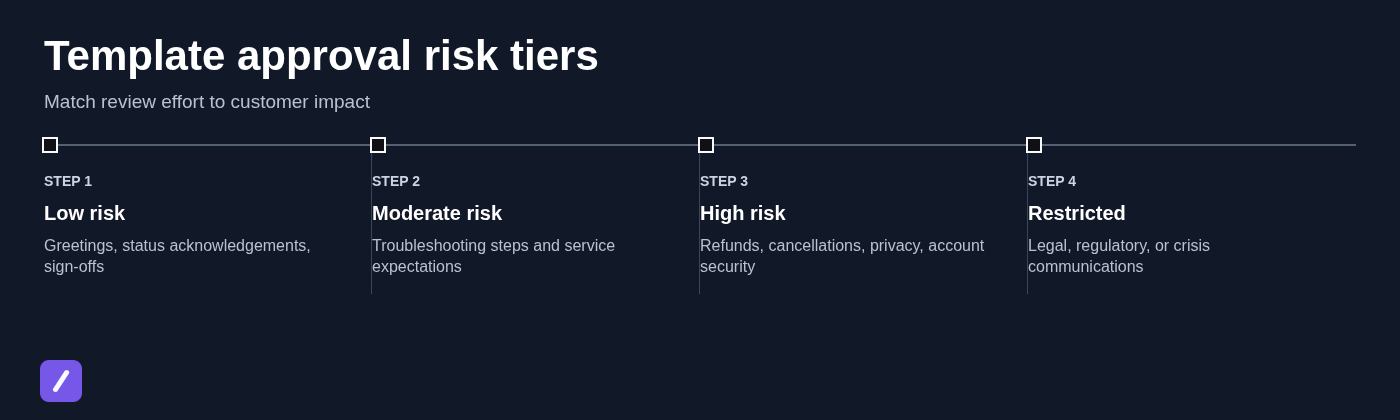
A practical structure looks like this:
- Low risk: Greetings, sign-offs, receipt confirmations, and status acknowledgements.
- Moderate risk: Standard troubleshooting steps, product guidance, and ordinary service expectations.
- High risk: Refunds, cancellation terms, account access, privacy requests, billing, and security issues.
- Restricted: Legal, regulatory, crisis, or public-facing communications that should not be freely reused without case-specific direction.
Set up a single shared customer support response library
You cannot reliably approve templates that live in personal notes, old email threads, random cloud documents, and copied chat messages. When several versions circulate, agents tend to use the one they can find fastest, not the one that is actually current.
Create one shared library for reusable responses. It can sit in your help desk, knowledge base, or snippet system, but it should be the recognized source of truth for approved wording. Include recurring resources such as a customer onboarding checklist email template when that scenario is part of your support workflow.
Each entry should include enough information for an agent and reviewer to understand its purpose without guessing:
- Template name
- Intended use or customer scenario
- Channel, such as email, chat, or social support
- Template owner
- Current status
- Approved version number
- Approvers or approval roles
- Last reviewed date
- Next review date
- Relevant policy, product, or help-center source links
Organize the library around customer scenarios rather than internal department labels alone. An agent searching for "customer cannot sign in" should not need to know whether the answer is technically owned by Identity, Product Operations, or Engineering.
Use clear statuses that agents can act on
Keep status labels short and unambiguous. A five-status system is usually enough: Draft, In review, Approved, Needs update, and Retired.
Agents should reuse only templates marked Approved. A response marked Needs update may still contain useful wording, but it should not be treated as current customer-facing guidance. Retired templates should be removed from everyday search and shortcuts, not left in place where they can be mistaken for approved material.
Write the template with the customer scenario and guardrails attached
Do not approve a generic block of text without context. Even technically correct wording becomes misleading when it is sent to the wrong customer, at the wrong point in a workflow, or without the facts needed to support the claim.
For every draft, document the trigger that makes the template appropriate, the intended customer audience, and the facts an agent must verify before sending it. State what an agent may edit and what they must not change. This turns a sentence into an operational tool instead of a risky copy-and-paste shortcut.
For example, a refund-delay response should specify whether it applies after a refund has been issued, whether a payment method affects the timing, and which timeframe is approved for that region or processor. "Your refund will arrive shortly" is not a usable instruction unless "shortly" is tied to verified, current information.
Build in safe personalization fields
Placeholders preserve speed while making the response specific. Use fields such as [Customer first name], [Order number], [Next action], and [Expected timeframe] where they improve clarity.
Every required placeholder needs an instruction. If the agent does not have the order number, should they omit it, find it before replying, or escalate the case? If the expected timeframe is not confirmed, the template should tell the agent to use approved conditional language rather than invent a date.
A safe pattern might read: "Hi [Customer first name], I have confirmed that [next action] is in progress. We expect an update by [verified timeframe]. If that changes, we will contact you through [channel]." The required verification is part of the template, not an assumption the agent must remember.

Run a first-pass review for clarity, accuracy, and customer impact
Before involving formal approvers, perform a foundational content review. This stage catches confusing wording, vague promises, and customer-hostile phrasing before specialists spend time reviewing a draft that is not ready.
Use a practical checklist. The reply should give the clear answer first, use correct facts, state realistic timing, use plain language, show appropriate empathy, avoid blaming the customer, and provide a usable next step. It should also make sense to a customer who is frustrated or who has already contacted support once.
Read the message as the customer would. If the first sentence only thanks them for their patience while avoiding the actual answer, rewrite it. If a customer must decode internal jargon such as "sync state" or "fulfillment exception," replace it with plain language or briefly explain it.
Check for accidental commitments
Support templates often create risk through small, casual phrases. Watch for absolute promises about outcomes, timelines, eligibility, confidentiality, or exceptions: "We will fix this today," "You are eligible for a full refund," or "This will never happen again."
When the result depends on an investigation, approval, or policy condition, use approved conditional wording. For example, replace "We will refund your order" with "Once we confirm the order details, we will review the available refund options." Replace "Your account will be restored today" with "Our account team is reviewing the request and will update you by [verified timeframe]."
The point is not to sound evasive. It is to tell the customer what is known, what is still being checked, and what will happen next.
Route each template to the right approvers
The best approver is determined by the claim in the message. Support operations should review workflow fit and agent usability. Product or technical owners should confirm functionality and troubleshooting instructions. Billing teams should validate charges, credits, subscriptions, and refunds. Legal or privacy reviewers should handle regulated statements, data requests, liability language, and sensitive disclosures.
Brand review can be useful when tone matters, but it should not delay every routine message. Keep the group lean. A greeting does not need legal review, and a routine troubleshooting response does not need approval from every department head.
Name one accountable final owner for each approved template. Several people may contribute feedback, but one person or role must resolve conflicting edits and make the final publish decision. Without that ownership, templates stall in review or accumulate contradictory comments.
Review the template in realistic support situations
Line editing is not enough. A response can look excellent in a document and fail when an agent tries to use it in a live ticket with incomplete information, an angry customer, or a conversation that has already gone through three exchanges.
Test templates against representative support situations. Include missing account details, repeat contacts, customers who dispute the premise of the reply, exceptions to policy, and requests that fall outside the template's intended scope. Check whether the message works within the limits of the actual channel: a chat response may need shorter steps, while an email may need more context and links. For complex cases, compare the draft with a customer support troubleshooting questions template to ensure the required diagnostic details are covered.
Reviewers should also confirm that escalation instructions, internal handoffs, and referenced resources are current. A template that tells an agent to send customers to an outdated form is not approved in any meaningful sense. When a case requires a handoff, the customer support escalation response template should also be reviewed for consistent next steps.
Use a short approval test before publishing
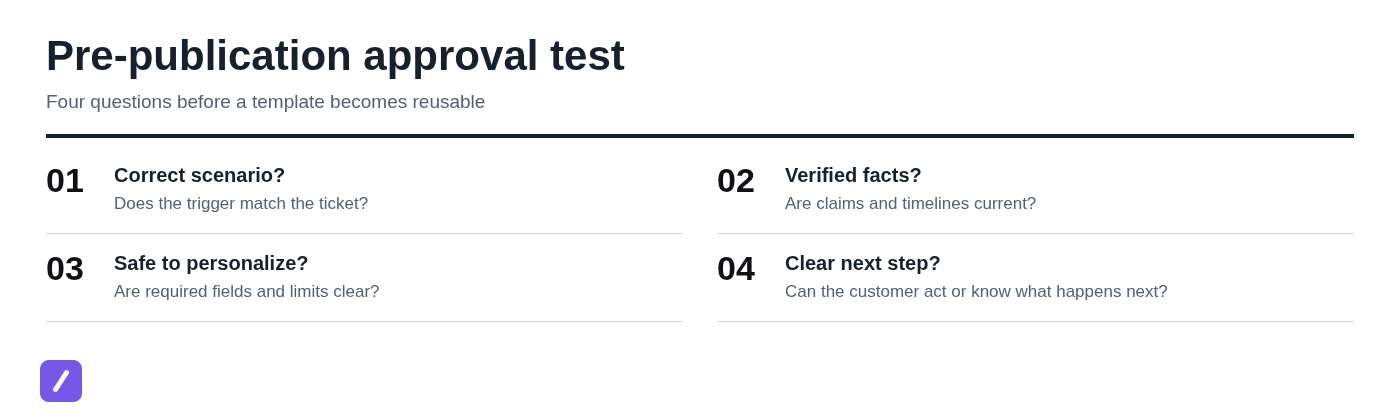
Before marking a response Approved, ask four questions:
- Can an agent clearly identify when this template applies?
- Can they fill every required field with information available in the case?
- Can they send it without inventing facts, dates, or policy exceptions?
- Will the customer understand what happens next and what, if anything, they need to do?
Record failed test cases as revision notes. "Unclear when shipping time is unavailable" is useful feedback. "Needs work" is not. Written failures create a record that the next editor can resolve without relying on a meeting or someone else's memory.
Capture approval decisions and version history
Approval should be traceable. For each approved version, log the version number, approval date, approver names or roles, decision notes, policy references, and any conditions on use. This record matters when an agent asks why a message changed or when a policy update requires a fast audit of affected templates.
Not every change needs a full approval cycle. Correcting a typo, adjusting spacing, or fixing a broken placeholder label may be a minor edit. Changing a refund timeframe, eligibility statement, escalation path, or product instruction is substantive and should trigger reapproval.
Retire superseded copies instead of leaving them visible with nearly identical names. A folder containing "Refund Reply Final," "Refund Reply Final 2," and "Refund Reply New" is an invitation to send outdated guidance. Keep the current approved response clearly identified and archive old versions outside the agent's daily workflow.
Publish approved templates where agents actually work
Approval has little value if agents cannot find the response during a live conversation. Publish approved wording in the systems they already use: the help desk, a support knowledge base, or a text-expansion workflow that works alongside email, chat, and browser-based tools.
Speed matters, but only when it helps agents retrieve the right wording without switching between scattered documents. Give authors a way to suggest revisions, while limiting the ability to alter approved versions to designated owners. That balance keeps the library responsive without turning every edit into an unofficial policy change.
Make approved replies fast to insert without making them automatic
Use short, memorable shortcuts tied to customer scenarios. For example, /refund-status, /login-reset, or /order-delay is easier to recall than a vague code such as /cs17. Pair each shortcut with a clear title and description so agents can search by scenario when they do not remember the exact shortcut.
Insertion should never remove judgment. Agents still need to confirm customer-specific facts, complete required placeholders, and adjust the reply to the actual conversation. A shortcut should speed up approved language, not cause an unreviewed message to be sent automatically.
SnipFlux
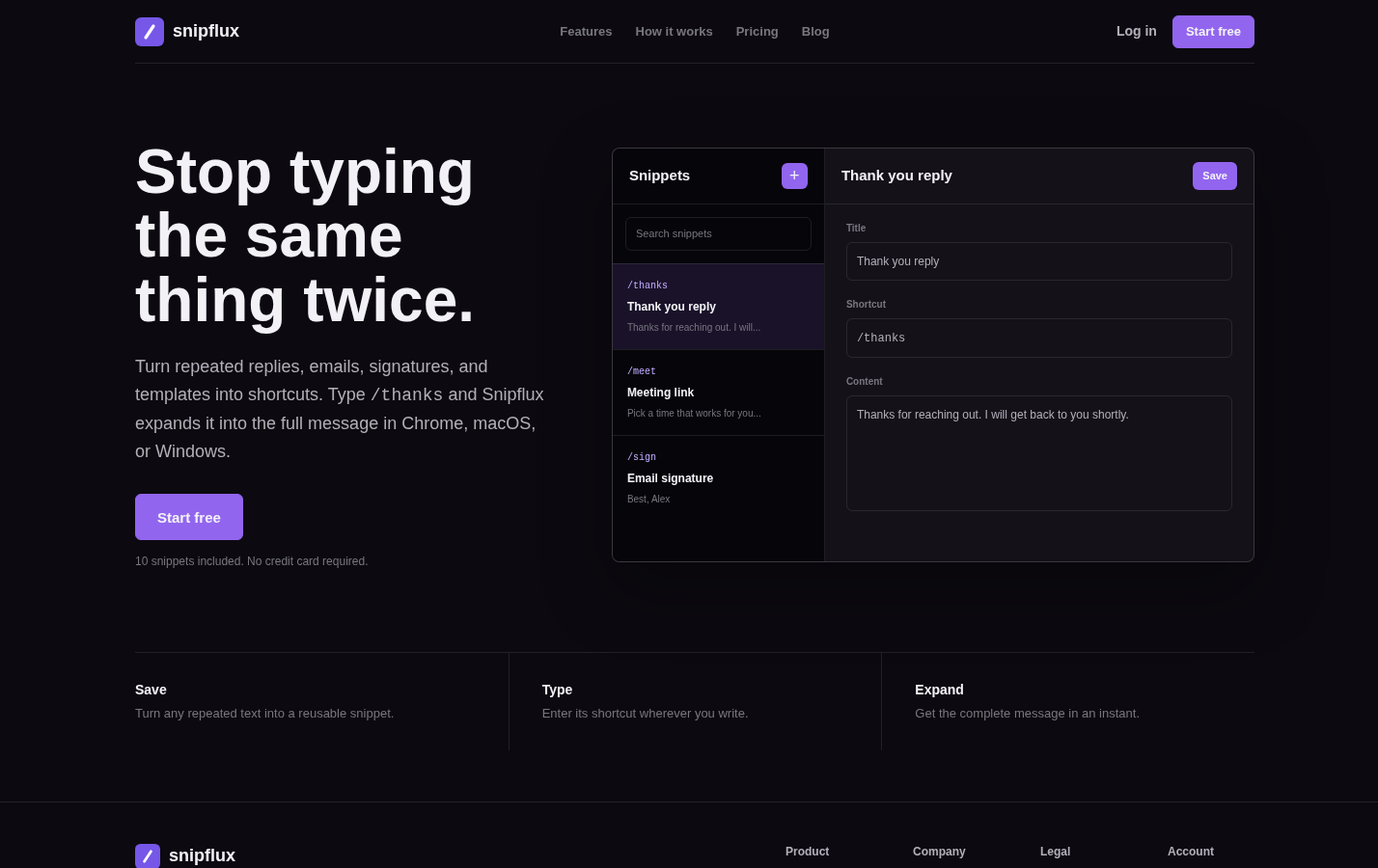
SnipFlux is useful when your team needs approved support replies available as reusable snippets across Chrome, macOS, and Windows. A team can organize snippets with folders and labels, assign practical shortcuts such as /cancel-review, and use shared workspaces to maintain a common library of response text.
Its strength is quick retrieval and shortcut expansion in the writing workflow, which is particularly helpful for agents repeatedly sending approved follow-ups, instructions, and signatures. The important limitation is that shortcut expansion does not replace approval governance: the template owner still needs to manage statuses, review dates, and changes before a revised snippet is made available to the team.
Choose it when the main problem is that agents already have approved wording but cannot access it quickly or consistently while responding to customers.
Train agents on when to reuse, adapt, or escalate a template
Approval does not mean "copy and send in every context." Train agents to decide whether a template fits, needs allowed customization, or should be escalated before use.
Reuse a template when the customer scenario matches its trigger and all required facts are verified. Adapt it only within the documented boundaries, such as adding the customer's name, account-specific details, or an approved timeframe. Escalate when the customer disputes the premise, required information is missing, a policy exception is requested, sentiment is escalating, or the issue falls outside the template's scope.
A common mistake is quietly creating a personal workaround when an approved template is unclear. That may solve one ticket, but it creates an unofficial version that no one else can review. Give agents a defined feedback path, such as a template-change request form or an owner-tagging process, so gaps become visible and can be corrected properly.
Review performance and refresh templates on a schedule
Customer service templates need maintenance because operations change. Monitor repeat contacts, low satisfaction scores, escalations, reopened tickets, handling time, recurring agent edits, policy updates, and product releases. These signals often reveal a template that is technically approved but no longer helping customers.
Set review dates by risk tier. Low-risk acknowledgements may only need periodic review, while high-risk billing, privacy, cancellation, and account-security responses should be reviewed more frequently. Any material policy or product change should trigger an immediate review for related templates, regardless of the calendar date.
Use agent feedback and real ticket patterns to improve the wording. If agents repeatedly add the same clarifying sentence, the template may need it. If customers keep replying with the same question, the next step may not be clear enough. Meaningful changes should still follow the appropriate reapproval path before publication.
Keep approved templates useful, current, and easy to trust
Reliable template reuse comes from clear approval criteria, scenario-specific review, traceable ownership, and controlled updates. The wording matters, but the system around the wording is what prevents outdated promises and inconsistent customer experiences.
When agents can quickly find an approved response, understand its limits, and flag gaps without creating unofficial variants, templates become a genuine support advantage. Teams that need faster access to approved wording can organize reusable responses as SnipFlux snippets and expand them with shortcuts across supported workflows.