A good bug report acknowledgement email does three things: confirms the report was received, tells the reporter what happens next, and avoids promising a fix before the issue is reviewed. It is not a diagnosis, a resolution notice, or a vague "we'll look into it" auto-reply.
That distinction matters. A clear acknowledgement reassures the person who found the problem while giving your support and product teams room to investigate properly.
What a bug report acknowledgement email should say
Your acknowledgement should state that the report is logged, identify it with a ticket or reference number, briefly reflect what was reported, and explain the next expected action. The reporter should not have to wonder whether their message disappeared into a shared inbox.
Do not treat an acknowledgement as proof that the reported behavior is a confirmed bug. At this stage, the team may still need to reproduce the issue, check account-specific conditions, compare product versions, or determine whether an outage is involved. "We are reviewing your report" is accurate. "We have confirmed the bug and will fix it today" usually is not.
A generic automated reply can be useful as a receipt, but it is rarely enough on its own. A helpful acknowledgement connects the receipt to the actual issue and gives the reporter a practical next step.
The essential elements to include
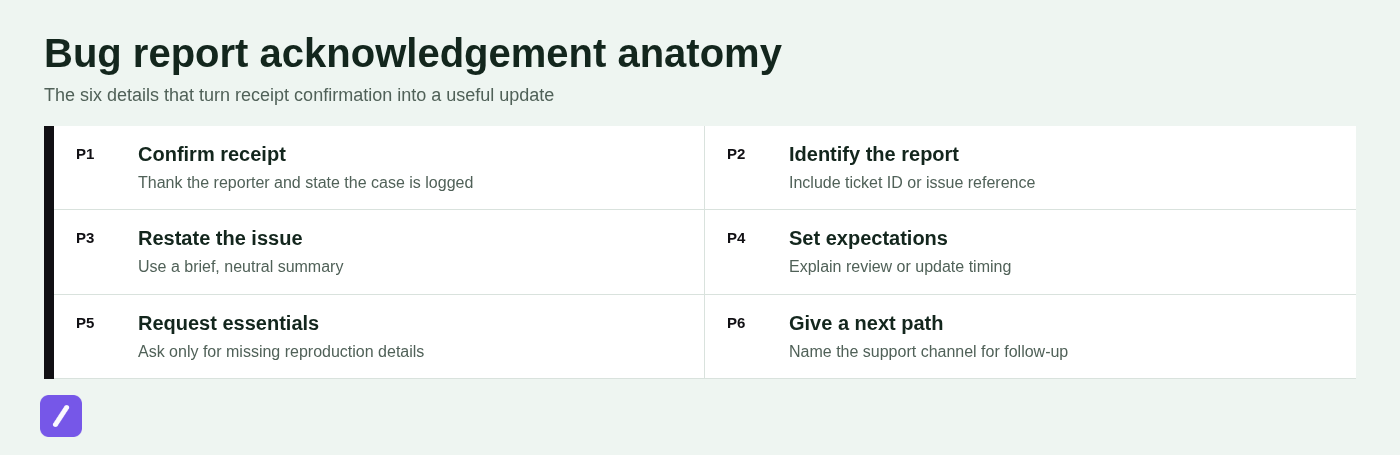
The best acknowledgement emails follow a simple sequence: confirm receipt, identify the report, summarize it, set expectations, and make follow-up easy. You do not need a long message, but every sentence should remove uncertainty.
- Confirmation: Thank the reporter and confirm that the issue has been logged for review.
- Issue reference: Include a ticket ID, case number, or other reference the reporter can use later.
- Brief summary: Restate the reported behavior in neutral language. Use only details the reporter actually provided.
- Impact or priority context: If the report is being treated as urgent, say so carefully. If not, avoid inventing a priority level.
- Next step: Explain whether the team will review, reproduce, investigate, or request more information.
- Update expectation: Give a realistic update point, such as "We will update you after initial review" or a specific timeframe your team can meet.
- Contact path: Tell the reporter how to add details or follow up, ideally by replying to the same ticket thread.
Accuracy matters more than polish. Do not imply a resolution date or details the reporter did not provide.
Bug report acknowledgement email template
Use the template below as a starting point, then adjust the summary and next step to match the actual report. The wording intentionally avoids declaring the issue confirmed before triage is complete.
General-purpose template
Subject: We received your bug report [Ticket #[Ticket ID]]
Hi [Name],
Thanks for reporting this. We have logged your report as [Ticket #[Ticket ID]] and are reviewing the behavior you described in [Product area]: [Brief issue summary].
Our team will review the available details and determine the next steps. [If applicable: We will send you an update by [date/timeframe].]
[If information is missing: To help us investigate, please reply with [specific missing detail].]
If you have anything else to add, reply to this email and include [Ticket #[Ticket ID]] in the subject line.
Best,
[Name or Support Team]
Short acknowledgement reply
Subject: Bug report received - [Ticket #[Ticket ID]]
Hi [Name],
Thanks for the report. We have logged the issue as [Ticket #[Ticket ID]] and are reviewing [brief issue summary]. We will share an update after our initial review.
Please reply to this thread if you can add any relevant details.
[Support Team]
Examples for common bug-report situations
The acknowledgement should reflect the quality and urgency of the report while staying clear about what the team has verified.
Example: report includes clear reproduction steps
When a reporter provides steps, expected behavior, actual behavior, and environment details, acknowledge that the information is sufficient to begin review. Do not say the issue has been reproduced unless someone has actually reproduced it.
Subject: Report received - [Ticket #4821]
Hi Maya,
Thank you for the detailed report. We have logged it as Ticket #4821 and are reviewing the issue where the export page returns an error after selecting CSV format in Chrome 126.
The steps, expected result, and error details you provided give our team a solid starting point for review. We will update you after the initial investigation, no later than Thursday.
Best,
Support Team
Example: report needs more details
If a report is too vague to investigate, ask for the smallest useful set of information. A long checklist creates friction and often produces incomplete answers. Make it easy for the reporter to respond in one message.
Subject: A little more information needed - [Ticket #4822]
Hi Jordan,
Thanks for reporting the login issue. We have opened Ticket #4822 and are reviewing the problem.
To help us investigate, could you reply with:
- The steps you took before the error appeared
- What you expected to happen and what happened instead
- Your browser or app version
- The approximate time of the issue, including your time zone
- A screenshot of the error, if available
Once we have those details, we can continue the review and update you through this ticket.
Best,
Support Team
Example: widespread or business-critical issue
For a potentially widespread or high-impact problem, acknowledge the impact directly and explain that active investigation is underway. Do not guess at the cause, promise a restoration time, or present an internal theory as fact.
Subject: We are investigating the reported service issue - [Ticket #4823]
Hi Priya,
Thank you for reporting the inability to complete payments. We have logged your report as Ticket #4823 and are actively investigating the issue as a high-priority incident.
We understand this may be affecting your business operations. Our team is reviewing the available information now, and we will provide an update through this ticket by [time] or sooner if we have confirmed details to share.
[If applicable: You can also monitor current service updates at [status channel].]
Best,
Support Team
How to tailor the message without overpromising
Personalize the acknowledgement when the submitted information changes what your team can reasonably say. A repeatable payment failure or possible outage deserves more context than a routine report with no reproduction details.
Start with known facts. You can say, "We are reviewing the error that appeared when you submitted the form," but not that a service is failing unless investigation has established it.
Use priority language carefully: a high-priority report may block a core workflow or affect many users; otherwise, say it has been escalated for review.
For a business-critical failure, give a specific next-update time when possible. For a standard issue, "We will update you after initial review" is better than an arbitrary deadline.
What to avoid in a bug report acknowledgement
Weak acknowledgements create more support work because reporters must ask basic follow-up questions. They can also damage trust when the message sounds more certain than the evidence allows.
- Vague auto-replies: "Your message is important to us" does not confirm what was reported or what happens next.
- Premature confirmation: Do not call something a confirmed defect before the team verifies it.
- False timelines: Never promise a fix date just to make the message sound reassuring.
- Oversized information requests: Ask for the missing facts that matter, not every possible diagnostic detail.
- No reference number: A ticket ID prevents confusion when the reporter follows up days later.
- Unsupported root-cause claims: Early investigation notes are not customer-ready explanations.
Before sending, check that the message answers four practical questions: Did we receive it? Which report is this? What will happen next? How can the reporter respond or follow up? If any answer is missing, the acknowledgement is probably incomplete.
Make acknowledgement templates fast to reuse
Templates work best when they standardize the reliable core of the response while leaving room for issue-specific facts. Keep placeholders for the ticket ID, concise summary, missing details, and next update point so agents do not accidentally send stale or inaccurate information.
For teams that send these messages frequently, a text expander avoids the copy-and-paste mistakes that creep into busy support queues. SnipFlux lets teams save approved acknowledgement templates as reusable snippets and expand them with shortcuts across Chrome, macOS, and Windows. A shortcut such as /bugack can insert the approved structure, while the agent fills in the details that need human judgment.
Review shared templates periodically. Product names change, status channels move, and escalation policies evolve. A template that was accurate six months ago can become a source of confusion if nobody owns its maintenance.
Send a clear acknowledgement, then keep the promise
A strong bug report acknowledgement is simple: confirm receipt, identify the report, explain the next step, and communicate again when you said you would. It does not need to solve the issue immediately, but it should make the reporter feel that their report has entered a real process.
If the issue is later resolved, the acknowledgement should lead into a separate closure message; see this support ticket closure email template for the information that message should include.
If your team repeatedly writes these responses, save the approved version in SnipFlux so agents can reply quickly while keeping every message accurate, consistent, and easy to personalize.